
Participating Frequently
September 15, 2017
Answered

Levels (Layers) are empty

  • September 15, 2017
  • 2 replies
  • 3382 views

Hey,

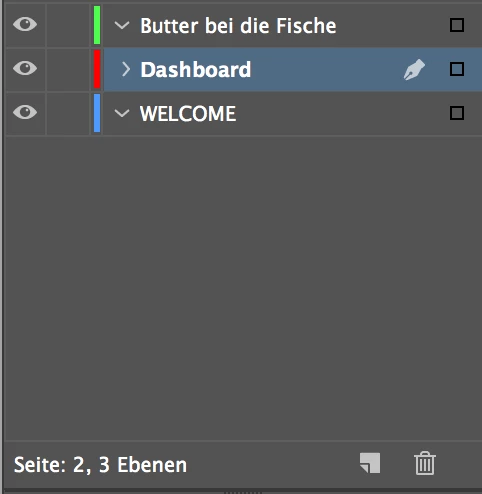
my inDesign remove all objects from my levels. They're still there in the left windows (can see them) but in my "level"-display just nothing appears?!

Need urgent help! Level "green" and "blue" is buggy.
Moderator note: Edited title to include layers as the panel in question.

    This topic has been closed for replies.
    Correct answer amaarora

    Hi,

    Yes the layers panel will only show layers of the active spread.

    Once you click on the down arrow, each layer will expand showing the objects in that layer.

    To select a particular object of the layer all you would need to do is to click on the tiny red box next to the entry of that item in the layers panel and that object will be selected in the document

    -Aman

    2 replies

    amaarora
    Inspiring
    September 15, 2017

    Hi,

    Can you post a screenshot of the document page?

    Or do one thing: select green level so that the pen icon comes next to it and create a text frame. Check if it comes under the green level and that the frame boundary is green colored.

    Do the same for blue.

    This way you can be sure that the levels/layers are working fine

    -Aman

    FloBoBAuthor
    Participating Frequently
    September 15, 2017

    Edit: Okay. inDesign shows me only the layers of the active page (If I click on page 1, it shows me all layers of page 1). Is it normal?!

    Hello Aman,

    I've created a "green" text frame:

    If I click on a existing object of the "green" layer at the main window, indesign shows me all objects:

    amaarora
    amaaroraCorrect answer
    Inspiring
    September 15, 2017

    Hi,

    Yes the layers panel will only show layers of the active spread.

    Once you click on the down arrow, each layer will expand showing the objects in that layer.

    To select a particular object of the layer all you would need to do is to click on the tiny red box next to the entry of that item in the layers panel and that object will be selected in the document

    -Aman

    Bill Silbert
    Community Expert
    Community Expert
    September 15, 2017

    Try trashing your InDesign cache files.

    To do so:

    For Macintosh Users: With InDesign closed launch a Finder Window in column view and click on your home folder. With the Option Key pressed choose Library from the Finder Go Menu. Within the Library folder find the “Caches” folder. Within the Caches folder find and delete the entire file “Adobe InDesign”. I find that deleting the cache file completely leads to a lasting change. 

    For Windows Users: Follow the path to C:\Users\[User Name]\AppData\Local\Adobe\InDesign\Version [#]\en_US\Cache.

    FloBoBAuthor
    Participating Frequently
    September 15, 2017

    Hey,

    I tried that without success. Removed the whole folder "Adobe inDesign" from "Library". My "levels" still empty.

    When I click on a object in my main windows in inDesign the level appears for a while.

    hammer0909
    Community Expert
    Community Expert
    September 15, 2017

    If you create a brand new document and create layers and add content does it work as expected? If so, try doing a "save as" and choosing .idml from the drop down menu. Now open that .idml file and see if the problem persists.