


Participant
October 18, 2024
Question

Licensing Error in InDesign CC2020: QR Code Appearing Instead of Adobe ID Input

  • October 18, 2024
  • 1 reply
  • 478 views

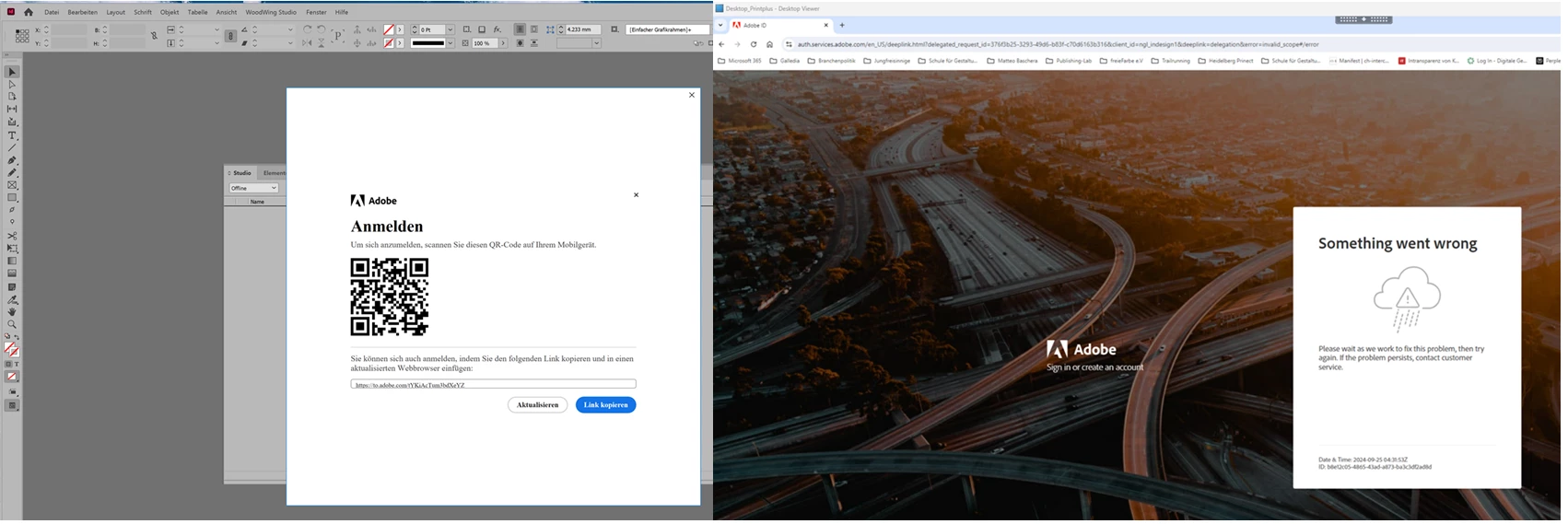
When starting InDesign CC2020 under Windows (22H2), the dialog for licensing the application (operation of single application in virtualized environment; without Creative Cloud Desktop App) only appears with QR code, which leads to an error message. Until recently (approx. 3 weeks ago), an input field for the Adobe ID appeared. Have any of you also had this experience and what is your workaround?
 

Best regards
Matteo


<Title renamed by MOD>


This topic has been closed for replies.

1 reply

Community Manager
October 18, 2024

Hi, Sorry for the trouble. Please follow the steps provided in this link and share the outcome.


^VS

Participant
October 18, 2024

Hi Vivek12

The problem described is a licensing issue of the entire Adobe InDesign application and not of Adobe Creative Cloud libraries. As long as the dialog with the QR code appears, we can no longer use Adobe InDesign.


Best regards

Matteo

Abhishek Rao
Community Manager
Community Manager
October 18, 2024
 

Hi @Prepress21817016exhc,


Thank you for clarifying the issue. To help us better understand the licensing problem with InDesign, could you please share a screen recording demonstrating the entire workflow? This will assist us in identifying the root of the issue and finding a solution.


In the meantime, you might also find useful information in this troubleshooting guide: Troubleshoot Licensing and Activation.


Best, 

Abhishek Rao