
ppppppppgonzaga
Inspiring
May 29, 2025
Answered

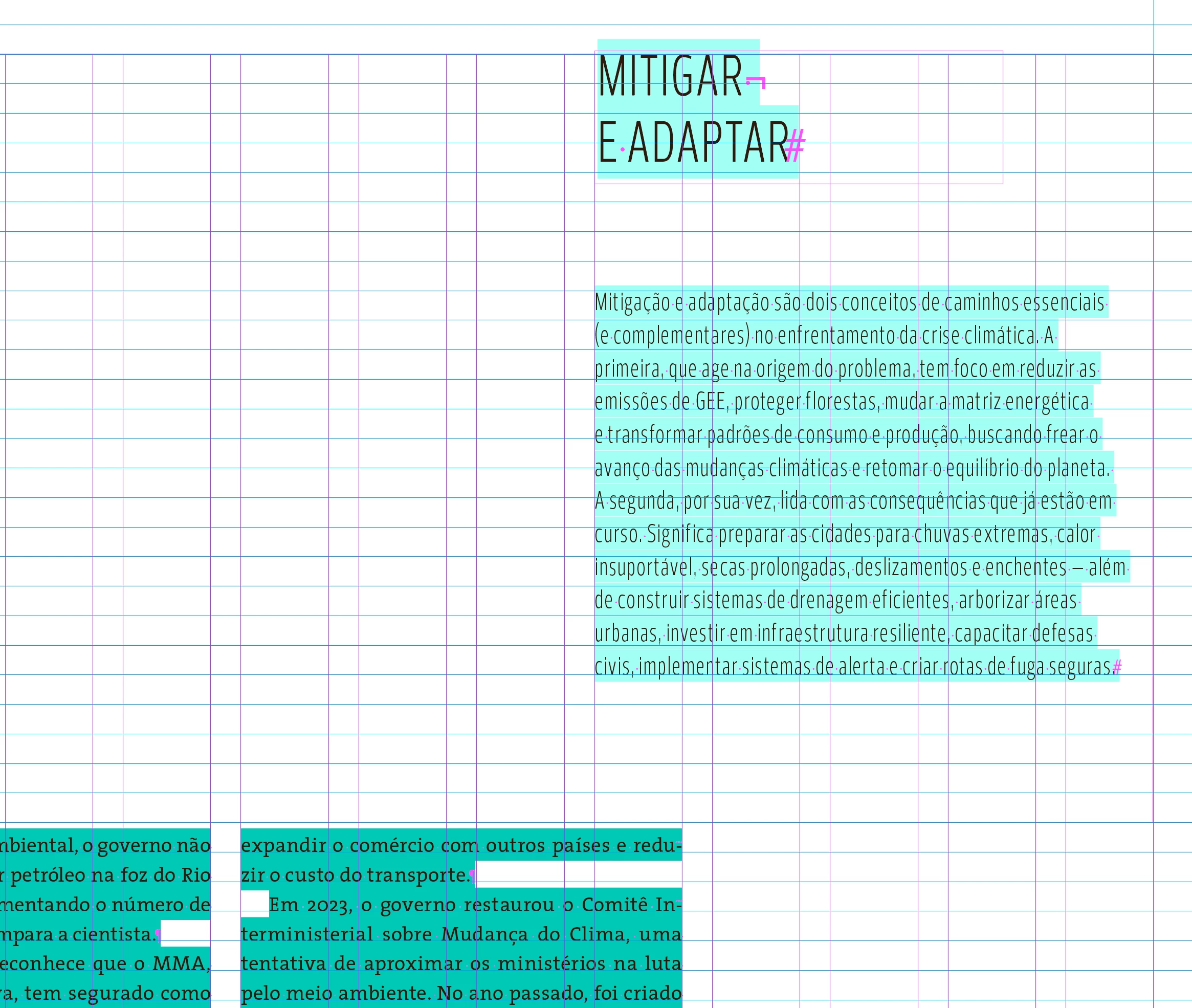
light blue highlighted text (color c2fff4)

  • May 29, 2025
  • 4 replies
  • 867 views

Hi! I started working with a team and I have seen some unusual highlighting in indesign texts eversince. I'm aware of the highlighting that shows change in tracking, which is a darker green, but I can't say where this one  is coming from. Please, does anyone have a clue about what it is and how to control it?


Correct answer ppppppppgonzaga

Seems like you nailed it, thanks!


There is tracking in the paragraph style and the highlight went away after setting it to zero. I thought I had tested this before, but I might not have been methodic and probably mixed this one with other tests. So the light pool blueish green color comes with, let's say, the paragraph style's official setting of custom tracking, and the darker petroleum green when the applied tracking is overriding the paragraph style — all clear now!

 
Thanks a lot for taking the time to help 🙂

4 replies

Mike Witherell
Community Expert
Community Expert
May 30, 2025

My essential question is this: Are you controlling these example paragraphs with a well-defined paragraph style? That is the expected technique. Or is this text all manually applied? Which paragraph style is applied to it, if any?

Mike Witherell
ppppppppgonzaga
ppppppppgonzagaAuthorCorrect answer
Inspiring
May 30, 2025

Seems like you nailed it, thanks!


There is tracking in the paragraph style and the highlight went away after setting it to zero. I thought I had tested this before, but I might not have been methodic and probably mixed this one with other tests. So the light pool blueish green color comes with, let's say, the paragraph style's official setting of custom tracking, and the darker petroleum green when the applied tracking is overriding the paragraph style — all clear now!

 
Thanks a lot for taking the time to help 🙂

Mike Witherell
Community Expert
Community Expert
May 30, 2025

You are welcome!

PS: Always use defined paragraph styles!

Mike Witherell
Mike Witherell
Community Expert
Community Expert
May 30, 2025

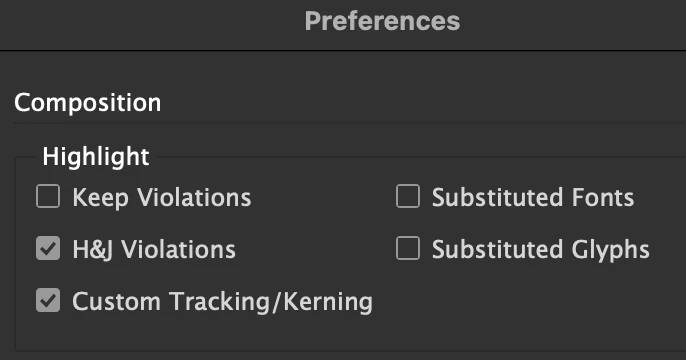
Is this color not a Composition Preference known as Custom Tracking/Kerning?

Mike Witherell
ppppppppgonzaga
Inspiring
May 30, 2025

Hi, Mike! It does go away when I turn off this preference, but there is no custom tracking applied in these paragraphs, and, in the parts where I indeed changed the tracking, the color is darker, like in the paragraphs in the bottom of the first picture.  

I'm aquainted with this composition feature and with the darker green, and I use it frequently. The thing is the lighter neon bluish green — because I'm unaware of what it is indicating, it makes me unsure of my work. 

I went through indesign user manual and some googling before coming here, but I couldn't find the answer for this behavior.

davecourtemanche
Inspiring
May 29, 2025

If you have a paragraph style being over-ridden and this is turned on, it will. highlight with this color.

ppppppppgonzaga
Inspiring
May 29, 2025

It was turned off. If I turn this option on, it shows the paragraph style overrides instead, yet another color 🙂 
I'm acquainted with this function, the weird thing for me is that there is a new color highlighting a paragraph with no overrides.

Peter Spier
Community Expert
Community Expert
May 29, 2025

Does it disappear if you turn off H&J violation highlights?

ppppppppgonzaga
Inspiring
May 29, 2025

No, it doesn't desappear. But, I just noticed that it goes away when I turn off the tracking option — the problem is that this paragraphs have no custom tracking/kerning, no paragraph style override, no GREP style applied, no nested style, no character style. I tend to think this might have something to do with some of the fonts we are using that are installed, even though there is no message or any obvious error that I can notice.