
Line and text selection ID 2020 (Bug)?
I'm having a weird problem in InDesign 2020. I have several lines of text in ID that are laid out with proper styles with some use of split columns. I've been using these lists for a several-year project and have never had any issues with them in previous versions of InDesign. I've imported the document into ID and now have a few lines that I can't seem to select with my mouse. If I click over the line, it selects the line above or below it and the only way I can get to the text on the problem line is to arrow down manually using keyboard arrow keys. See pictures below:
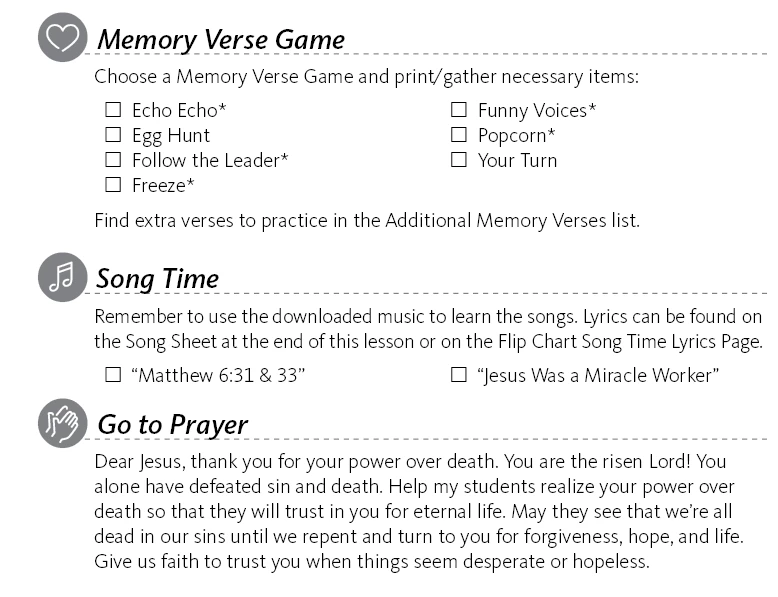
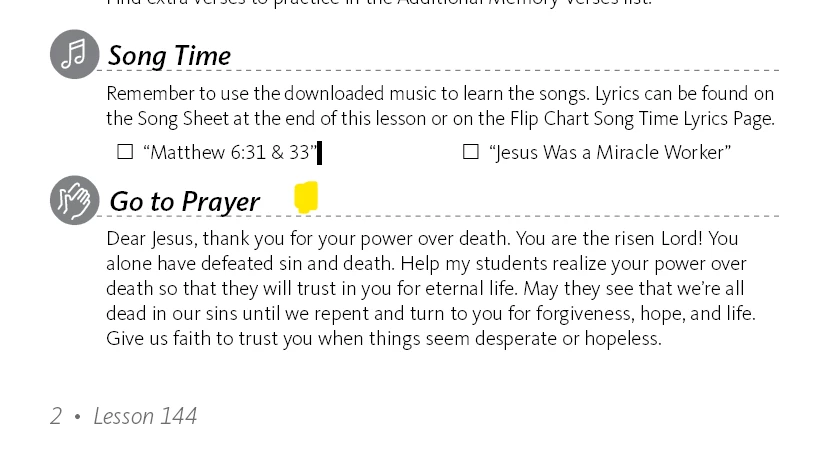
The problems lines are the check boxes below Song Time and the Go to Prayer line below that. In the picture at right, the curser is where the yellow dot is on my screen shot. Yet when I click and drag, it selects the line above. I cannot select Go To Prayer at all, I have to arrow down or up from the lines below or above. I can only select the check box line by clicking in a sweet spot below the line, and I can only select words by double clicking, if I click and drag, it selects the whole line plus the line above it.
I have exported the file to IDML and rebuilt it and tried it on several computers with the same result. Text selection on these particular lines work just fine in ID 2019. This appears to be a random occurence throughout the document, I can find other random lines that will not let me select them and it does not seem to be a sensitivity specific to any particular style.
I'm on Windows but it does it on a Mac as well. I've tried both.


 AdChoices