
Acai06
Inspiring
December 27, 2021
Answered

Line break shrinks when rotating upside down??

  • December 27, 2021
  • 5 replies
  • 656 views

Hello,

As I was making the A5 calendar to be printed in A4, so people can fold in half to hang it, I encounter this strange issue...

First I made a data in A5 document, then copied pasted them into a new A4 document.

However, while rotating half of the monts on the top part of A4 document, I notice the line breaks are shrinking all of sudden.


This text below change into....
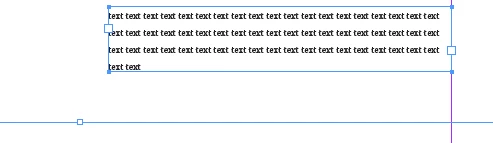
this below:
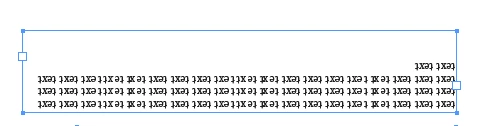
Why does this happen and how to avoid this? This way it corrupts all the layout..
 

This topic has been closed for replies.
Correct answer Laubender

Hi Acai06,

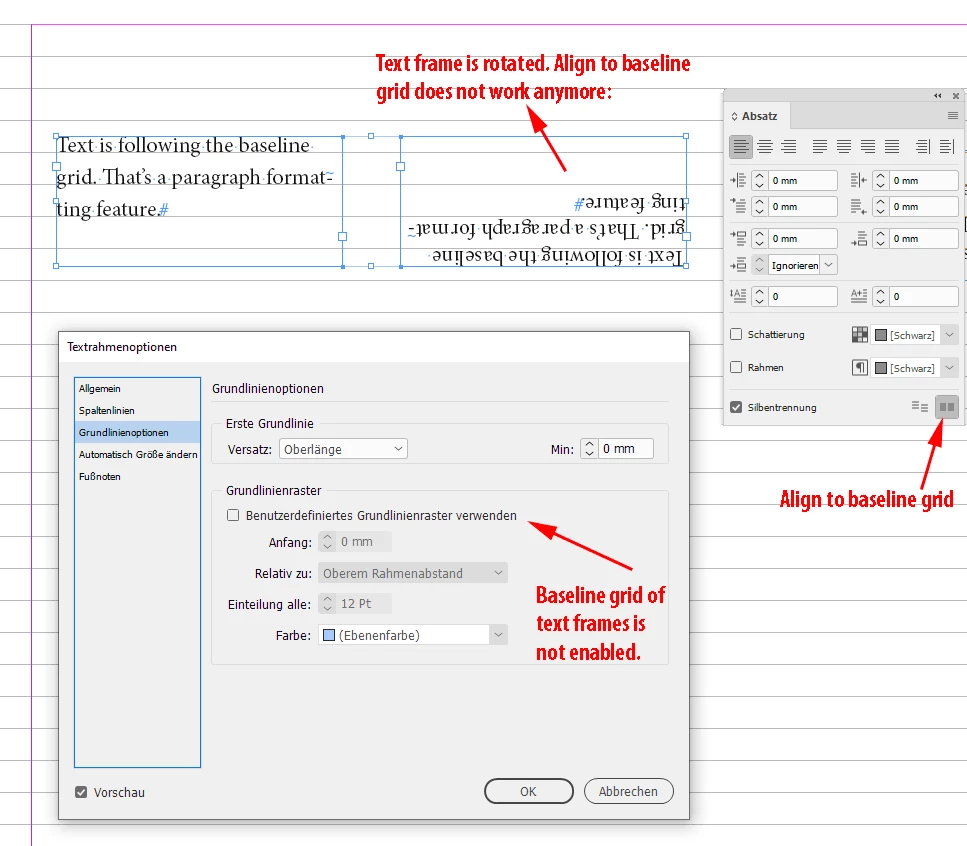
my guess: in the first screenshot the text is following the document's baseline grid.

As soon as you rotate the text frame this cannot happen anymore.


Solution: Enable the baseline grid of the text frame itself.

You'll find that in the text frame options.


From my German InDesign:


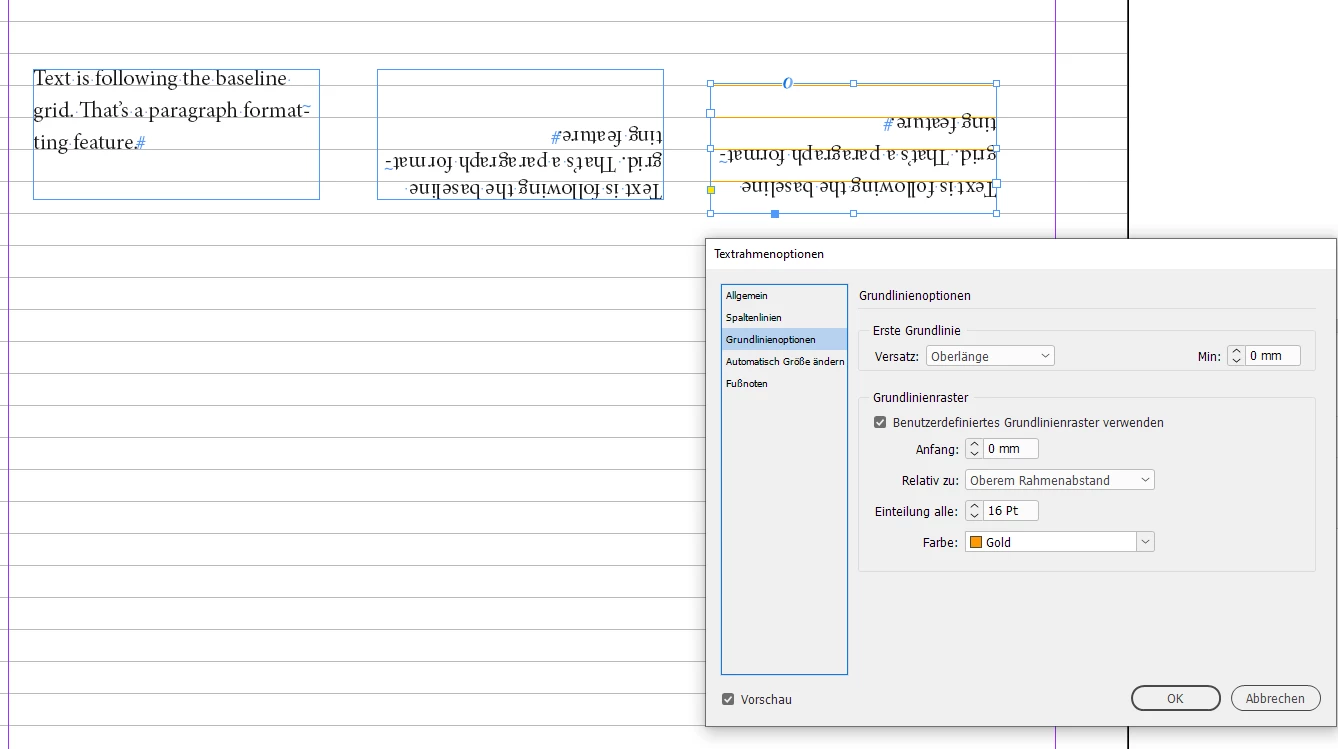
Solution:

Enable the baseline grid of the rotated text frame and synch its position to the grid of the document.


Regards,
Uwe Laubender

( ACP )

5 replies

Community Expert
December 28, 2021

The difference:

Placing InDesign pages is like placing PDFs or AI files.

Copy/paste contents from one document to another one is something entirely different.


Note: in the area of the A4 page where you rotated the live and editable contents your document baseline positions are probably not in synch with the ones on your original A5 page where you took the contents from. And may also not in the other area where you did not rotate the frames.


So, all in all, placing InDesign pages could be an advantage.

Editing the original A5 pages is still possible, updating the edited and placed InDesign pages as well.


Regards,
Uwe Laubender

( ACP )

Acai06
Acai06Author
Inspiring
December 28, 2021

Thank you for explainig, let me dive into this and try out a few things once I fix another problem m(__)m

Community Expert
December 28, 2021

Acai06 said:
"First I made a data in A5 document, then copied pasted them into a new A4 document.

However, while rotating half of the monts on the top part of A4 document, I notice the line breaks are shrinking all of sudden."


Yet another solution:

Keep the A5 pages and place the InDesign pages to the A4 document where you rotate one of the A5 pages.


Regards,
Uwe Laubender

( ACP )


Acai06
Acai06Author
Inspiring
December 28, 2021

Thanks for the alternative solution, and I'm a bit puzzled what the difference with that and what I did...sorry

LaubenderCommunity ExpertCorrect answer
Community Expert
December 28, 2021

Hi Acai06,

my guess: in the first screenshot the text is following the document's baseline grid.

As soon as you rotate the text frame this cannot happen anymore.


Solution: Enable the baseline grid of the text frame itself.

You'll find that in the text frame options.


From my German InDesign:


Solution:

Enable the baseline grid of the rotated text frame and synch its position to the grid of the document.


Regards,
Uwe Laubender

( ACP )

Acai06
Acai06Author
Inspiring
December 28, 2021

It worked!! Thank you so much for explainig with screenshots. It helps..!

Willi Adelberger
Community Expert
Community Expert
December 28, 2021

I suppose the leading is fixed to the base line grid to the document. I would try to apply a specific baseline grid to the frame you want to rotate. cmd/ctrl+B baseline grid options or do it better with an object style.

Acai06
Acai06Author
Inspiring
December 28, 2021

Yes, indeed they are fixed to the base line grid. I did not know you can apply a specific baseline grid to a frame.

Do you mean this below, and if so what should I do?


Barb Binder
Community Expert
Community Expert
December 28, 2021

Hi @Acai06:


Did you try printing or exporting to PDF? I'm guessing it is a visual issue, and won't appear like that in the final document. If it does, can you share the file?


~Barb

~Barb at Rocky Mountain Training
Acai06
Acai06Author
Inspiring
December 28, 2021

Yes, I tried both and they apear the same way. I am sending the file now