
Participant
March 29, 2023
Answered

Linear gradient gets white in it

  • March 29, 2023
  • 5 replies
  • 476 views

Hey!


When i make an gradient for a line (0%: #F000000, 50%: #e6223b (Coca Cola color), 100%: F000000) it gets in the last part white in it.
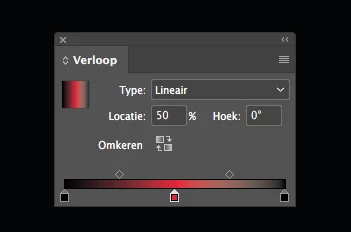
You can also see this in the line:

 

Does someone know how te resolve this? I'm pretty new to Adobe InDesign.


Thanks in advance.
This topic is closed to new replies. Start a new post to keep the conversation going.
Correct answer Rene Andritsch

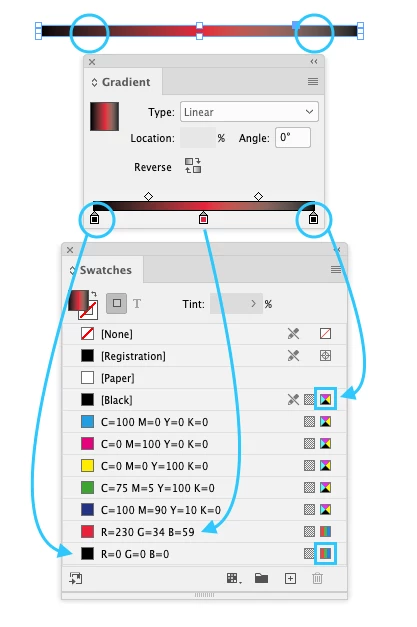
Make sure your black is an RGB Black an not the CMYK document black if you are working in a “PRINT” document. Please see attached screenshot. The brighter area only appears if you have a pure 100% CMYK Black. If you want to use it in print too you have to add the color your want to trasition from to the Black as well.

5 replies

Rene Andritsch
Community Expert
Rene AndritschCommunity ExpertCorrect answer
Community Expert
March 30, 2023

Make sure your black is an RGB Black an not the CMYK document black if you are working in a “PRINT” document. Please see attached screenshot. The brighter area only appears if you have a pure 100% CMYK Black. If you want to use it in print too you have to add the color your want to trasition from to the Black as well.

Participant
March 30, 2023

Thanks a lot! I will change it.

Rene Andritsch
Community Expert
Community Expert
March 30, 2023

If that solved your problem, please mark the answer as correct so other users can also benefit from it. Thanks!