
Participant
October 7, 2018
Question

Líneas horizontales en marcos de texto y formas en Indesign

  • October 7, 2018
  • 3 replies
  • 1182 views

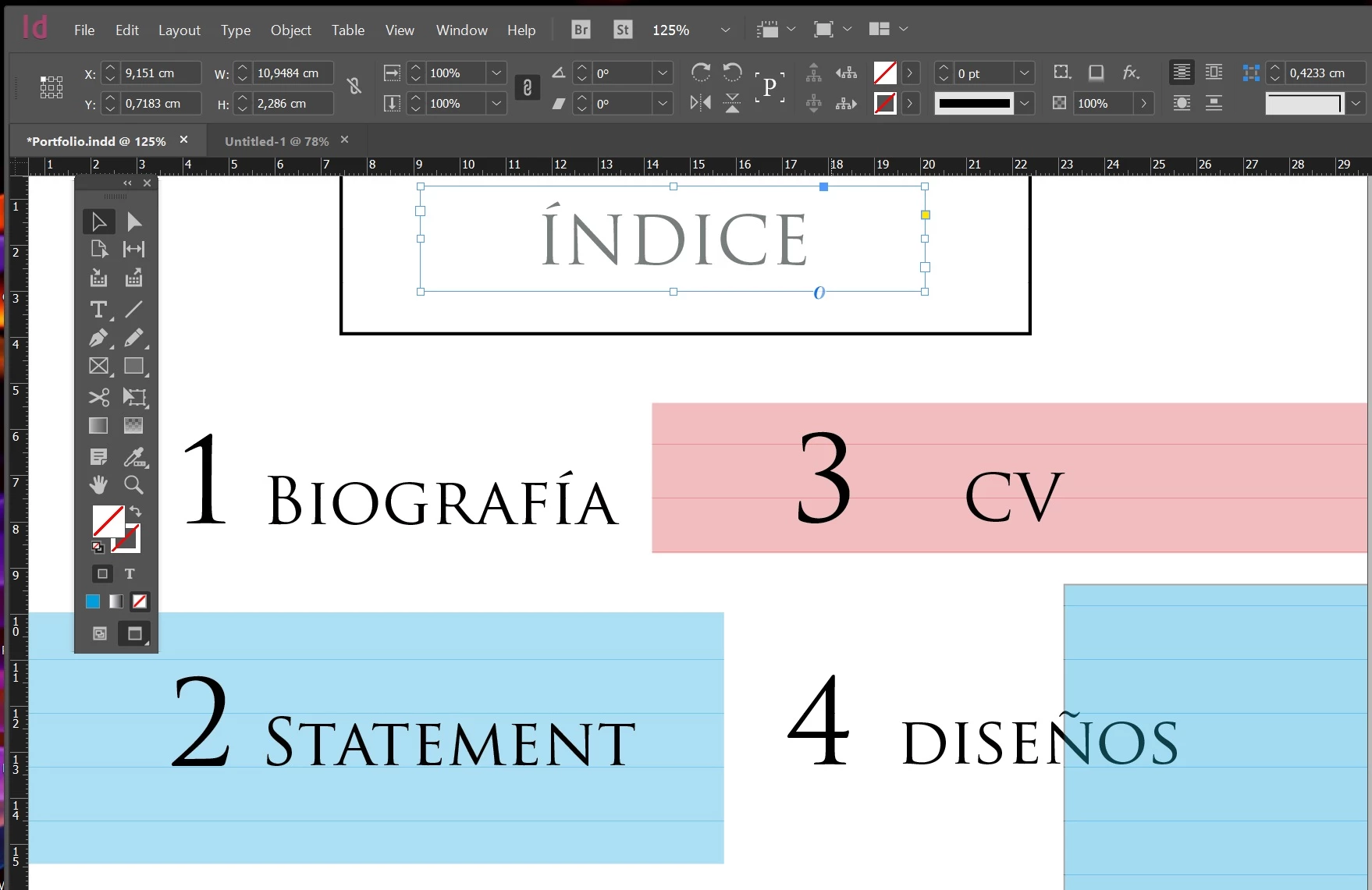
Hola, en Indesign CC2017 me aparecen unas lineas horizontales dentro de los cuadros de texto y de las formas que aumentan en número conforme hago más zoom. He mirado opciones de grid y ocultar guías y nada. Es como si formaran parte de cada uno de los elementos. Me podéis ayudar? Gracias.
3 replies

Participant
May 22, 2025

Pudiste solucionarlo, tengo el mismo problema, agradecería cualquier consejo


leo.r
Community Expert
Community Expert
May 24, 2025
quote

Pudiste solucionarlo, tengo el mismo problema, agradecería cualquier consejo

By @Rayen36694238trss


This discussion is almost 7 years old. You may want to start a new thread. Please include your exact versions of InDesign and the operating system, as well as screenshots that illustrate your particular problem. 

Srishti Bali
Legend
October 9, 2018

Hi,

I would like to know if the steps suggested by Barb worked for you, or the issue still persists.

Kindly update the discussion if you need further assistance with it.

Thanks,

Srishti

Barb Binder
Community Expert
Community Expert
October 7, 2018

Hi iam123:

I'm guessing that you activated baseline grids as a default for your text frames.

You can hide them with View > Grids & Guides > Hide Baseline Grids.

You can disable the frame grids with Object > Text Frame Options > Baseline Options and uncheck Use Custom Baseline Grid.

~ Barb

~Barb at Rocky Mountain Training
Iam123Author
Participant
October 9, 2018

He hecho lo que dices, pero no me ha funcionado. Ya modifiqué esos parámetros anteriormente. Cuando hago zoom aumenta el número de líneas. No tengo ni idea de qué puede ser. ¿Alguna otra sugerencia?

Barb Binder
Community Expert
Community Expert
October 9, 2018

I'm happy to look at your file, if you could post it on dropbox and send a link. That would be most efficient at this point.

~Barb

~Barb at Rocky Mountain Training