Leah Ward
Participating Frequently
February 25, 2020
Answered

Linked ai files in Indesign

  • February 25, 2020
  • 4 replies
  • 1992 views

Does anyone know a way of changing an .ai link in Indesign, without having to select the link, relink, select file etc.

This topic has been closed for replies.
Correct answer Laubender

Hi Leah,

a script could help that would relink with options showing. The original idea is from John Hawkinson. Unfortunately I cannot find the related old thread in the new forum.


But below is my code in ExtendScript (JavaScript) that is working on a selected graphic frame or the selected placed graphic or image itself:


// PlaceAgain-PlaceOptionsShowing-SELECTION.jsx
// Uwe Laubender

//DESCRIPTION:Select a placed image, PDF or InDesign document to replace it with itself getting options

/**
* @@@BUILDINFO@@@ PlaceAgain-PlaceOptionsShowing-SELECTION.jsx !Version! Fri Sep 09 2016 14:09:53 GMT+0200
*/

/*
	Posted in this thread at Adobe InDesign Forum:
	"Toggle pages of a linked Indesign document inside Indesign?"
	mmackinven | Sep 9, 2016
	https://forums.adobe.com/message/8993859#8993859
	
	You can either select the placed file directly or its container frame.
	Or, if its part of a group, the group itself.
	Or, if the container frame is pasted inside another object, that object.
	
*/

placeAgainSelection();

function placeAgainSelection()
{
	if(app.documents.length == 0){alert("ERROR"+"\r"+"No document is open."); return};
	if(app.selection.length != 1){alert("ERROR"+"\r"+"Select one single item containing a placed file."); return};

	// The placed object is selected:
	if
	(
		app.selection[0].constructor.name == "ImportedPage" || 
		app.selection[0].constructor.name == "PDF" ||
		app.selection[0].constructor.name == "EPS" ||
		app.selection[0].constructor.name == "Image" ||
		app.selection[0].constructor.name == "PICT" ||
		app.selection[0].constructor.name == "WMF"
	)
	{	
		var graphic = app.selection[0];
	};
	
	else if(app.selection[0].allGraphics.length == 0){return};
	
	// The container of the placed object is selected:
	else{var graphic = app.selection[0].allGraphics[0]};

	// Two important checks:
	// Case 1: Graphic was pasted on the page from e.g. PhotoShop:
	if(graphic.itemLink == null){alert("ERROR"+"\r"+"The graphic was pasted on the page. The original file cannot be found.");return};
	// Case 2: Link is not available, because placed graphic was renamed, removed or otherwise is not available:
	var file = File(graphic.itemLink.filePath);
	if(!file.exists){alert("ERROR"+"\r"+"\""+file.name+"\""+"\r"+"File cannot be found."); return};
	
	// If you cancel the place options dialog, no error will be thrown:
	try{
	graphic.place(file,true);
	}catch(e){};
};


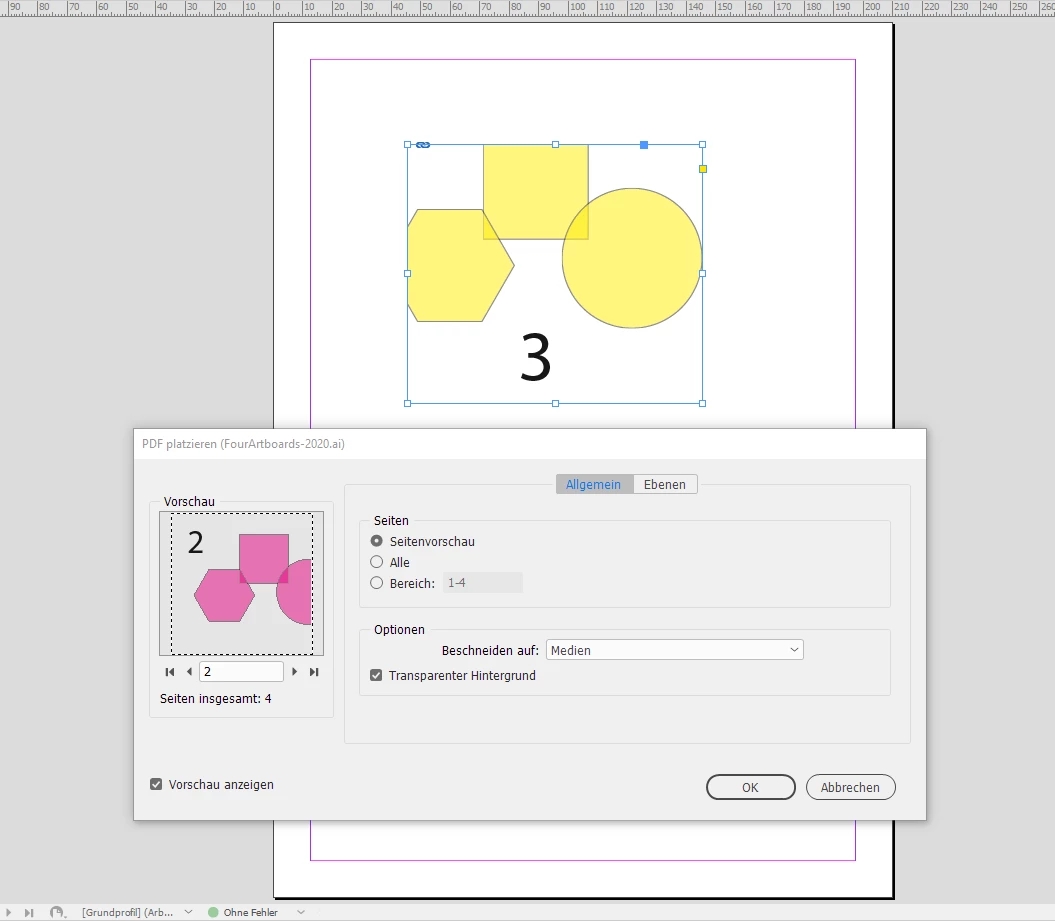
Tested with my German InDesign 2020 on Windows 10 where I placed an AI file from Illustrator 2020 using four artboards. I selected the graphic frame and ran the script. Placing options are showing up immediately and I am able to replace the selected graphic with itself using a different artboard:


Regards,
Uwe Laubender

( ACP )

4 replies

LaubenderCommunity ExpertCorrect answer
Community Expert
February 25, 2020

Hi Leah,

a script could help that would relink with options showing. The original idea is from John Hawkinson. Unfortunately I cannot find the related old thread in the new forum.


But below is my code in ExtendScript (JavaScript) that is working on a selected graphic frame or the selected placed graphic or image itself:


// PlaceAgain-PlaceOptionsShowing-SELECTION.jsx
// Uwe Laubender

//DESCRIPTION:Select a placed image, PDF or InDesign document to replace it with itself getting options

/**
* @@@BUILDINFO@@@ PlaceAgain-PlaceOptionsShowing-SELECTION.jsx !Version! Fri Sep 09 2016 14:09:53 GMT+0200
*/

/*
	Posted in this thread at Adobe InDesign Forum:
	"Toggle pages of a linked Indesign document inside Indesign?"
	mmackinven | Sep 9, 2016
	https://forums.adobe.com/message/8993859#8993859
	
	You can either select the placed file directly or its container frame.
	Or, if its part of a group, the group itself.
	Or, if the container frame is pasted inside another object, that object.
	
*/

placeAgainSelection();

function placeAgainSelection()
{
	if(app.documents.length == 0){alert("ERROR"+"\r"+"No document is open."); return};
	if(app.selection.length != 1){alert("ERROR"+"\r"+"Select one single item containing a placed file."); return};

	// The placed object is selected:
	if
	(
		app.selection[0].constructor.name == "ImportedPage" || 
		app.selection[0].constructor.name == "PDF" ||
		app.selection[0].constructor.name == "EPS" ||
		app.selection[0].constructor.name == "Image" ||
		app.selection[0].constructor.name == "PICT" ||
		app.selection[0].constructor.name == "WMF"
	)
	{	
		var graphic = app.selection[0];
	};
	
	else if(app.selection[0].allGraphics.length == 0){return};
	
	// The container of the placed object is selected:
	else{var graphic = app.selection[0].allGraphics[0]};

	// Two important checks:
	// Case 1: Graphic was pasted on the page from e.g. PhotoShop:
	if(graphic.itemLink == null){alert("ERROR"+"\r"+"The graphic was pasted on the page. The original file cannot be found.");return};
	// Case 2: Link is not available, because placed graphic was renamed, removed or otherwise is not available:
	var file = File(graphic.itemLink.filePath);
	if(!file.exists){alert("ERROR"+"\r"+"\""+file.name+"\""+"\r"+"File cannot be found."); return};
	
	// If you cancel the place options dialog, no error will be thrown:
	try{
	graphic.place(file,true);
	}catch(e){};
};


Tested with my German InDesign 2020 on Windows 10 where I placed an AI file from Illustrator 2020 using four artboards. I selected the graphic frame and ran the script. Placing options are showing up immediately and I am able to replace the selected graphic with itself using a different artboard:


Regards,
Uwe Laubender

( ACP )

Leah Ward
Leah WardAuthor
Participating Frequently
February 25, 2020

Thanks so much. That script is scary!! I wish Adobe would make that an easy click in the links panel. I really appreciate it. Cheers! L.

Ton Frederiks
Community Expert
Community Expert
February 25, 2020

I don't think it is possible in the way you describe it, switching artboards in InDesign.

If you would have set up the Illustator file with layers on a single artboard. you can turn on and off the visibility of the layers after placing in InDesign: Object > Object Layer Options...

S_Gans
Community Expert
Community Expert
February 25, 2020

Moderator moving to InDesign forum, as this is more of an InDesign question, than an Illustrator issue.

Adobe Community Expert / Adobe Certified Instructor
Omar.Fathy
Community Expert
Community Expert
February 25, 2020

Edit the original file in Illustrator ?! 

Leah Ward
Leah WardAuthor
Participating Frequently
February 25, 2020

Thanks, but I actually want to update the link artboard in Indesign. So I've placed a file in Indesign with say ai Artboard 1, but then I want to change the artboard to Artboard 2. So is there a way to change the artboard, without having to select the link, relink and then select the ai file again with Options to select the new artboard. Hope that makes sense.

Omar.Fathy
Community Expert
Community Expert
February 25, 2020

I think you have more links and you don't like to edit all of it.
Would you tell me more about what do you want to do exactly and I can help you.