Hari1968
Participant
Mar 30, 2025 8:04 PM UTC
Answered

Linked text frames overwrite paragraph styles – how to preserve local formatting?

Hi everyone,

I’m working with linked text frames in InDesign (v2025) and trying to keep content synchronized across multiple frames. The problem is:

Whenever I update the source text, the linked text frame also resets its paragraph style to match the original – but I want each frame to keep its own style (different font, size, etc.).


I already tried the “Linked Content Options” and enabled:

•☑️ Appearance

•☑️ Frame Content

•☑️ Warn when local changes are overwritten


Still, the paragraph style from the source frame replaces the one in the target, which I don’t want.

Maybe somebody having a solution

Robert at ID-Tasker
Robert at ID-TaskerCorrect answer
Legend
Mar 31, 2025 5:49 PM UTC

@Hari1968 


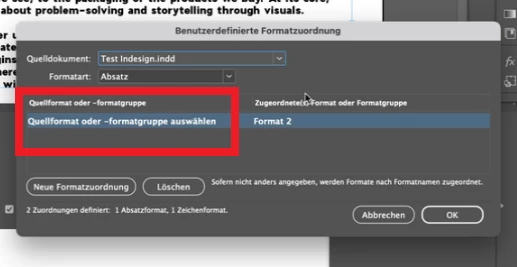
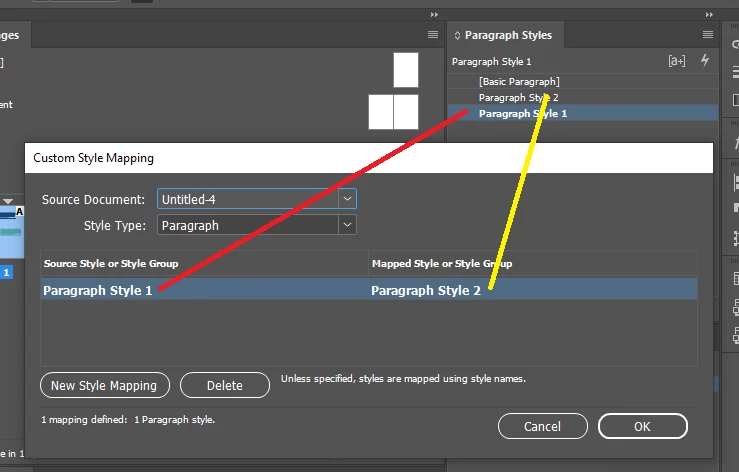
You forgot to select SOURCE style:


15 replies

Community Expert
Apr 2, 2025 4:56 PM UTC

Hallo @Hari1968 ,

es wäre gut, wenn wir ein Test-Dokument hätten.

Sonst ist es ein wenig wie "Kaffeesatzleserei" dahinter zu kommen, was da schiefläuft.


Bei verwendeten Objektformaten stellt sich auch die Frage, welches Format das bestimmende Grundformat ist.

Muss nicht unbedingt das Objektformat mit Namen [Einfacher Textrahmen] sein, kann auch ein anderes sein.

Je nachdem, an welchem Objektformat das kleine [T] am rechten Rand des Objektformate-Bedienfeld hängt.


Was noch wichtig ist:

Bei den Zeichenformaten sollte immer das Format mit Namen [Ohne] ausgewählt sein, wenn Text in irgendeiner Form importiert wird. Sonst kann es passieren, dass das im Zeichenformat-Bedienfeld ausgewählte Zeichenformat dem aufgefrischten Text mitgegeben wird.


Gruss,
Uwe Laubender
( Adobe Community Expert )

Translate
Inspiring
Apr 2, 2025 4:07 PM UTC

I have done some testing. Question: are you using a script to open the document  (has linked text that will update) or are you opening the document manually and updating in the Links panel? 

  1. The document I am using for test has an object style applied to each text frame (paragraph style is part of  style)
  2. The script I am using to open the document and update links uses clear object style overrides (after updating). Have not tested LinkedStoryOptions (currently using default values)
  3.  The text files I am using are plain text. (Could make a difference if files are .doc or rich text format). I need to test these.

Hope this gives you some options to try. 

Translate
Robert at ID-Tasker
Legend
Apr 2, 2025 4:48 PM UTC

@S Hopkins


OP forgot to define source style. 


Translate
Abhishek Rao
Community Manager
Community Manager
Mar 31, 2025 4:37 PM UTC

Hi @Hari1968,  


Thanks for sharing the details! I see that Robert and Willi have provided some great insights, and I appreciate you trying out their suggestions. I tried reproducing this and it worked the same for me. 

I’m currently checking with the product team to confirm whether this is the intended behavior or if something else is going on here. I’ll update you as soon as I have more information. In the meantime, if you notice any specific patterns or additional details that might help, feel free to share them. 


^
Abhishek

Translate
Hari1968
Hari1968Author
Participant
Mar 31, 2025 5:23 PM UTC

Thank you all so much for your support!

Just to recap: I believe the steps I’m following—and the ones shown in the video—are correct. I’ve tried several other approaches, but they all lead to the same issue. My only guess at this point is that it might be related to the language version, since my InDesign is set to German.


Translate
Robert at ID-Tasker
Robert at ID-TaskerCorrect answer
Legend
Mar 31, 2025 5:49 PM UTC

@Hari1968 


You forgot to select SOURCE style:


Translate
Hari1968
Hari1968Author
Participant
Mar 31, 2025 4:34 AM UTC

thank you for the help, but i think there must be something eles wrong - maybe a bug ?

lookk here: https://www.loom.com/share/90c89904071148a68754c8f9db0df85a?sid=168609ca-1df3-44c2-b43a-7640fd8641c0

Translate
Robert at ID-Tasker
Legend
Mar 31, 2025 9:17 AM UTC

@Hari1968


I'll have to test your steps - but when I set mapping from the Links panel - it works.


Translate
Willi Adelberger
Community Expert
Community Expert
Mar 30, 2025 8:58 PM UTC

Did you apply an object style to the text frames? It is good to do.

In the object style  define the paragraph style from the frame.

Translate
Robert at ID-Tasker
Legend
Mar 30, 2025 9:16 PM UTC
quote

Did you apply an object style to the text frames? It is good to do.

In the object style  define the paragraph style from the frame.


By @Willi Adelberger


But with Object Style - you have to also clear overrides on the TextFrame after update.


Translate
Robert at ID-Tasker
Legend
Mar 30, 2025 8:19 PM UTC

Can you post some screenshots of your design / layout / contents? 


Translate
Hari1968
Hari1968Author
Participant
Mar 30, 2025 8:26 PM UTC

First frame has stye format 1 / Second frame hast format 2. if I change the text in Frame 1 (format 1) - it also changes the style, of the Frame 2. What I want is, only the contet should change, but not the format.

Translate
Robert at ID-Tasker
Legend
Mar 30, 2025 8:38 PM UTC

Looks like a bug...


But there is an easy solution - you just need to define Style Mappings for each TextFrame.:


Translate