

Linking Cell From Table to Elsewhere
Hi,
I'm trying to link content from a table cell to various other places on my indesign document. Our company manufactures accessories and each item has a myriad specifications and forms (most of which repeat information found on other forms), I'm trying to devise a system where all the information goes into one form, and the other forms are linked to the relevant data- instead of manually having to fill in the same information on several forms (and raising the likelihood of mistakes).
I set up a master page which contains a table with all relevant specifications and I had hoped to link cells to elsewhere in the document. It didnt seem possible to link individual cells, so I tried dropping text boxes into the cells and linking those. I was able to link them outside of the table, but the linked boxes arnt updating when I 'update all links'.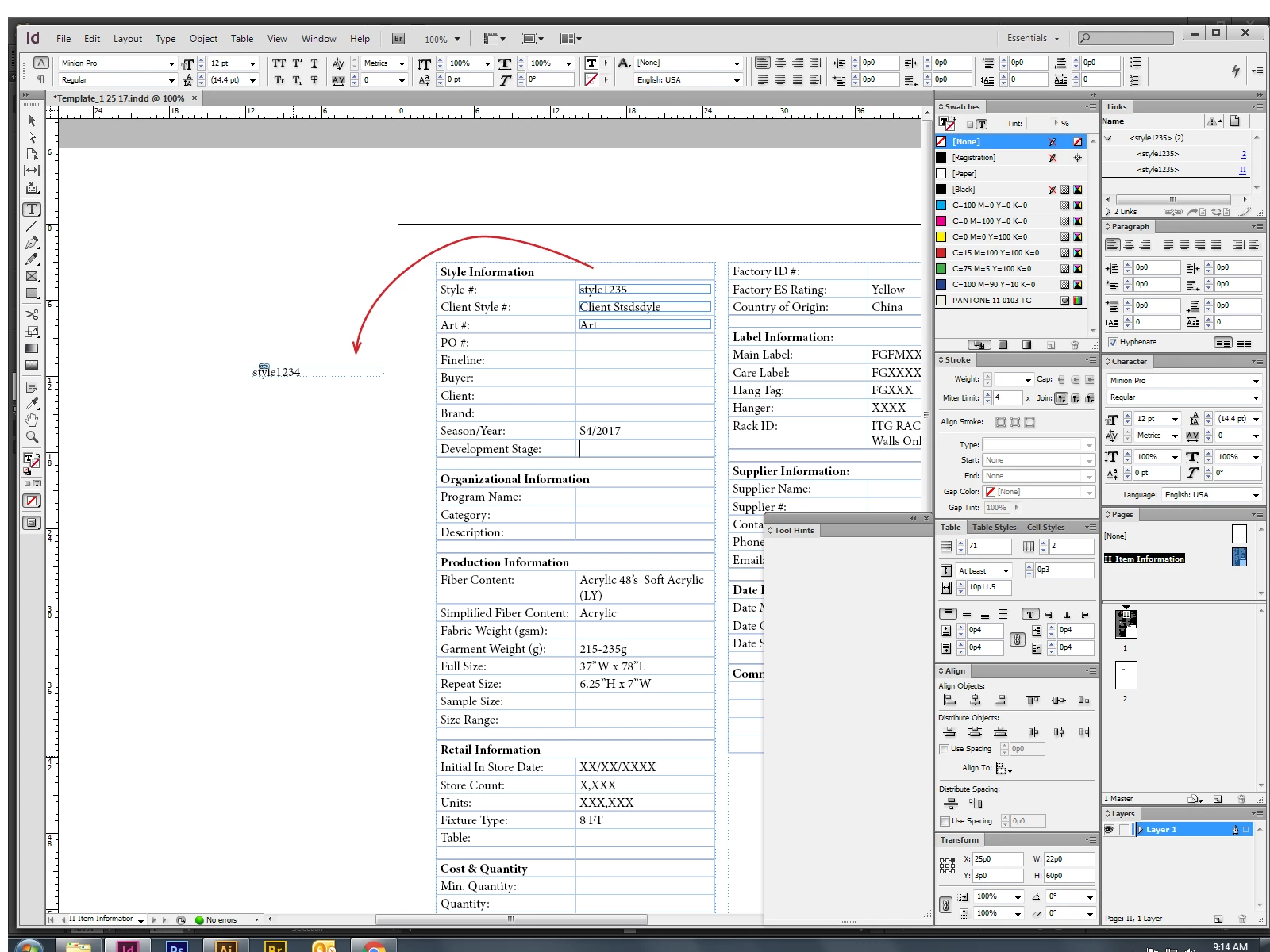
In the above image you'll notice that I had content collected the box associated with 'style #:' and linked it outside of the table. When I changed the value to 'style12345' and hit update all links, the linked box retained the original value of 'style1234'. I don't have any problem linking text boxes when the table isnt involved, but I like the functionality offered by tables (all below lines dropping when I have a line break, selecting all text in a cell without selecting the category).
If anyone can help with my issue or suggest another means of accomplishing the same goal, I'd be thrilled to hear it.
Best,
David
 AdChoices