
ScottV_SF
Participant
October 22, 2018
Answered

Linking InDesign Files in Indesign

  • October 22, 2018
  • 2 replies
  • 756 views

Hi All,

I am struggling to link an InDesign file within an InDesign file with bleed.

Both documents have bleed in the document setup - only difference is 6mm on one document and 5mm on the other.

When I do place an InDesign document on to the page, no bleed is shown.

Is this possible to link in with bleed?

Thanks,

Scott.
This topic has been closed for replies.
Correct answer rob day

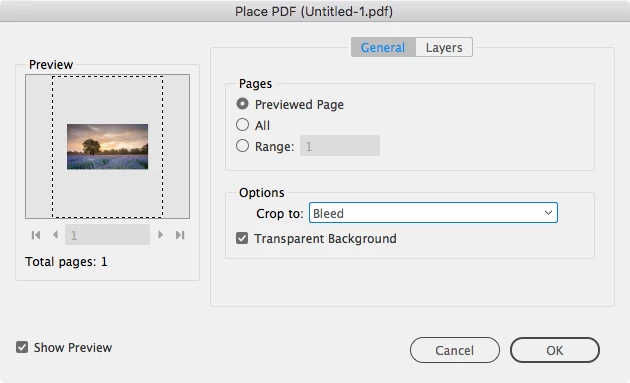
When you place the PDF or ID file check Show Import Options and you'll get this—choose Crop to> Bleed. If you are placing into a frame choose Object>Fitting>Fit Frame to Content

2 replies

rob day
Community Expert
rob dayCommunity ExpertCorrect answer
Community Expert
October 22, 2018

When you place the PDF or ID file check Show Import Options and you'll get this—choose Crop to> Bleed. If you are placing into a frame choose Object>Fitting>Fit Frame to Content

ScottV_SF
ScottV_SFAuthor
Participant
October 23, 2018

Thank you - I have no idea how I missed this.

Thanks.

Scott.

Legend
October 22, 2018

You can simply add the bleed back in

Open InDesign Document > File > Document Set up > Bleed > 5mm/6mm or whatever is desired > OK.