


Inspiring
August 10, 2024
Answered

Linking Word document - matching styles in group

  • August 10, 2024
  • 2 replies
  • 291 views

In my linked word document I have a number of styles which also exist with the identical names in InDesign. When placing the text (and thus creating the link) I select as follows:
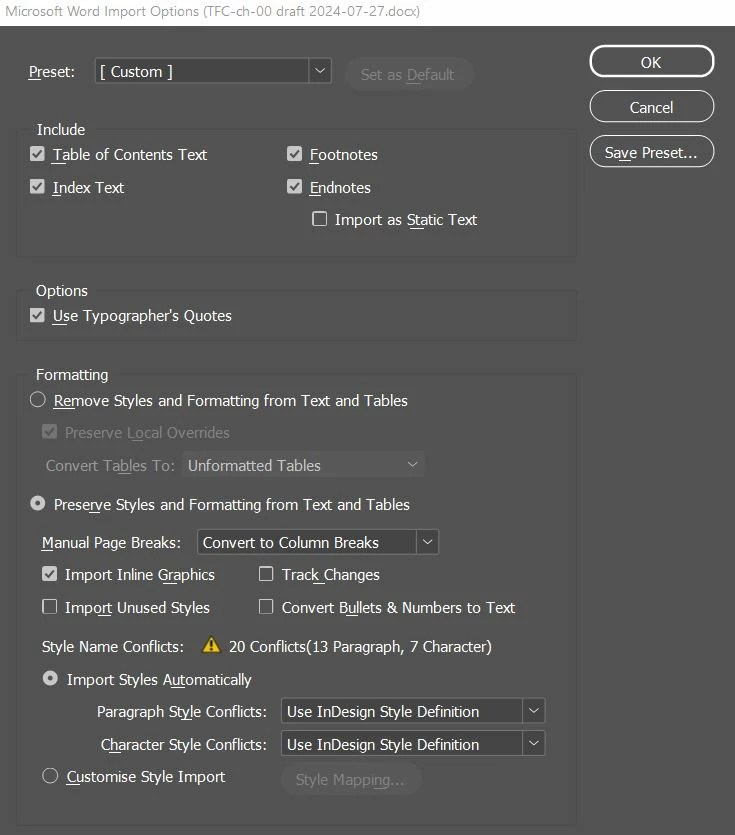
 

My problem is that if I have placd the Paragraph Styles in groups, the styles are recreated as doubles when I update the word document. Does this mean it is not possible to group text styles if I want them to work with a linked word document?

This topic has been closed for replies.
Correct answer James Gifford—NitroPress

Start with the option at the very bottom, "Customize Style Import," and manually review and correct the style mapping between the documents.


Having "the same" style names is a deceptive notion, since any minor variation in the names can cause a mismatch, and Word has all kinds of quirks in the way it manages and exports style names. Don't leave the process to automated matching.

2 replies

James Gifford—NitroPress
Legend
August 10, 2024

Start with the option at the very bottom, "Customize Style Import," and manually review and correct the style mapping between the documents.


Having "the same" style names is a deceptive notion, since any minor variation in the names can cause a mismatch, and Word has all kinds of quirks in the way it manages and exports style names. Don't leave the process to automated matching.

Inspiring
August 10, 2024

Thanks! This seems to solve my problem (albeit I still haven't tried e.g. to create a group of already linked styles before updating the link..., but crossing my fingers that too will work).

Again, many thanks!