Known Participant
Jun 13, 2018 2:24 AM UTC
Answered

Locate Object in Layers Window

In Illustrator when you have an object selected, you can go to the flyout option menu and select an action named "locate object." This then brings you to where that object is located in layers. It's brilliant and I am looking for it's equivalent in InDesign. Otherwise, in documents with many objects and layers, I have to scroll a lot while looking for a colored square, sometimes opening many sublayers in the process to locate my desired layer/object.

A basic question and I say thank you!
    vinny38
    vinny38Correct answer
    Legend
    Jun 14, 2018 9:48 AM UTC

    Hi!

    I believe CTRL/Command + click on an closed arrow will only expand all layers/groups that have the same level of hierarchy.

    Meaning it won't display the whole content of each layer.

    But... ALT (PC) + Click on an closed arrow will expand everything in the clicked layer (or group)

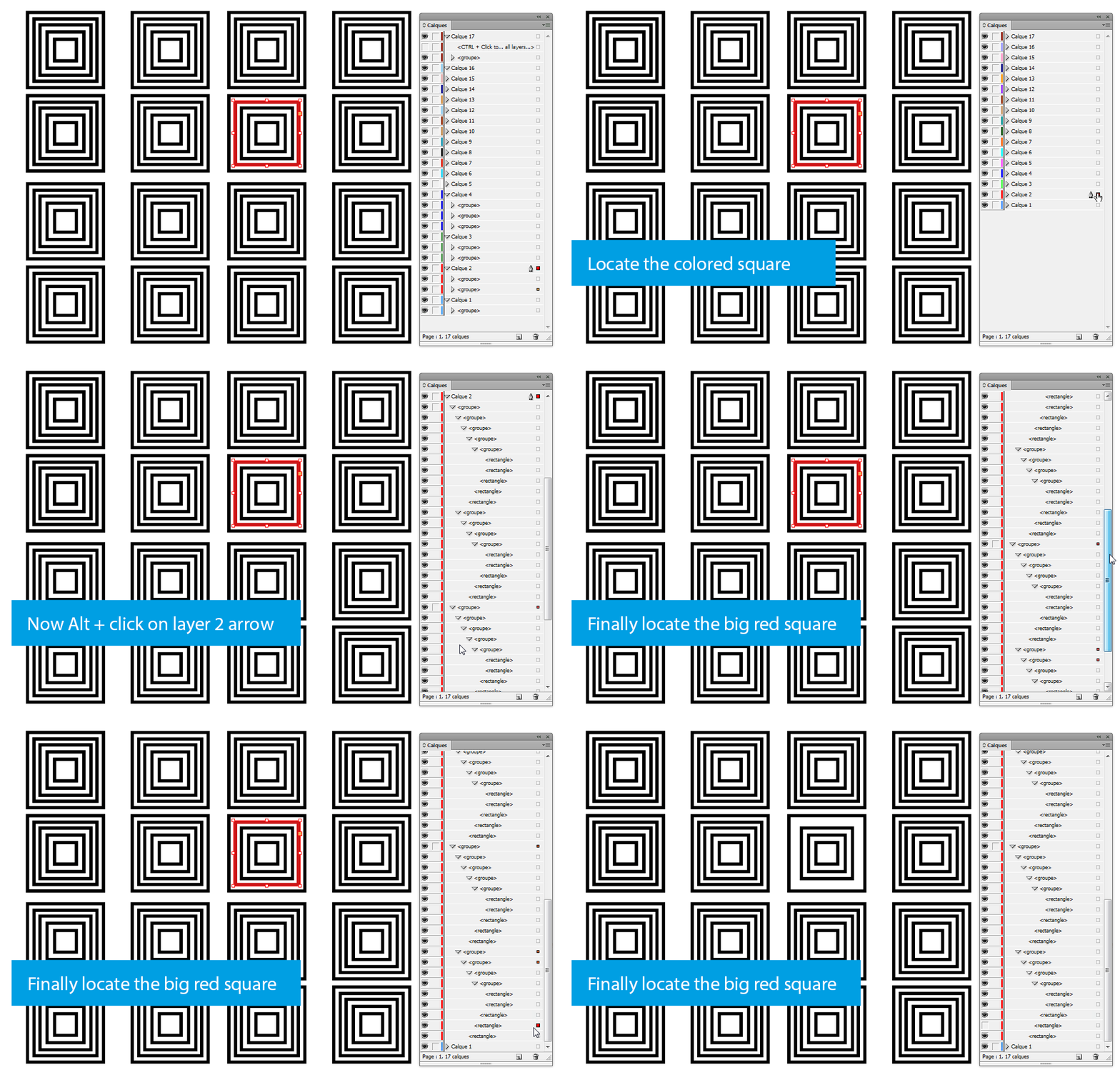
    As an example, I want to "locate" the red stroked square in my layer panel.

    I would start by CTRL + clicking on the arrow of an expanded layer in order to close all layers. (But it's not really necessary)

    Then I would Alt + click on the arrow of the layer that contains the selected object.

    Piece of cake: just notice the colored square on the right hand-side of the layer. Red in my example, because Layer 2 is red.

    Now, all you have to do is to look for the big colored square that flags the selected object. Small colored square flag the parent groups of the object. If you reaaaally have a lot of stuff, you might have to scroll down a little bit, but it's still quite easy to locate.

    See example below:

    9 replies

    Known Participant
    Dec 9, 2018 12:56 PM UTC

    Hi everyone,

    Can I enable the automatic location of the currently selected object?

    It's a very convenient and time-saving option.

    Best Regards

    Translate
    Steve Werner
    Community Expert
    Community Expert
    Dec 9, 2018 1:35 PM UTC

    If you mean, "can I create a keyboard shortcut to call out 'Locate Object' from the Layers panel menu?" the answer is no. It is not included as a panel option for which a shortcut can be applied. It needs to be chosen from the menu.

    Translate
    Known Participant
    Dec 9, 2018 2:12 PM UTC

    Thank you for your response. My bad. The question concerned Illustrator. Thank you for your response.

    Translate
    Known Participant
    Jun 13, 2018 11:27 PM UTC

    Thank you Dan and Erica. I appreciate your response. I am now transitioning from using mostly Illustrator to using InDesign more frequently and I am seeing the two programs have many differences!

    Translate
    Erica Gamet
    Inspiring
    Jun 13, 2018 7:35 PM UTC

    If you press the Command key (Ctrl on PC) while clicking on one of the disclosure arrows to open a layer, it will open all layers and show their contents. At least you can quickly see all the objects...still will have to scroll though.

    Translate
    vinny38
    vinny38Correct answer
    Legend
    Jun 14, 2018 9:48 AM UTC

    Hi!

    I believe CTRL/Command + click on an closed arrow will only expand all layers/groups that have the same level of hierarchy.

    Meaning it won't display the whole content of each layer.

    But... ALT (PC) + Click on an closed arrow will expand everything in the clicked layer (or group)

    As an example, I want to "locate" the red stroked square in my layer panel.

    I would start by CTRL + clicking on the arrow of an expanded layer in order to close all layers. (But it's not really necessary)

    Then I would Alt + click on the arrow of the layer that contains the selected object.

    Piece of cake: just notice the colored square on the right hand-side of the layer. Red in my example, because Layer 2 is red.

    Now, all you have to do is to look for the big colored square that flags the selected object. Small colored square flag the parent groups of the object. If you reaaaally have a lot of stuff, you might have to scroll down a little bit, but it's still quite easy to locate.

    See example below:

    Translate
    Community Expert
    Jun 15, 2018 8:27 AM UTC

    vinny38  wrote

    … But... ALT (PC) + Click on an closed arrow will expand everything in the clicked layer (or group)

    Hi Vinny,

    thank's for that hint!

    Hm… with my laptop where a German Windows 10 version 1803 and a German InDesign CC 2018.1 is installed it is Strg + Alt + Click to open all layers. That said: All layers that contain contents on the active spread. The ones that contain no contents will not be opened.

    EDIT: Misread your sentence above. It says "in the clicked layer (or group)", not in the entire Layer panel.
    For all layers in the Layer panel that contain something it's: Strg + Alt + Click .

    Regards,
    Uwe

    Translate
    Dan Rodney
    Community Expert
    Community Expert
    Jun 13, 2018 3:46 AM UTC

    I don't believe that InDesign has an equivalent feature.

    Translate
    Adobe Certified Expert & Instructor at Noble Desktop | Web Developer, Designer, InDesign Scriptor
    Participant
    Jul 30, 2025 12:01 AM UTC

    Sorry for resurrecting the chat but I came across this same issue in InDesign 2025. I managed to locate items on layers by toggling the "dropdown carrot" next to the layer name(s) in question. I then selected page by page until something appeared in the dropdown layer.

    Translate