
Fozzie Foster
Known Participant
February 22, 2024
Question

Lock w and h

  • February 22, 2024
  • 3 replies
  • 688 views

How is there not a lock for w and h in the transform panel? Am I missing something? 
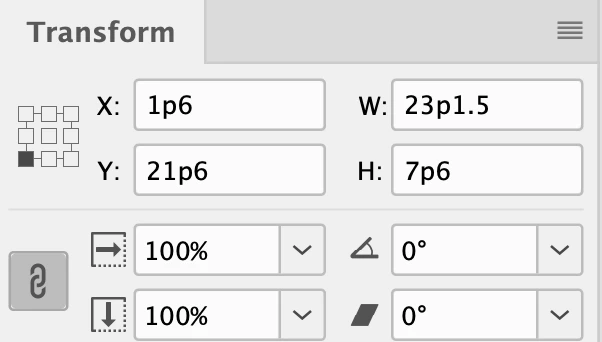
This topic has been closed for replies.

3 replies

Mike Witherell
Community Expert
Community Expert
February 22, 2024

The chainlink icon is clickable when using the Transform W & H in the Control panel. Oddly, it is not also present in the Transform panel. Odder still, is that it is present in the Properties panel. Of course, you could always simply type a changed value and then finish with a Cmd/Ctrl+Enter/Return. This is the keyboard shortcut for what you seek to do.


You didn't ask, but X and Y Percentage boxes in the Control Panel instead of the W/H fields. When these fields are used, the change in dimension of the frame will also scale the graphic within the frame. The X/Y Percentage fields can have explicit measurement values typed in; not merely percentages.

Mike Witherell
Fozzie Foster
Known Participant
February 22, 2024

Hey Mike, 

Appreciate the reply and the tips. This is how I currently do it with the X and Y. I guess what I'm asking is…why is it different in the first place? And not just different to the control panel but different to every other adobe program? Seems very odd to me.

Steve Werner
Community Expert
Community Expert
February 22, 2024

They're different because they were designed by a different team of engineers and product managers.

Steve Werner
Community Expert
Community Expert
February 22, 2024

What version of Illustrator are you using? Mine is the latest, Illustrator 2024 (28.2). I think yours is an older version which has a somewhat different arrangement.

Steve Werner
Community Expert
Community Expert
February 22, 2024

What are you. wanting to use a Lock feature for?


The useful feature for Width and Height is Constrain Proportioins (the lock icon) which determines whether the fields operate independently or together.


Fozzie Foster
Known Participant
February 22, 2024

Hey Steve, 

This is InDesign sorry not Illustrator. Constrain proportions is what I am reffering too. It is missing per my screenshot above. 

Thanks

Steve Werner
Community Expert
Community Expert
February 22, 2024

Sorry...I've been focused on Illustrator the past few hours, and forgot I was answering an InDesign question!!


It's circled in this illustration: