Known Participant
May 29, 2025 5:01 AM UTC
Answered

Locked layer photos moving

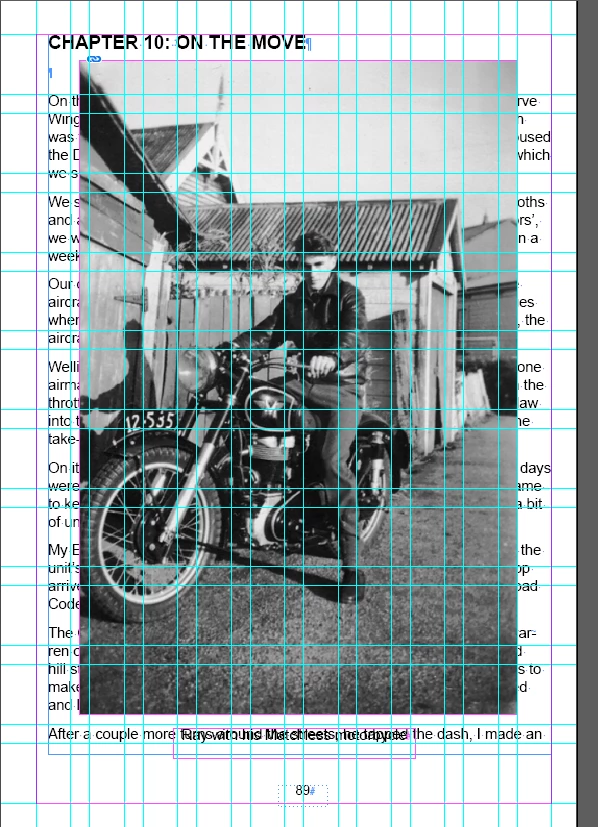
Hi, hoping you can help please. I’ve set up my book using layers. All layers are locked except text. I’ve been working through the text layer, adding new paragraph breaks from the start of chapter 8, as I’m working through editing the book. But when I got to chapter 10, the locked photo there has superimposed itself onto the text. Any thoughts on why? It has happened with a few photos and the photo layers are definitely lockec. 


Peter Spier
Peter SpierCorrect answer
Community Expert
May 29, 2025 7:10 AM UTC

It looks like the photo layer is above the text layer (in general, text should be on the top to avoid transparency issues), and has no text wrap applied.

@Eugene Tyson the photo might be on the "wrong" layer, but it is definitely bot on the text layer -- different color frame border.

5 replies

Peter Spier
Community Expert
Peter SpierCommunity ExpertCorrect answer
Community Expert
May 29, 2025 7:10 AM UTC

It looks like the photo layer is above the text layer (in general, text should be on the top to avoid transparency issues), and has no text wrap applied.

@Eugene Tyson the photo might be on the "wrong" layer, but it is definitely bot on the text layer -- different color frame border.

Translate
Community Expert
May 29, 2025 7:30 AM UTC

Well it doesn't seem to be a locked layer either - I don't think I said it was on the text layer, just the wrong layer. 


The pittance of looking at the image on a mobile phone at 5am without my glasses - hard to see the frame edges 😄 

Translate
ali_4619Author
Known Participant
Jun 2, 2025 3:05 AM UTC

Thanks for always helping Eugene. Even though I watched a tutorial on layers, I didn't realise I had to keep the text layer at the top every time I added a photo layer. Thanks so much.

Translate
Community Expert
May 29, 2025 5:36 AM UTC

The only thing I can think of is that it's on the wrong layer. If the layer was locked I don't think you can see the icons on the frame, link the Link icon. 


It's likely it's on the incorrect layer.

Translate
Community Expert
May 29, 2025 5:33 AM UTC

Impossible to tell what's happening from the photo - can you share the file.
If you export to IDML (File>Export) and you can attach it to the forums. 


Thanks

Translate