Participant
May 4, 2020
Answered

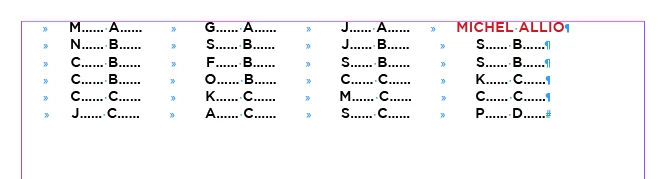
Long alphabetized list of names to read like 4 column credits

  • May 4, 2020
  • 2 replies
  • 1728 views

I'm working on a video honoring my School's graduates. We have a long list of graduates’ names we want to include like scrolling credits in the video. I want to set up a document in InDesign file of the names like the attached four column Movie Credits and then later upload that file to our Premiere Pro video file.

How do I set up in InDesign four columns with the names reading from left to right then returning below to a new row to read the next four names all in alphabetical order. I currently have a long list of names only separated by paragraph returns. What is the fastest way to convert this list into a usable format so I can list the names similar to the attached credit screenshot. 
This topic has been closed for replies.
Correct answer FRIdNGE

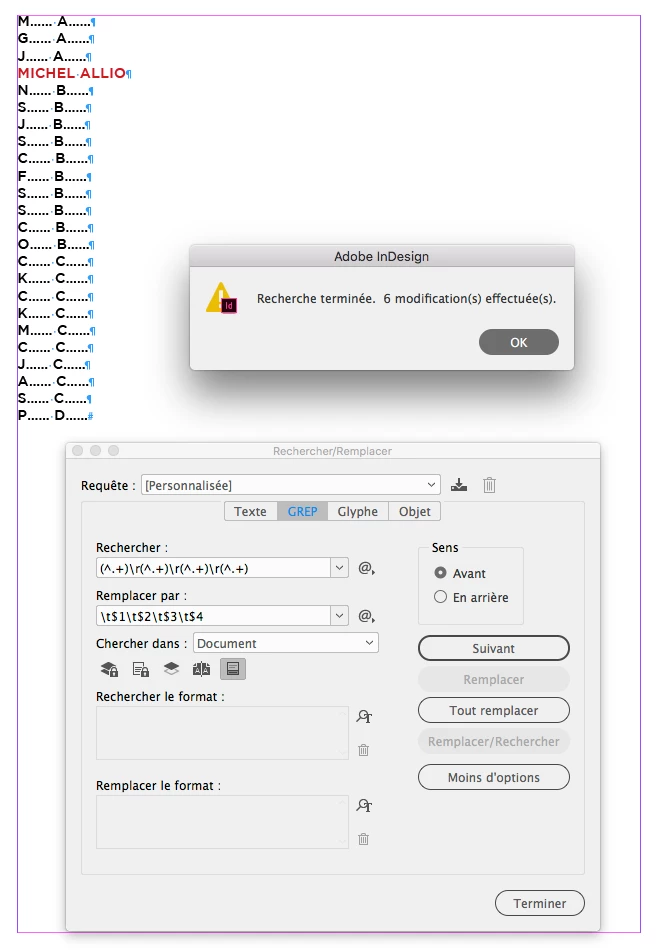
If you just have a list and consider Grep as one the greatest features included in InDesign, do it with 1 click!


That's what we call a simplistic solution! …


(^/)  The Jedi


2 replies

FRIdNGE
FRIdNGECorrect answer
May 5, 2020

If you just have a list and consider Grep as one the greatest features included in InDesign, do it with 1 click!


That's what we call a simplistic solution! …


(^/)  The Jedi


Participant
May 5, 2020

Michel__FRIdNGE you are a Master Jedi and on May the 4th too!

That process works perfectly with the list I already had set up. I had no idea InDesing could read code like that.

How do you even come up with code like that? Are there more Grep resources out there?

May the Force be with you.

FRIdNGE
May 5, 2020

Ask Steve Werner!


He surely teaches Grep to all his studients since years and I suppose he's a Grep-master with a great knoledge on this feature and books/web sources links [personally, not an expert, just an user with some basics!].


Have a good day!


(^/)  The Jedi

Steve Werner
Community Expert
Community Expert
May 4, 2020

I would organize the names in Excel:


Name 1    Name 2    Name 3    Name 4

Name 5    Name 6    Name 7    Name 8

and so on.


Four cells across. You can then place the Excel file into InDesign as 4 column table in the order you need.

Participant
May 4, 2020

Awesome! 

Thanks Steve, wasn't sure where best to format things, excel makes good sense. 

Thanks for the suggestion! 

Steve Werner
Community Expert
Community Expert
May 4, 2020

If that turns out to be a good way for your project, you could mark my answer as Correct which will suggest it for others who might have the same issue.