ScooterD76
Legend
December 16, 2020
Answered

Looking for tooltip to show alternate characters (Was "Function question")

  • December 16, 2020
  • 2 replies
  • 427 views

This will sound silly because I don't know what it's called


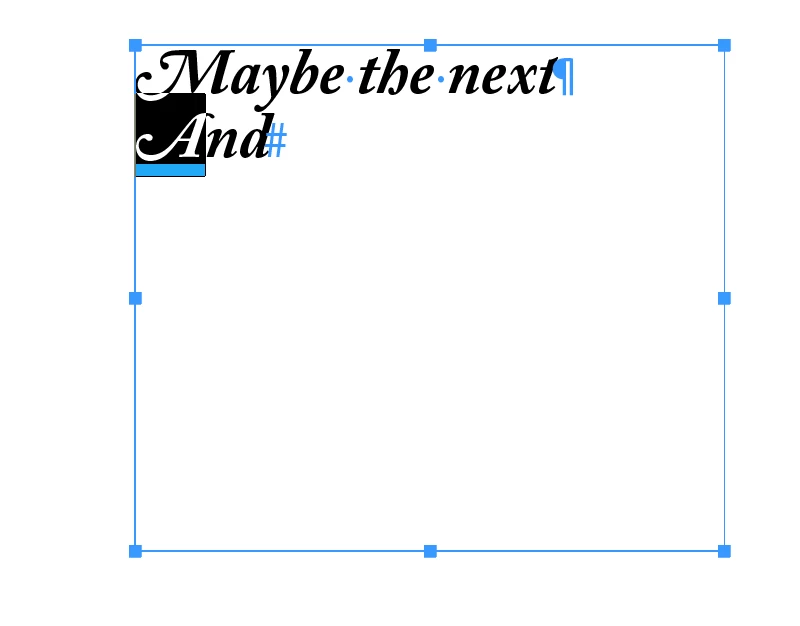
Recently upgraded to current ver. Used to be, i could roll over a selected character, and i'd get a little tooltip with alternate options for that character. This is no longer active after the upgrade and I don't even know where to begin to look for it, and it was super helpful.

TIA! 🙂
This topic has been closed for replies.
Correct answer Steve Werner

Also, this only works with OpenType fonts where alternate characters are included in the font—like this example from Adobe Caslon Pro:


2 replies

Steve Werner
Community Expert
Steve WernerCommunity ExpertCorrect answer
Community Expert
December 16, 2020

Also, this only works with OpenType fonts where alternate characters are included in the font—like this example from Adobe Caslon Pro:


ScooterD76
Legend
December 16, 2020

Two correct answers. Turns out it's a new font i'm working with as well. 

Legend
December 16, 2020

I think you are looking for Type Contexual Controls

The option to activate these can be found in the InDesign Preferences, under Advanced Type.