


Participant
September 29, 2026
Question

Looping font activation
  • September 29, 2026
  • 3 replies
  • 21 views

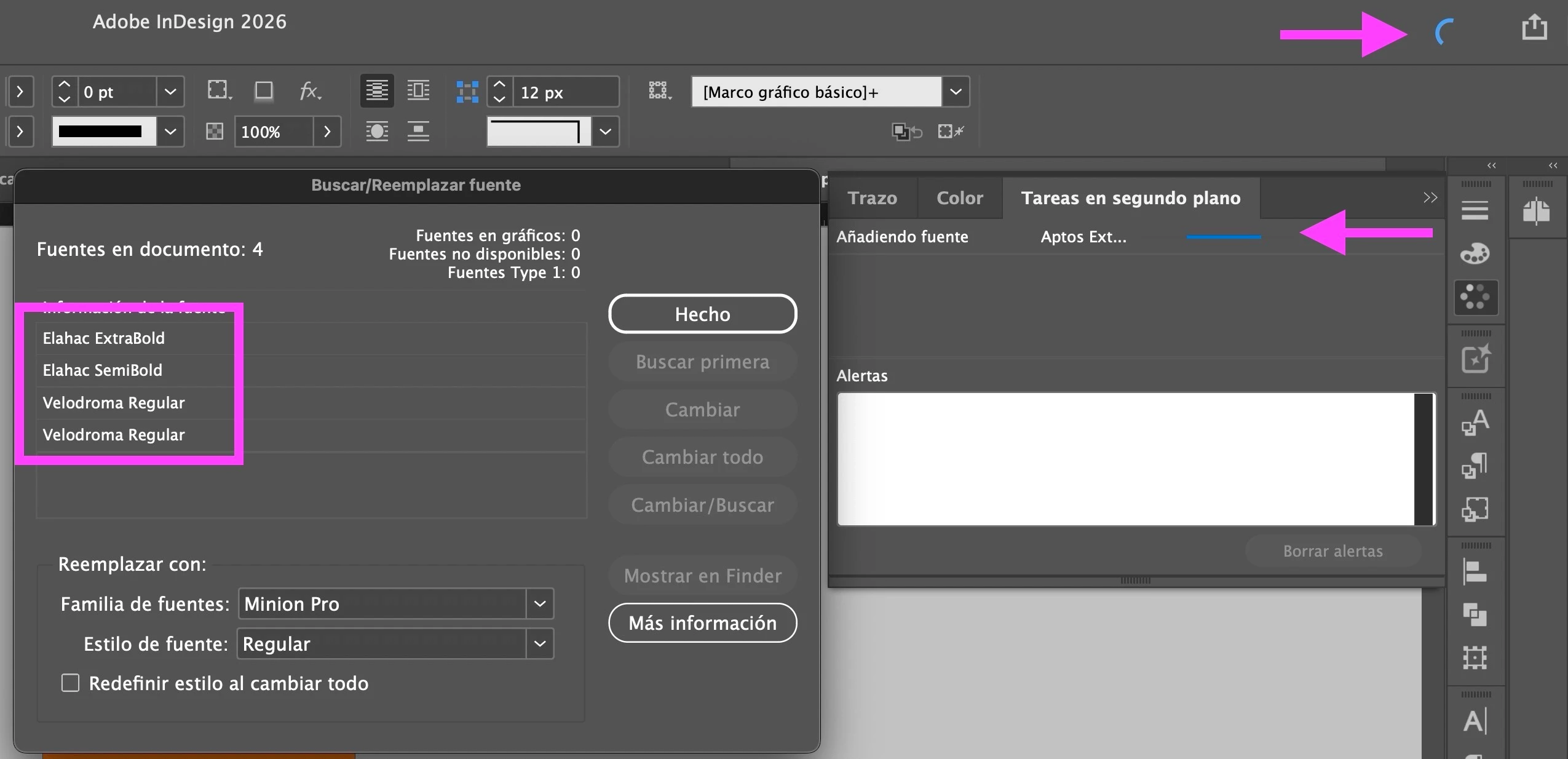
I’ve had this problem for years, and no update fixes it. Sometimes, the font activation process just keeps spinning indefinitely. It’s really annoying to see that wheel spinning all the time. It even happens with fonts I’m not using or don’t even want to activate. The worst part is that there’s no "X" to stop the process.

Is there a solution?

Thanks in advance.

    3 replies

    David R.Author
    Participant
    September 29, 2026

    I disabled "Auto-activate Adobe Fonts" in InDesign, and it's working for now. 

    Thank you so much.

    Abhishek Rao
    Community Manager
    Community Manager
    September 29, 2026

    Hi @David R.,


    Thanks for reaching out and for sharing the screenshot. Sorry to hear about the experience. It looks like InDesign's font activation background task is getting stuck on "Adding font".

    Could you please try the following:

    1. Go to Preferences > File Handling, temporarily turn off Auto-activate Adobe Fonts, restart InDesign, and reopen the document. Check if the spinner stops.

    2. If it does, open Creative Cloud desktop > Preferences > Services, turn Adobe Fonts off, wait a few seconds, and turn it back on.

    3. If the issue persists, sign out of Creative Cloud, quit the app, restart your computer, sign back in, and relaunch InDesign.

    4. To check whether the issue is document-specific, close the affected document, create a new blank document, and check Window > Utilities > Background Tasks. If "Adding font" appears only with the affected document, please check its Parent pages, hidden/locked layers, styles, and overset text for unexpected font references.

    Adobe Fonts troubleshooting:
    https://adobe.ly/4xQVvL6

    Troubleshoot font issues | Adobe Fonts

    Please let us know the results, along with your InDesign version and operating system version.


    ^

    Abhishek

    Mike Witherell
    Community Expert
    Community Expert
    September 29, 2026

    What version of InDesign are you using?

    What version of operating system are you using?

    What reset strategies have you tried?

    Mike Witherell