
Participant
September 24, 2025
Question

Looping not working for .mov inserted using InDesign in interactive pdf, viewed in Acrobat

  • September 24, 2025
  • 3 replies
  • 316 views

Hi,


I have followed the instructions in this Adobe article: https://www.adobe.com/au/acrobat/roc/blog/how-to-add-gifs-to-pdf.html. I have inserted a .mov file into the InDesign file, and have selected the "Play in loop" option in the media controls. I have also selected the "Play on page load" option.
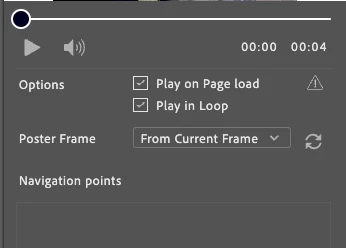


I then export as an Interactive PDF, and open in Acrobat (fresh install today). The file plays on page load only after giving the file permission.


The problem: The file does not play in a loop, it plays once and defaults back to the poster frame. There are also no controls that allow it to be restarted.


I believe I have followed only steps specified by Adobe, so I don't understand why this isn't working as expected. Any suggestions?


(I am on a Mac, if relevant)

3 replies

Mike Witherell
Community Expert
Community Expert
September 25, 2025

BTW, it should not be a .mov file added to an Acrobat PDF. It should be a .mp4 file that is H.264 encoded. (If you really must embed a video file in an Acrobat-only desktop app world).

Mike Witherell
Frans v.d. Geest
Community Expert
Community Expert
September 24, 2025

You mention inserting gif but then you say you inserted a .mov. ?

A .mov is not a gif, so I am a bit confused what you are asking now.
Anyway, a .mov will not work in a pdf, a gif should work but not in every pdf reader out there.

My advice, and Bob Levine will second this, forget 'interactive pdf' for this kind of stuff as 90% will not work. Use Publish online instead when you really want this interactivity.

BobLevine
Community Expert
Community Expert
September 24, 2025

90% is being awfully generous. It's a complete waste of time to even try.

leo.r
Community Expert
Community Expert
September 24, 2025

Interactive elements will not work reliably in PDF. Even if you manage to make it work in Acrobat, there's no guarantee they will work in the myriad of other PDF viewers that people are using. It's unfortunate that the Adobe article you linked to doesn't mention this.

Participant
September 24, 2025

I have seen this comment in other posts, I am aware of the issues with other viewers.

I am simply trying to get this working in Acrobat. I am operating entirely in the Adobe ecosystem, hence why I am confused with this issue. 

leo.r
Community Expert
Community Expert
September 24, 2025
quote

I have seen this comment in other posts, I am aware of the issues with other viewers.

I am simply trying to get this working in Acrobat. I am operating entirely in the Adobe ecosystem, hence why I am confused with this issue. 


By @Mathew36218627pe4i


As far as I know, there's no guarantee it will work in Acrobat either. (If someone's aware of a proven way to make it work in Acrobat, I'm sure they'll chime in.)