Inspiring
February 6, 2024
Answered

LOW GCR IN CMYK CONVERSION

  • February 6, 2024
  • 2 replies
  • 604 views

good morning,

I use the Prepress Europe 3 preset with my Adobe application.
This preset use the Coated FOGRA39 (ISO 12647-2:2004) profile for CMYK color management.

In my indd docuement I've imported 3 cmyk images produced with low black generation (see image).

I choose this GCR because of a lot of black area in my images, so I do not want any kink of risk with the black
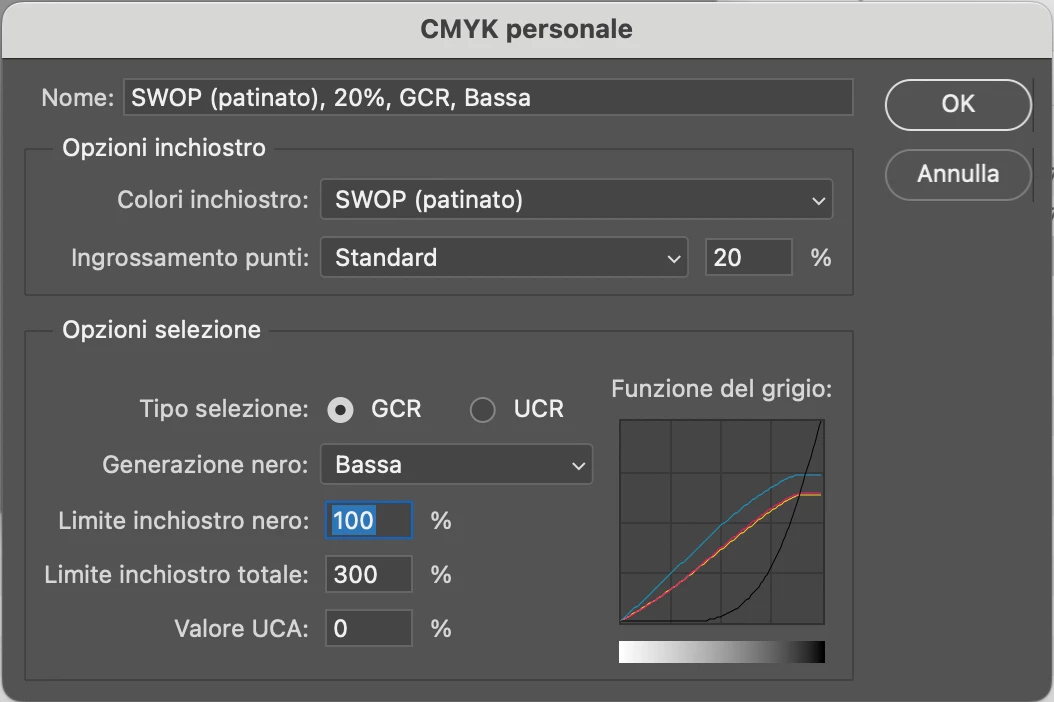
 

how to manage these images in indesign ?
cmyk indesign preset is to keep numeric values and ignore  embedded profile:checking the black channel in color separation preview it seems the right way.


what's your opinion ?

thx


This topic has been closed for replies.
Correct answer rob day

You might look at the ICC site for downloading profiles and information on how modern profiles are created—to customize a modern profile you would need the hardware and software to create and edit profiles:


https://www.color.org/registry/index.xalter


https://www.color.org/profilingtools.xalter


There is more to a profile than black generation and total ink—all of the color is affected by the profile. If the sheet is coated and the press is actually running to the CoatedFOGRA39 profile, the overall color accuracy of the CoatedFOGRA39 separation and soft proof is going to be better than a Photoshop custom CMYK separation.


Of course I could change the color settings of the image at object level, attributing the color profile saved by Photoshop.


If you want your custom separation values to export to a PDF unchanged, you would need to assign the Photoshop profile to the InDesign document (Edit>Assign Profiles...), leave the image as Document CMYK (select the image and see LinkInfo) and also set the Export>Output Destination to Document CMYK or use No Color Conversion. You would also have to communicate with the printer and make sure they don’t convert the custom CMYK numbers to a different destination at output.

2 replies

reproo2773183
Inspiring
February 7, 2024
quote

I choose this GCR because of a lot of black area in my images, so I do not want any kink of risk with the black


what's your opinion ?

thx


By @milko259349307s4y


Usually the kink is caused by UCR , where the cmy curves would turn downwards as the black goes up. You should be fine with GCR.

Even though you are creating a Custom Conversion for your separations, Photoshop will still use the FOGRA39 to display (if thats the one set as its Working Space) for CMYK without a profile. It should still be accurate if FOGRA39 matches your print destination.

The legacy dialog predates color profiles. It was a better method of converting DeviceRGB to Device CMYK than simply inversing RGB with CMY at the RIP (almost all RIPs use Profiles these days).

As Rob wrote, It will have no relationship to the conversion you'd get using the FOGRA39 profile. But you can still use FOGRA39 for onscreen proofing.


rob day
Community Expert
Community Expert
February 6, 2024

Hi @milko259349307s4y , You should keep in mind that Photoshop’s Custom CMYK dialog is a legacy curve based method of making CMYK conversions. If you use Photoshop’s Custom CMYK for your separations they would have no relationship to the Coated FOGRA39 profile, which is a modern profile captured from a printed press sheet.


If you save your custom CMYK separations with no embedded profile and place them in an InDesign document with the Coated FOGRA39 profile assigned to the InDesign document (Edit>Assign Profiles...), the color will soft proof as it is expected to print on a press running to the Coated FOGRA profile (the color appearance will likely be different than the preview in Photoshop). If you were to export that document to one of the default PDF/X presets, the CMYK numbers would export unchanged as DeviceCMYK (no profile embedded).

Inspiring
February 7, 2024

Hi Rob and thx for reply.

I wasn't aware that it was a Legacy dialog (Is it present for reasons of compatibility with previous versions?).
Anyway photoshop attach the color profile "SWOP (coated), 20%, GCR, Low" to the CMYK image.
Indesign's settings are "preserve numeric values and ignore linked profiles".
Of course I could change the color settings of the image at object level, attributing the color profile saved by Photoshop.
What do you think ?
Can you suggest me an official site from which to download color profiles with high and low black generation?

Thank you.

rob day
Community Expert
rob dayCommunity ExpertCorrect answer
Community Expert
February 7, 2024

You might look at the ICC site for downloading profiles and information on how modern profiles are created—to customize a modern profile you would need the hardware and software to create and edit profiles:


https://www.color.org/registry/index.xalter


https://www.color.org/profilingtools.xalter


There is more to a profile than black generation and total ink—all of the color is affected by the profile. If the sheet is coated and the press is actually running to the CoatedFOGRA39 profile, the overall color accuracy of the CoatedFOGRA39 separation and soft proof is going to be better than a Photoshop custom CMYK separation.


Of course I could change the color settings of the image at object level, attributing the color profile saved by Photoshop.


If you want your custom separation values to export to a PDF unchanged, you would need to assign the Photoshop profile to the InDesign document (Edit>Assign Profiles...), leave the image as Document CMYK (select the image and see LinkInfo) and also set the Export>Output Destination to Document CMYK or use No Color Conversion. You would also have to communicate with the printer and make sure they don’t convert the custom CMYK numbers to a different destination at output.