mtcte
Participant
May 15, 2026
Question

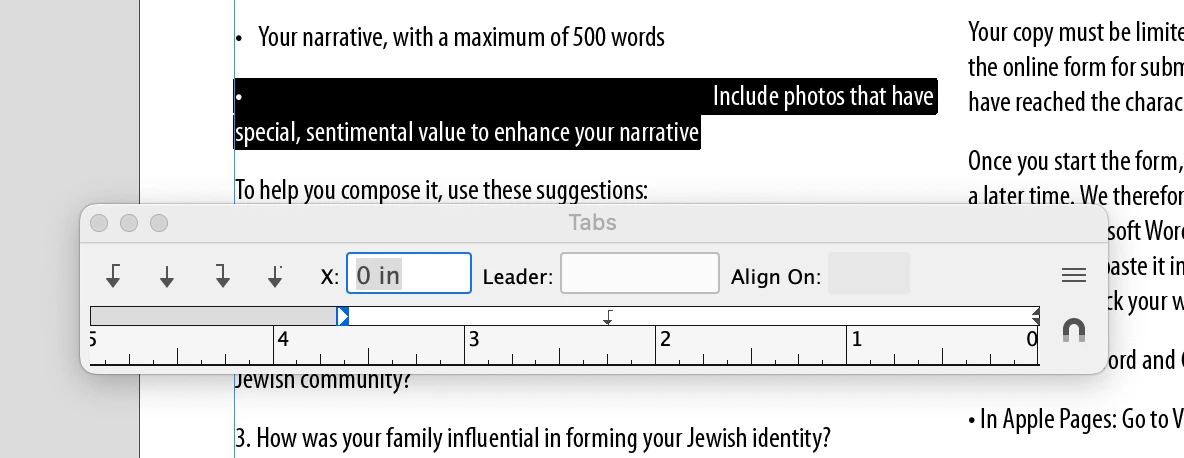
LTR Reading Doc but RTL tab ruler!

  • May 15, 2026
  • 1 reply
  • 11 views

I occasionally have to enter Hebrew into the documents I create. I set it as World-Ready Paragraph Composer so that it reads RTL (just the Hebrew). I'm currently working on a doc that has NO Hebrew and only English LTR copy BUT when I try to set tabs, the ruler is RTL! I have already uninstalled InDesign once and redownloaded it. HELP! 


    1 reply

    Joel Cherney
    Community Expert
    Community Expert
    May 15, 2026

    Did you use a Hebrew specific version of the application? Plain-vanilla English InDesign certainly has the capacity to handle Hebrew, but it’s possible for its defaults to accidentally get stuck in RTL mode, which is easy to turn off if you already have an “English (Hebrew)” or “English (Arabic)” version installed - there’s a paragraph direction button in the Paragraph panel:


    It looks like your English “Include photos...” paragraph there is marked as right-to-left. If you don’t happen to have that “English (Hebrew)” locale installed, I think you should be able to just turn the composer here back to the Adobe Paragraph Composer, which lacks support for RTL paragraphs. 


    Alternately, if you wanted the scorched-earth solution, you could uninstall InDesign, then use the Creative Cloud Cleaner Tool to make sure your removal was complete before reinstalling. 

    mtcte
    mtcteAuthor
    Participant
    May 16, 2026

    I do have this problematic line set to Adobe Paragraph Composer. I’ve always only had the vanilla English version of the Adobe apps. If I install the MENA version of InDesign, are there any other differences other than the ability to set for LTR or RTL reading? Just FYI, I’ve been working at my job for 17 years using Hebrew periodically and I’ve never had this issue before!