
Known Participant
August 25, 2023
Question

Make a parameter for stroke swatches

  • August 25, 2023
  • 2 replies
  • 344 views

Hello all, 

Big thanks to you also so far who have helped - 10 days later the script for lines is nearly working and now its just bonus features time. 

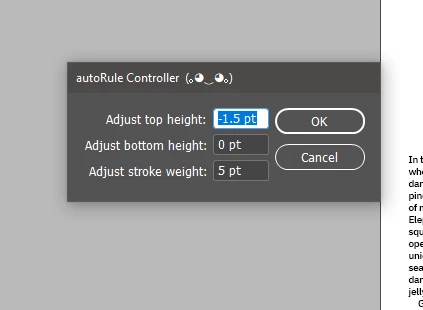
So there are two scripts one which makes a xml for variable user input parameters
and the main script which does the work.

I am looking to add a parameter for users to be able to select a specific stroke colour they want the lines to be - i.e. specifically the stroke colour panel options
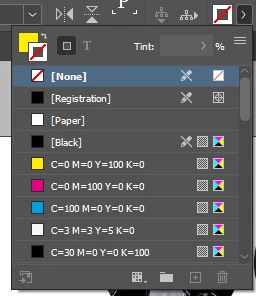


But i am not sure what to use to get this 

Below are both parts of the code.

Many thanks all, 

Smyth

//controller

var f = File($.fileName).parent + "/defaults.xml";

var xml = readXML(f);
if (xml == "") {
    xml = XML("<dialog><values><top>0</top><bottom>0</bottom><stroke>1</stroke></values></dialog>");
}

var tv = Number(xml.values.top);
var bv = Number(xml.values.bottom);
var sv = Number(xml.values.stroke); // New variable for stroke weight

var t, b, s; // Declare new variable for stroke weight
makeDialog();

function makeDialog() {
    var d = app.dialogs.add({ name: "autoRule Controller  (。◕‿◕。)", canCancel: true });
    with (d.dialogColumns.add()) {
        staticTexts.add({ staticLabel: "Adjust top height:" });
        staticTexts.add({ staticLabel: "Adjust bottom height:" });
        staticTexts.add({ staticLabel: "Adjust stroke weight:" });
    }
    with (d.dialogColumns.add()) {
        t = measurementEditboxes.add({ editUnits: MeasurementUnits.POINTS, editValue: tv, minWidth: 50 });
        b = measurementEditboxes.add({ editUnits: MeasurementUnits.POINTS, editValue: bv, minWidth: 50 });
        s = measurementEditboxes.add({ editUnits: MeasurementUnits.POINTS, editValue: sv, minWidth: 50 });
    }
    if (d.show() == true) {
        t = t.editValue;
        b = b.editValue;
        s = s.editValue;

        xml.values.top = t;
        xml.values.bottom = b;
        xml.values.stroke = s; // Update stroke weight in XML
        writeXML(f, xml.toXMLString());

        d.destroy();
    }
}

function writeXML(p, s) {
    var file = new File(p);
    file.encoding = 'UTF-8';
    file.open('w');
    file.write(s);
    file.close();
}

function readXML(p) {
    var f = new File(p);
    f.open("r");
    var t = f.read();
    f.close();
    return XML(t);
}
//Main

// Load user-defined values from XML
var f = File($.fileName).parent + "/defaults.xml";
var xml = readXML(f);
var userDefinedAmountTop = Number(xml.values.top);
var userDefinedAmountBottom = Number(xml.values.bottom);
var userDefinedStrokeWeight = Number(xml.values.stroke); // New variable for stroke weight

// Main code below
if (app.documents.length > 0) {
    var doc = app.activeDocument;
    var selectedFrames = doc.selection;

    if (selectedFrames.length >= 2) {
        selectedFrames.sort(function(a, b) {
            return a.geometricBounds[1] - b.geometricBounds[1];
        });

        app.doScript(function() {
            for (var i = 0; i < selectedFrames.length - 1; i++) {
                var currentFrame = selectedFrames[i];
                var nextFrame = selectedFrames[i + 1];

                if (currentFrame.parentPage === nextFrame.parentPage) {
                    var centerX = (currentFrame.geometricBounds[3] + nextFrame.geometricBounds[1]) / 2;
                    var ruleHeight = Math.max(
                        currentFrame.geometricBounds[2] - currentFrame.geometricBounds[0],
                        nextFrame.geometricBounds[2] - nextFrame.geometricBounds[0]
                    );

                    var startHeight = Math.max(
                        currentFrame.geometricBounds[2],
                        nextFrame.geometricBounds[2]
                    );

                    var endHeight = Math.min(
                        currentFrame.geometricBounds[0],
                        nextFrame.geometricBounds[0]
                    );

                    var adjustedStartHeight = startHeight + userDefinedAmountBottom;
                    var adjustedEndHeight = endHeight - userDefinedAmountTop;

                    var newLine = currentFrame.parentPage.graphicLines.add();
                    newLine.strokeWeight = userDefinedStrokeWeight; // Set stroke weight
                    newLine.paths[0].entirePath = [
                        [centerX, adjustedStartHeight],
                        [centerX, adjustedEndHeight]
                    ];

                    newLine.sendToBack();
                }
            }
        }, ScriptLanguage.JAVASCRIPT, [], UndoModes.ENTIRE_SCRIPT, "Add Vertical Lines Between Text Boxes");
    } else {
        alert("Please select at least two text frames.");
    }
} else {
    alert("Open a document before running this script.");
}

function readXML(p) {
    var f = new File(p);
    f.open("r");
    var t = f.read();
    f.close();
    return XML(t);
}


This topic has been closed for replies.

2 replies

rob day
Community Expert
Community Expert
August 25, 2023


I am looking to add a parameter for users to be able to select a specific stroke colour they want the lines to be - i.e. specifically the stroke colour panel options


You would have to add a swatch dropdown to the dialog and track the selected index. Try this:


var f = File($.fileName).parent + "/defaults.xml";

var xml = readXML(f);
if (xml == "") {
    xml = XML("<dialog><values><top>0</top><bottom>0</bottom><stroke>1</stroke><color>3</color></values></dialog>");
}

var tv = Number(xml.values.top);
var bv = Number(xml.values.bottom);
var sv = Number(xml.values.stroke); 
var cv = Number(xml.values.color);

var t, b, s, c, cd;
makeDialog();

function makeDialog() {
    var d = app.dialogs.add({ name: "autoRule Controller  (。◕‿◕。)", canCancel: true });
    with (d.dialogColumns.add()) {
        staticTexts.add({ staticLabel: "Adjust top height:" });
        staticTexts.add({ staticLabel: "Adjust bottom height:" });
        staticTexts.add({ staticLabel: "Adjust stroke weight:" });
        staticTexts.add({ staticLabel: "Stroke color:" });
    }
    with (d.dialogColumns.add()) {
        t = measurementEditboxes.add({ editUnits: MeasurementUnits.POINTS, editValue: tv, minWidth: 50 });
        b = measurementEditboxes.add({ editUnits: MeasurementUnits.POINTS, editValue: bv, minWidth: 50 });
        s = measurementEditboxes.add({ editUnits: MeasurementUnits.POINTS, editValue: sv, minWidth: 50 });
        cd = dropdowns.add({stringList:getArrayNames(app.activeDocument.swatches.everyItem().getElements()), selectedIndex:cv, minWidth:80});
    }
    if (d.show() == true) {
        t = t.editValue;
        b = b.editValue;
        s = s.editValue;
        //get the swatch object
        c = app.activeDocument.swatches.everyItem().getElements()[cd.selectedIndex];

        xml.values.top = t;
        xml.values.bottom = b;
        xml.values.stroke = s;
        xml.values.color = cd.selectedIndex;//the selected dropdown number
        writeXML(f, xml.toXMLString());

        //call the main() function via doScript here
        app.doScript(main, ScriptLanguage.JAVASCRIPT, undefined, UndoModes.ENTIRE_SCRIPT, 'Add Vertical Lines Between Text Boxes');
        d.destroy();
    }
}


/**
* returns an array of swatch names for the dropdown 
* @ return value 
*/
function getArrayNames(arr){
    var a = new Array;
    for(var i = 0; i < arr.length; i++){
        a.push(arr[i].name);
    }
    return a
}


/**
* The main script 
*/
function main(){
    //the dialog is getting points, so make sure the script uses points no matter what the ruler units are set to
    app.scriptPreferences.measurementUnit = MeasurementUnits.POINTS;

    if (app.documents.length > 0) {
        var doc = app.activeDocument;
        var selectedFrames = doc.selection;

        if (selectedFrames.length >= 2) {
            selectedFrames.sort(function(a, b) {
                return a.geometricBounds[1] - b.geometricBounds[1];
            });
        
            for (var i = 0; i < selectedFrames.length-1; i++) {
                var currentFrame = selectedFrames[i];
                var nextFrame = selectedFrames[i + 1];

                if (currentFrame.parentPage === nextFrame.parentPage) {
                    var centerX = (currentFrame.geometricBounds[3] + nextFrame.geometricBounds[1]) / 2;
                    var startHeight = Math.max(currentFrame.geometricBounds[2], nextFrame.geometricBounds[2]);
                    var endHeight = Math.min(currentFrame.geometricBounds[0], nextFrame.geometricBounds[0]);
                    var adjustedStartHeight = startHeight + b;
                    var adjustedEndHeight = endHeight - t;

                    //graphic lines have a bounds not including the stroke
                    var newLine = currentFrame.parentPage.graphicLines.add({
                        geometricBounds: [adjustedEndHeight,centerX,adjustedStartHeight,centerX], 
                        strokeWeight:s,
                        strokeColor:c});
                    
                    newLine.sendToBack();
                }  
            }
        } else {
            alert("Please select at least two text frames.");
        }
    } else {
        alert("Open a document before running this script.");
    } 

    app.scriptPreferences.measurementUnit = AutoEnum.AUTO_VALUE;
}


function writeXML(p, s) {
    var file = new File(p);
    file.encoding = 'UTF-8';
    file.open('w');
    file.write(s);
    file.close();
}

function readXML(p) {
    var f = new File(p);
    f.open("r");
    var t = f.read();
    f.close();
    return XML(t);
}


Known Participant
August 26, 2023

hello, 

Thanks Rob, aye that works well. 

I got a version working and it seems your one is on point too. 

I think when i get the main script following the hooked up to the colour then I can finally put this script to rest until I think of more features! The good think is that this should be fairly dynamic at placing rules when complete.

Best, 

Smyth

rob day
Community Expert
Community Expert
August 25, 2023

Hi @SmythWharf , I think you want to wrap your line construction code in a function and call it before the dialog gets destroyed. Also, your dialog is getting points, so you want to use points in the main() function—your code did not work on my first try because my doc was set to inches, and my stroke default color is [None]. Try this:


//controller

var f = File($.fileName).parent + "/defaults.xml";

var xml = readXML(f);
if (xml == "") {
    xml = XML("<dialog><values><top>0</top><bottom>0</bottom><stroke>1</stroke></values></dialog>");
}

var tv = Number(xml.values.top);
var bv = Number(xml.values.bottom);
var sv = Number(xml.values.stroke); // New variable for stroke weight

var t, b, s; // Declare new variable for stroke weight
makeDialog();

function makeDialog() {
    var d = app.dialogs.add({ name: "autoRule Controller  (。◕‿◕。)", canCancel: true });
    with (d.dialogColumns.add()) {
        staticTexts.add({ staticLabel: "Adjust top height:" });
        staticTexts.add({ staticLabel: "Adjust bottom height:" });
        staticTexts.add({ staticLabel: "Adjust stroke weight:" });
    }
    with (d.dialogColumns.add()) {
        t = measurementEditboxes.add({ editUnits: MeasurementUnits.POINTS, editValue: tv, minWidth: 50 });
        b = measurementEditboxes.add({ editUnits: MeasurementUnits.POINTS, editValue: bv, minWidth: 50 });
        s = measurementEditboxes.add({ editUnits: MeasurementUnits.POINTS, editValue: sv, minWidth: 50 });
    }
    if (d.show() == true) {
        t = t.editValue;
        b = b.editValue;
        s = s.editValue;

        xml.values.top = t;
        xml.values.bottom = b;
        xml.values.stroke = s; // Update stroke weight in XML
        writeXML(f, xml.toXMLString());

        //call the main() function via doScript here
        app.doScript(main, ScriptLanguage.JAVASCRIPT, undefined, UndoModes.ENTIRE_SCRIPT, 'Add Vertical Lines Between Text Boxes');
        d.destroy();
    }
}

/**
* The main script, call this via app.doScript in the makeDialog() function before the dialog is closed
*/
function main(){
    //the dialog is getting points, so make sure the script uses points no matter what the ruler units are set to
    app.scriptPreferences.measurementUnit = MeasurementUnits.POINTS;

    //Don’t need this because t,b, & s were declared above and set via the dialog
    //var userDefinedAmountTop = Number(xml.values.top);
    //var userDefinedAmountBottom = Number(xml.values.bottom);
    //var userDefinedStrokeWeight = Number(xml.values.stroke);
    
    if (app.documents.length > 0) {
        var doc = app.activeDocument;
        var selectedFrames = doc.selection;

        if (selectedFrames.length >= 2) {
            selectedFrames.sort(function(a, b) {
                return a.geometricBounds[1] - b.geometricBounds[1];
            });
        
            for (var i = 0; i < selectedFrames.length-1; i++) {
                var currentFrame = selectedFrames[i];
                var nextFrame = selectedFrames[i + 1];

                if (currentFrame.parentPage === nextFrame.parentPage) {
                    var centerX = (currentFrame.geometricBounds[3] + nextFrame.geometricBounds[1]) / 2;
                    var startHeight = Math.max(currentFrame.geometricBounds[2], nextFrame.geometricBounds[2]);
                    var endHeight = Math.min(currentFrame.geometricBounds[0], nextFrame.geometricBounds[0]);
                    var adjustedStartHeight = startHeight + b;
                    var adjustedEndHeight = endHeight - t;

                    //graphic lines have a bounds not including the stroke
                    var newLine = currentFrame.parentPage.graphicLines.add({
                        geometricBounds: [adjustedEndHeight,centerX,adjustedStartHeight,centerX], 
                        strokeWeight:s,
                        strokeColor:"Black"});
                    
                    newLine.sendToBack();
                }  
            }
        } else {
            alert("Please select at least two text frames.");
        }
    } else {
        alert("Open a document before running this script.");
    } 

    app.scriptPreferences.measurementUnit = AutoEnum.AUTO_VALUE;
}


function writeXML(p, s) {
    var file = new File(p);
    file.encoding = 'UTF-8';
    file.open('w');
    file.write(s);
    file.close();
}

function readXML(p) {
    var f = new File(p);
    f.open("r");
    var t = f.read();
    f.close();
    return XML(t);
}


Known Participant
August 25, 2023

Hello, 


thanks for that, will have a look into these corrections 


best 


Smyth