
WCMProduction
Participant
May 9, 2025
Question

Make a text box attribute non-printing in InDesign v20.1 using JavaScript

  • May 9, 2025
  • 7 replies
  • 860 views

I had so much success with my 1st post (question) Thanks @rob day Next question. Have a text box at top of page that is the document version. For proofing to client, I need this to print so client can see what version they are looking at. But when printing the live print I need to make this texy box non-printing. Looking for a script that can make text box non-print.  I have tried this script:


document.textFrames.item("version").nonprinting = true;


I have the text box labeled using script label as “version” (with no quotes).

I am getting below error:
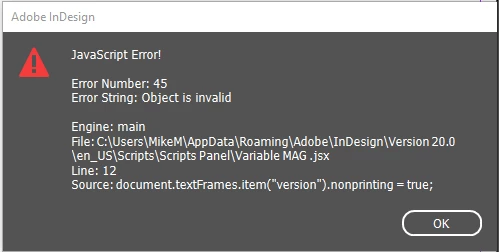
I also tried the below script:


var version = doc.textFrames.itemByName("version");

version.nonprinting = true;


Getting this error:
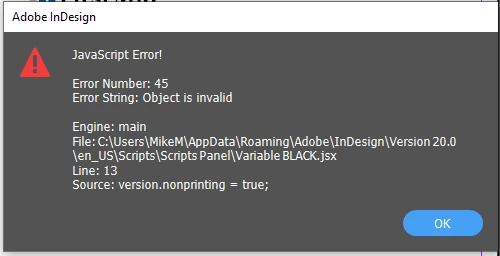
Again Thanks VERY MUCH for all help and comments!


7 replies

Community Expert
May 13, 2025

Hi @WCMProduction ,

in your specific case I would avoid the Script Label panel.

Instead I would simply name the text frame "version". Either do this using the Layers panel or by scripting when the text frame is selected:

app.selection[0].name = "version";

Then your code will work as expected:

app.documents[0].textFrames.itemByName("version").nonprinting = true ;


Regards,
Uwe Laubender
( Adobe Community Expert )


Robert at ID-Tasker
Legend
May 12, 2025

@WCMProduction


As you're a Windows user - would you like to try full version of my tool for a few days?


You can sort & filter by any of the 1000+ object properties, or you can find TextFrames by their (partial) contents abd / or text properties - 400+.


Then, if you need to do more - you can export PDF/JPEG/ePUB/etc. file(s).


So, if your workflow requires turning on/off visibility of some objects / layers and then export PDF(s) - you can have it done with one click. 


Or you can process in bulk whole folder with subfolders - of course, you can filter files first as well 😉 


And if you don't need to export after creating / editing each document - you want to save time - you can edit them first and then export PDF(s) later in bulk - during a lunch break 😉  


Exporting to a designated folder included. 


Robert at ID-Tasker
Legend
May 12, 2025

@WCMProduction


Overall, instead of switching this one property for each TextFrame with the label - move them ONCE to a layer - then it will be a single click on the Layers pallet...


Community Expert
May 12, 2025

Hope this helps - run it again it switches it off and on 

var doc = app.activeDocument;
var frames = doc.textFrames.everyItem().getElements();

for (var i = 0; i < frames.length; i++) {
    if (frames[i].label === "version") {
        frames[i].nonprinting = !frames[i].nonprinting;
        alert("Text frame with script label 'version' is now set to " + (frames[i].nonprinting ? "non-printing." : "printing."));
        break;
    }
}


rob day
Community Expert
Community Expert
May 9, 2025

Hi @WCMProduction , As @Robert at ID-Tasker  suggests I thnk you will have to loop through the textFrames—.getElements() converts the Collection into an Array.


var ver = app.activeDocument.textFrames.everyItem().getElements();
for (var i = 0; i < ver.length; i++){
    ver[i].nonprinting = true;
};  


Robert at ID-Tasker
Legend
May 9, 2025

@rob day


But you're not checking for "version"?


Robert at ID-Tasker
Legend
May 9, 2025

@WCMProduction


I'm not JS guy - but maybe you've more than one "version" object in your document?


WCMProduction
Participant
May 12, 2025

Thanks for input, but there are no other script labels in Doc.

Robert at ID-Tasker
Legend
May 12, 2025
quote

Thanks for input, but there are no other script labels in Doc.


By @WCMProduction


Then it would be best if you iterate through all TFs - or only for a particular layer - and check "label" property. 


leo.r
Community Expert
Community Expert
May 9, 2025

Are you sure you really do have a text frame named "version"? Your second script does work for me, unless I'm using a non-existent name, in which case it returns the same "Object is invalid" error.

WCMProduction
Participant
May 12, 2025

I am no expert but I am about 95% sure Text box is labeled version.

leo.r
Community Expert
Community Expert
May 12, 2025
quote

I am no expert but I am about 95% sure Text box is labeled version

By @WCMProduction


As @Robert at ID-Tasker has already mentioned, then you need to check the label property of your text frames. In your original post, I missed that you were using Script Label (sorry!), I thought that "version" was the name assigned in the Layers panel.