
Participant
November 28, 2016
Question

Make Color Label Script?

  • November 28, 2016
  • 2 replies
  • 1373 views

Hi, I am trying to use a script that will add a text box underneath the swatch box in a document. I found an applescript that does this, but it also adds the LAB value and I only need the pantone value. Can anyone help with this?  Screenshot below shows what I am getting
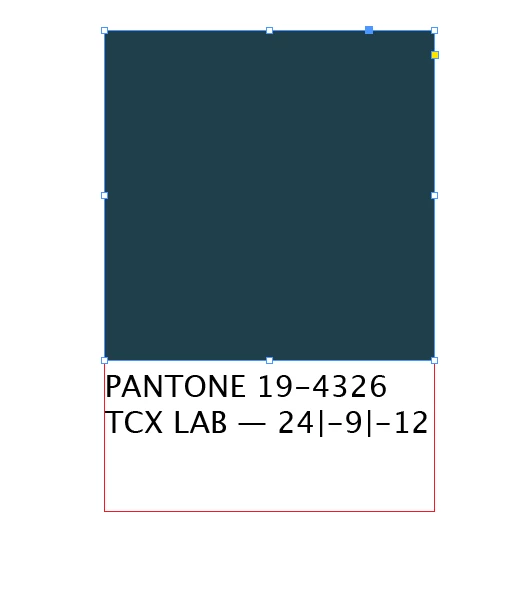
I've also attached the applescript

This topic has been closed for replies.

2 replies

tbill647
Participant
April 26, 2021

Thanks for the post.  Have you had success with this on InDesign 2021?

rob day
Community Expert
Community Expert
April 26, 2021

It should work—the script expects a selected rectangle. If you change the application tells to id "com.adobe.indesign" it should work with any version. Also, the original question was how to remove the color values from the label—this would do that:


tell application id "com.adobe.indesign"
	set myDocument to active document
	
	--set units
	set horizontal measurement units of view preferences of myDocument to points
	set vertical measurement units of view preferences of myDocument to points
	
	--make a layer and style sheet for the document if it doesn't exist
	
	tell myDocument
		try
			make new paragraph style with properties {name:"Labels", applied font:"Lucida Grande", point size:5, left indent:0}
			set myLabelStyle to paragraph style "Labels"
		on error
			set myLabelStyle to paragraph style "Labels"
		end try
	end tell
	
	--get all the page items
	set myItems to selection
	
	--get the fill color and make a label at bottom
	repeat with x from 1 to count of myItems
		set myFill to fill color of item x of myItems
		try
			my MakeLabel(myFill, item x of myItems, myLabelStyle)
		end try
	end repeat
end tell

--make labels (the cmyk color, the object, the label style)

on MakeLabel(myColor, myRectangle, myLabelStyle)
	tell application id "com.adobe.indesign"
		set cv to color value of myColor as list
		set n to "— "
		repeat with a in cv
			set a to round a rounding up
			set n to n & a & "|"
		end repeat
		
		--get the label text	
		set x to (count of characters of n) - 1
		set n to characters 1 thru x of n
		set myLabelString to name of myColor
		--set myLabelString to name of myColor & " " & space of myColor & " " & n	
		--set AppleScript's text item delimiters to "LAB"
		--set myLabelString to text item 1 of myLabelString
		
		-- make the label box below the page item [y1, x1, y2, x2]
		set {a, b, c, d} to geometric bounds of myRectangle
		
		tell parent of myRectangle
			set myTextFrame to make text frame with properties {geometric bounds:{c, b, c + 25, d}, contents:myLabelString}
			tell myTextFrame
				set first baseline offset of text frame preferences to leading offset
				set applied paragraph style of text 1 to myLabelStyle
			end tell
		end tell
	end tell
end MakeLabel


Jongware
Community Expert
Community Expert
November 29, 2016

Is that an image of your code?

Out of curiosity: if we make the requested changes to it (with Photoshop I presume) and upload it again, just how are you going to run it?

Participant
November 29, 2016

Hi it wouldn't let me upload the applescript file onto the adobe forum here, i'm not sure how to send it?

Jongware
Community Expert
Community Expert
November 29, 2016

Copy and paste does not work?