Participant
July 15, 2023
Answered

malayalam

  • July 15, 2023
  • 4 replies
  • 5149 views

Sir,
When I am pasting unicode malayalam font (MLU-Revathi) into indesign, the symbol (ു) jumps from the preceeding letter and joints with the succeeding letter. Please view the preview image.

Pleaase Solve this issue.

Correct answer Joel Cherney

Joel Cherney has already answered your solution. I had similar situation while using with old ml which were converted to unicode. The solution to this was enabling harfbuzz in indesign. It'll definitly help.

Also i'll provide a link which you can look into:

https://rajeeshknambiar.wordpress.com/2020/11/09/harfbuzz-shaping-engine-in-indesign/


Your link helped me figure out why I was wrong about my empty bag of tricks! Their step 6 is


6. If you have already laid out text, you may need to reapply style/font to see the effect.


What I didn't realize was that the story had to be recomposed after enabling Harfbuzz in order to see the changes. Typing in a frame would force recomposition, but it's just as easy to to in the script. I wrote a pair of scripts to switch shaping engines (with the recomposition of the story built in), and another script to alert me as to whether or not Harfbuzz was turned on.
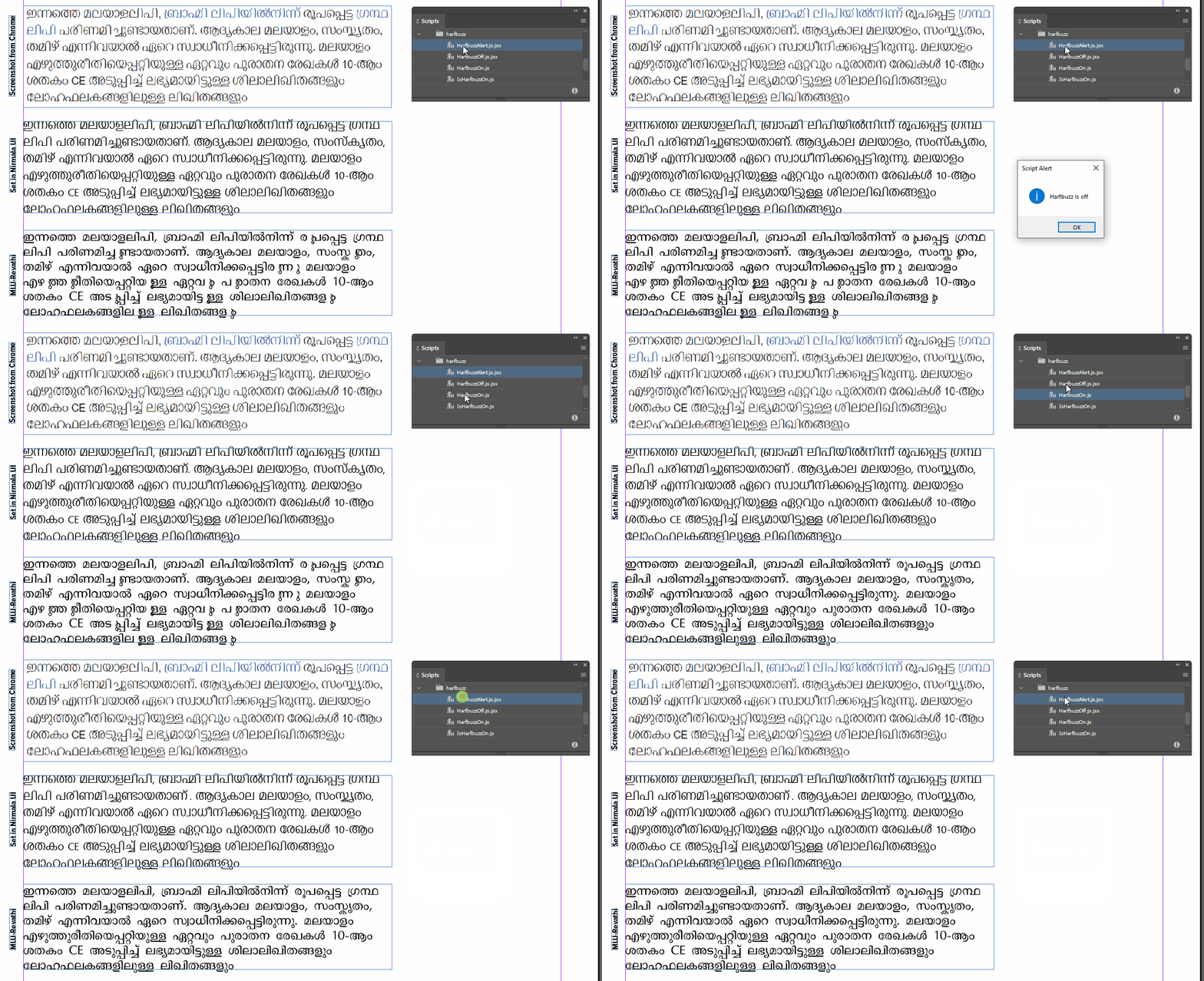


// Turn Harfbuzz on 
app.textPreferences.shapeIndicAndLatinWithHarbuzz = true;
app.menuActions.itemByName("Recompose all stories immediately").invoke();


// Turn Harfbuzz off
app.textPreferences.shapeIndicAndLatinWithHarbuzz = false;
app.menuActions.itemByName("Recompose all stories immediately").invoke();

4 replies

Robert at ID-Tasker
Legend
April 13, 2025

100% spam... 


Peter Kahrel
Community Expert
Community Expert
October 4, 2023

I'm kind of at a loss as to why it doesn't work


InDesign sometimes has problems recomposing text when it's triggered by .recompose() in a script, but in my experience that was the case in tables and in texts with many footnotes. Never in such simple stories as the ones you showed.


But there's another way to make your script locale-independent: add $ID/ before the menu name:

app.menuActions.
  itemByName("$ID/Recompose all stories immediately").
  invoke();


Joel Cherney
Community Expert
Community Expert
October 4, 2023

1000x thanks, Peter. I know that I am probably supposed to already know all about how InDesign handles locale under the hood, but in fact it's a bit of a mystery to me. I suppose it's time to go de-mystify myself!

Joel Cherney
Community Expert
Community Expert
July 15, 2023

I suspect that you may be using a non-Unicode font, and am more confident that you have Optical Kerning turned on. I can't find any font called "MLU-Revathi" but when I go looking for Malayalam fonts with the word "Revathi" I find MLW-TT-Revathi; is that it? Because the World-Ready Composer won't do much for a non-Unicode font with a character map like this:


Now, you say that your font is a Unicode font; can you post a link to the foundry, or to a place where I can download it? If it is a Unicode font there are a few settings (OpenType options, kerning settings, language settings, Harfbuzz vs Lipika glyph shaping, etc.) that might affect  proper composition, and I feel like it'd be easier to experiment myself than it would be to list out all the many ways that complex-script glyph composition can go wrong. It'd be better than, after many posts wiht suggestions that do not resolve your issue, saying to you "Oh well, I guess it's just a poorly constructed font!" 


But look at Optical Kerning first. 

Participant
July 15, 2023

Thanks for your reply.

But sir, the font I said, very well working without any error in Microsoft Word, and perfectly working in Adobe Illustrator. Only in adobe indesign shows these things. I attached the font in normal and bold variants. see the screen shots in Microsoft word and Adobe Illustrator.

Joel Cherney
Community Expert
Community Expert
July 15, 2023

Well, I've emptied my bag of tricks! This glyph doesn't seem to work correctly in InDesign. I see that it is working fine in other applications on my computer as well.

Peter Kahrel
Community Expert
Community Expert
July 15, 2023

Do you have a World-Ready composer enabled? If you do, try switching between the paragraph and single-line composers. In Arabic and Hebrew that sometimes makes a difference. Anyway, it looks like a composer problem.

Participant
July 15, 2023

Thank you for the reply.
Sir, I tried paragraph and single-line composers. But no change.
