
Inspiring
March 3, 2020
Answered

Managing two lines indents: not easy/clear with ID

  • March 3, 2020
  • 5 replies
  • 554 views

Using the marks in the tab palette is strange. Markers change, cannot be move, appears tab stops.

The documentation in the Adobe Help seems not be enough.

And sometimes it seems it is necessary to close the tab palette and open it again to clean the info.


What is this icon that appears after touching the first line indent and sometimes is converted to a tab stop?



Here is a resume:
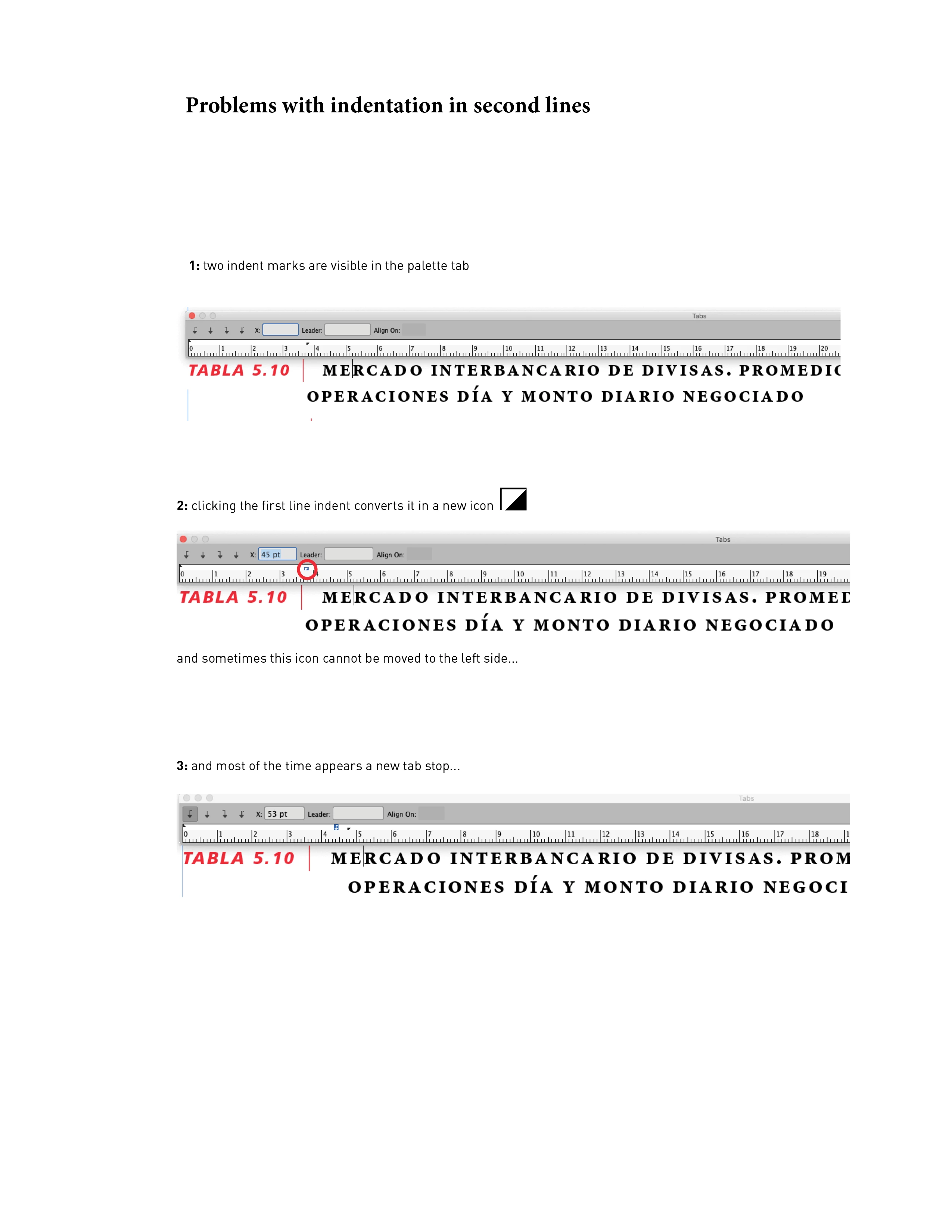


This topic has been closed for replies.
Correct answer Barb Binder

What's is that icon that is not documented in the Help site?

That icon represents the left indent on the paragraph. If you put the tip of your mouse on the triangle you can move it (hold the Shift to move it without moving the top (1st line indent) triangle).


It's tiny, and if you miss clicking right on the triangle, you will add tab stops by accident. You can avoid this mess if you enter the left indent location on the Control Panel or Properties panel instead.


~Barb

5 replies

Barb Binder
Community Expert
Barb BinderCommunity ExpertCorrect answer
Community Expert
March 3, 2020

What's is that icon that is not documented in the Help site?

That icon represents the left indent on the paragraph. If you put the tip of your mouse on the triangle you can move it (hold the Shift to move it without moving the top (1st line indent) triangle).


It's tiny, and if you miss clicking right on the triangle, you will add tab stops by accident. You can avoid this mess if you enter the left indent location on the Control Panel or Properties panel instead.


~Barb

~Barb at Rocky Mountain Training
Inspiring
March 4, 2020

Thanks, it is clear now.

Legend
March 3, 2020

I don't think the icon is changing, it's just being highlighted because it is selected.

Sorry, but I don't understand your second question.

Inspiring
March 3, 2020

Hi, thanks.

I am still confused because touching the lower indent icon (triangle) is transformed in the sign shown below:

What's is that icon that is not documented in the Help site?

Also, because after dragging it some tab stops appear as shown in the example.!


Thanks.


Legend
March 3, 2020

Barb

I'd like to add that in InDesign (but not in Illustrator), the second tab stop is redundant. The left-indent triangle also functions as a tab stop.

Barb Binder
Community Expert
Community Expert
March 3, 2020

In the Tabs panel, the two triangles on the left are the first line indent and left indent. The arrows are the tab stops.


In your scenario, I would approach the formatting as shown below.


Note: I am holding the Shift key as I drag the bottom triangle (the left indent) to match the left-aligned tab stop. Also, I have two tabs on the line, one in front of the | and one after, so I need to set two tab stops. 


~Barb


~Barb at Rocky Mountain Training