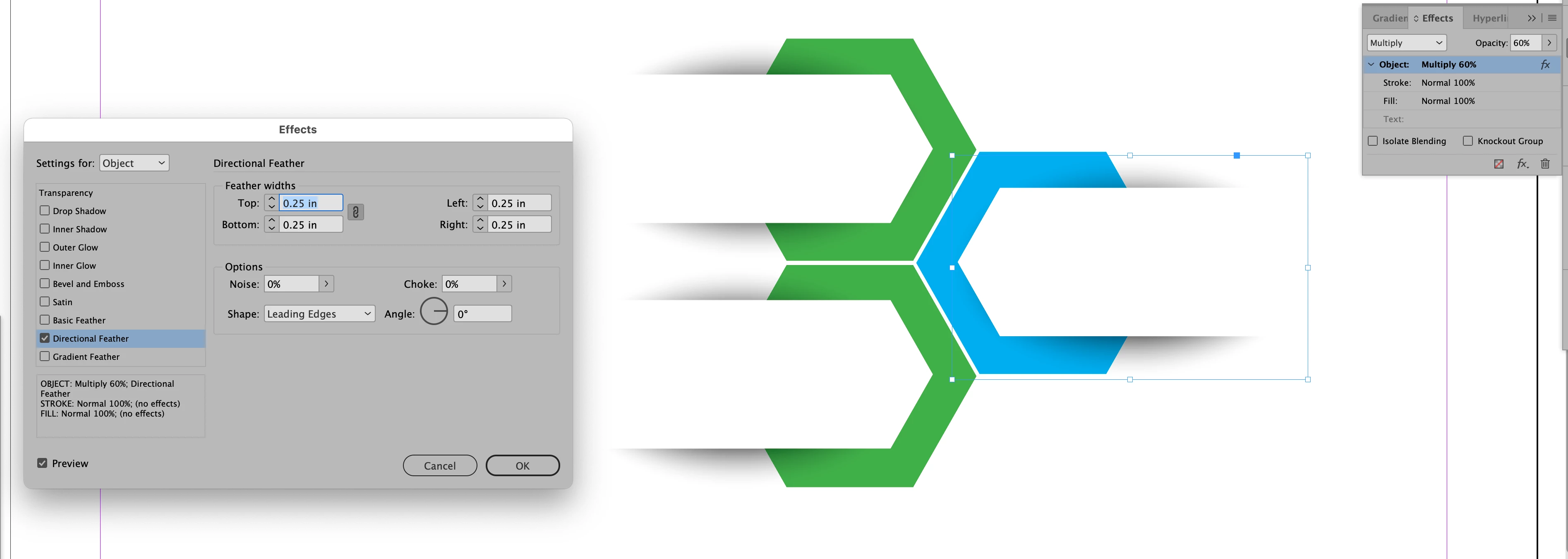
Using a drop shadow effect will only act as an extension of a shape so it won't work to make a shadow that does not reflect the contour of the shape. It needs a workaround. In the screen shot below I made the custom shadows by first drawing an ellipse to roughly the shape I needed, filling it with black and applying the Directional Feather Effect using the settings shown. I then moved the shape backward in the stacking order to be behind the shape that needed the shadow and applied the opacity and Multiply as shown in the Effects Panel.
Using a drop shadow effect will only act as an extension of a shape so it won't work to make a shadow that does not reflect the contour of the shape. It needs a workaround. In the screen shot below I made the custom shadows by first drawing an ellipse to roughly the shape I needed, filling it with black and applying the Directional Feather Effect using the settings shown. I then moved the shape backward in the stacking order to be behind the shape that needed the shadow and applied the opacity and Multiply as shown in the Effects Panel.




 AdChoices