Participating Frequently
May 3, 2023
Answered

Margins/column cutting off a bit on the left

  • May 3, 2023
  • 2 replies
  • 2029 views

Hello!

I have created a label sheet in InDesign - with 4 columns and 5 rows.

I don't understand what I've done wrong, but the purple margins on the left show that the furthest left column of labels will be slightly cut off - and they are.

I can't figure out how to fix it. The column of labels are printing exactly where they should, but a tiny bit is cut off of this left column.

Please help 🙂

Amber


This topic has been closed for replies.
Correct answer Peter Spier

Hi Peter,

So this printer is a $15,000 Konice Minolta printer. It doesn't print to the edge, but it does print to 1/2 cm. Which is what this margin should be. And is on the right side of the page.

Printing as a PDF would make my margins even larger, and give me no control.

When I created the layout, to have rows and columns, I feel like I made a mistake here - which is why I posted here. 

This screen shot shows the both margins. It looks as though the whole page is shifted to the left - but it doesn't print that way. The labels (circles) print exactly where they should on the paper, perfectly centered - with a 1/2 cm margin on each side. 

But that fraction of each circle in the left column is cut off.

So baffling.
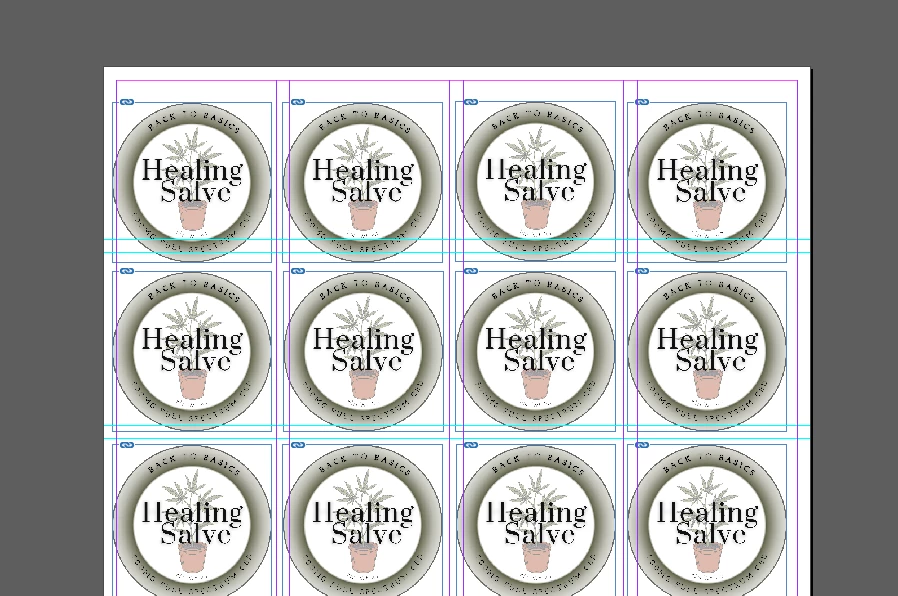


OK, I suspect your printer has the ability to shift the image, which is good. Your screen capture clearly shows that the lables are not aligned to the margins, and that's why the left edge is cutting off.

I don't know why you say the margins would be larger printing from PDF unless youare telling it to print the full page inside the printable area. You would want the page to print at a scale of 100%.


I sugest you make a copy of the layout, shift the labels to the right so they align with the margins and make some test pints on plain paper to start. Compare the postioning to the label die cuts and use the printer driver to shift the image if necessary, then see if the left edge is still cut off.

2 replies

Barb Binder
Community Expert
Community Expert
May 4, 2023

Hi @Chrysalid:


Most in-house printers can't print to the edge of the paper. They stop somewhere between 0.125-.25" from the paper edge.


You can test your printer's capabilities by creating a new file at the exact same size, and cover it with a light-colored rectangle that is slightly larger than the page size and then print it. You will be able to see where your printer stops printing (or just check the printer manua, which will tell you). 


If this is really the correct paper size and label size, you will need to send this to a printer that supports printing to the paper edge or send to to a commercial printer with equipment capable of handling bleeds.


~Barb

~Barb at Rocky Mountain Training
ChrysalidAuthor
Participating Frequently
May 4, 2023

Hi Barb,

On the actual paper (label sheet) that margin is .5cm (the edge of the label - and circle).

The margin is the same on the right side - and it prints fine.

I feel like I manually created that margin/guide - and not sure how to remove it? or adjust?

These label sheets - my printer can print that narrow of a margin from different programs - but I am trying to set it up to use in InDesign.


Thanks,

Amber

Peter Spier
Community Expert
Community Expert
May 4, 2023

What happens if you rotate the page 180 degrees before printing? Is the other edge cut off?

Barb Binder
Community Expert
Community Expert
May 3, 2023

Hi @Chrysalid:


Can you share a screen shot with guides visible?


~Barb

~Barb at Rocky Mountain Training
ChrysalidAuthor
Participating Frequently
May 4, 2023

Hi Barb,


When I print these labels, the images are exactly where I need them, but the far left column is cutting off where that purple guide line is.


Thanks,

Amber