
Inspiring
April 6, 2022
Question

Master Page Confusion

  • April 6, 2022
  • 3 replies
  • 1439 views

Hi,

I have an InDesign Document which, when I choose "File ----> Document Set Up" shows as 50mm x 200mm (see red area on attached screenshot) whereas in fact the canvas size is 50 x 260 (blue area).


What is going on here can anyone explain? This has caused huge problems when printing!
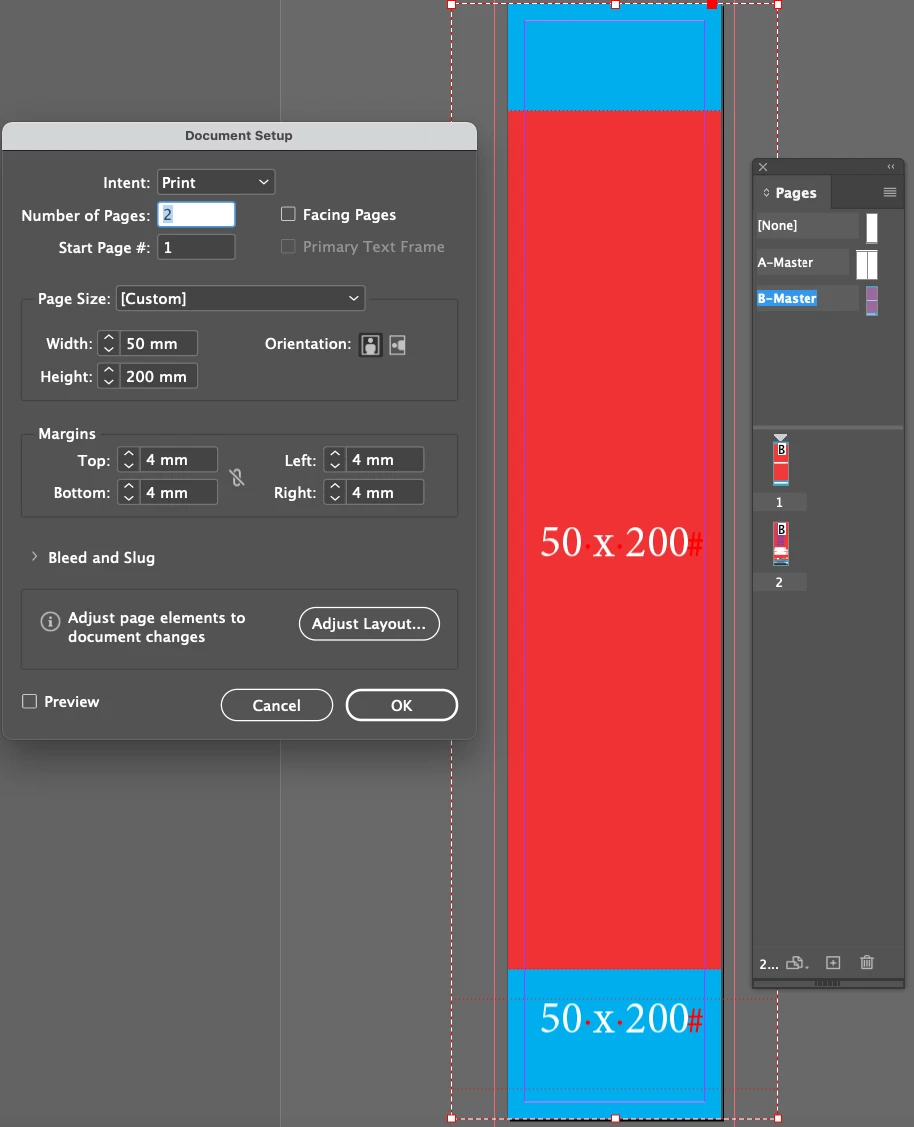
 

This topic has been closed for replies.

3 replies

Community Expert
April 7, 2022

"And I dunno where to see the size of the page in the 'Control panel.'"


If a page is selected you can see the size in the width and height fields of the Control panel like that; from my German InDesign with one A4 size page selected with the Page tool:


If two pages were selected with the same size you still could see the same numbers:


Now, here are two pages selected with different page sizes:


Access the Control panel (like all other panels) through the Window main menu.


Regards,
Uwe Laubender

( ACP )

Inspiring
April 10, 2022

Thanks Uwe for your reply. 


I think I'm assuming "Document Set Up" should tells me what is the size of the page I'm working on. Even when highlighted, the "Document Set Up" always displays as the initial set up?


Willi Adelberger
Community Expert
Community Expert
April 10, 2022

The document set up is only valid for all master/parent pages and their children if the size is not altered with the page tool.

The problem is that anyone should first always change the doument set up and not use the page tool. Even if all pages have the same size, the altered size with the page tool will increase the file size in an unexpected amount and reduce the stability. The page tool should only be used for relatively small documents with unequal page sizes, like a book cover (front, spine, back) or a trifold. All other changes have to be done in document setup.

When you drag a page from one document to the other not only the page moves, but also its parent/master. To reduce confusions I strongly recommend to give the master/parent proper names. It is not helpful to have 3 Master-A pages with different properties in one document. You will be much clearer konowing what happens in your document if all things do not have their generic names, like Master-A, Master-B, Layer 1, Layer 2, etc. Rename everything and you will see the hierarchy in your document and you will be able to resolve the problems.

Community Expert
April 6, 2022

The explanation:
Someone did a new document with page size 50 x 200 mm.


Later the Page tool was used to change the size of an individual page to something else.


Select the page in the Pages panel and switch to the Page tool.

You should see the actual size of the page in the Control panel.


Regards,
Uwe Laubender

( ACP )

Inspiring
April 7, 2022

Thank you for your reply. 


I'm with you up to "switch to the 'Page tool'. (I seem to have the page highlighted in my pages panel. I've tried highlighting the master page also.)

And I dunno where to see the size of the page in the 'Control panel.'


I suppose really, my question is if I have a Master Page dragged into my working document and then I do a "Document Set Up" - why doesn't this give the correct size?


Any clarification appreciated.


K

rob day
Community Expert
Community Expert
April 7, 2022

Hi @KieranBrennanDublin , A document can have any number of different sized pages—you are not limited to the Document Setup’s default page size. Here I have the A-Master page selected in the Pages panel with the Pages tool active, and I can set that master to any size:


or I could reset it to match the Document default


If I create a New Master the Page Size defaults to the Document Setup Size, but it could be anything:


Inspiring
April 6, 2022

Sorry please see THIS image!