
Participant
February 1, 2025
Answered

Master Page Missing When Creating New Document

  • February 1, 2025
  • 4 replies
  • 747 views

I'm running Indesign 20.1 on a Mac mini running OS 15.1 (24B83). 


When I create a new document I do not have a Master page. All is see is a A-Parent page and another titled "[None]". 


I have tried deleting prefs, tried going back a view versions and no luck. I also can't move spreads around at all. 


I have tried an Adobe chat session and let the tech take over my computer and he still couldn't figure it out.


Anybody have the same issue?
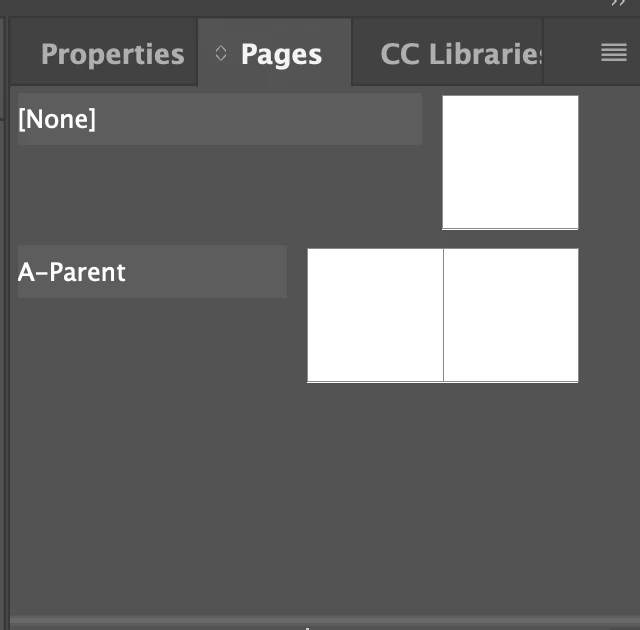
Thanks! 

 

Correct answer Willi Adelberger

If you select the number labels of a spread or master, you move the whole spread. 
If you select the thumbnail icons, you move the selected page. 

4 replies

James Gifford—NitroPress
Legend
February 1, 2025

Other than the minor confusion over Parent/Master, what can you not do in the new document?


Can you create one or more document pages and assign either Parent-A or None to each?

Participant
February 2, 2025

Thanks. I can't drag and move spreads. If I try to move a spread like before, Ican only move one page and it reorders my layout. I try selcting both pages and mcvoing them but same thing happens. Am I doing something wrong?  

Willi Adelberger
Community Expert
Willi AdelbergerCommunity ExpertCorrect answer
Community Expert
February 2, 2025

If you select the number labels of a spread or master, you move the whole spread. 
If you select the thumbnail icons, you move the selected page. 

Peter Spier
Community Expert
Community Expert
February 1, 2025
quote

I'm running Indesign 20.1 on a Mac mini running OS 15.1 (24B83). 


 I also can't move spreads around at all. 


By @claudiar76138265

What happens when you try? Are you trying to move Parent Page spreads or document spreads?

Willi Adelberger
Community Expert
Community Expert
February 1, 2025

New document ha e only master/parent A as default.

You can either import them from an existing document or you can create a template (INDT) and create there all needed master/parents and create documents from that template with all masters/parents from there.

jmlevy
Community Expert
Community Expert
February 1, 2025

Hi @claudiar76138265 

Parent pages and master pages are the same. Adobe has changed the terminology a few versions ago (I don't remember when since I use a French version and the terminology has not changed in this version).

Participant
February 2, 2025

Thank you.