Known Participant
December 18, 2018
Answered

Master Page Not Retaining Margins or Page Numbers

  • December 18, 2018
  • 3 replies
  • 552 views

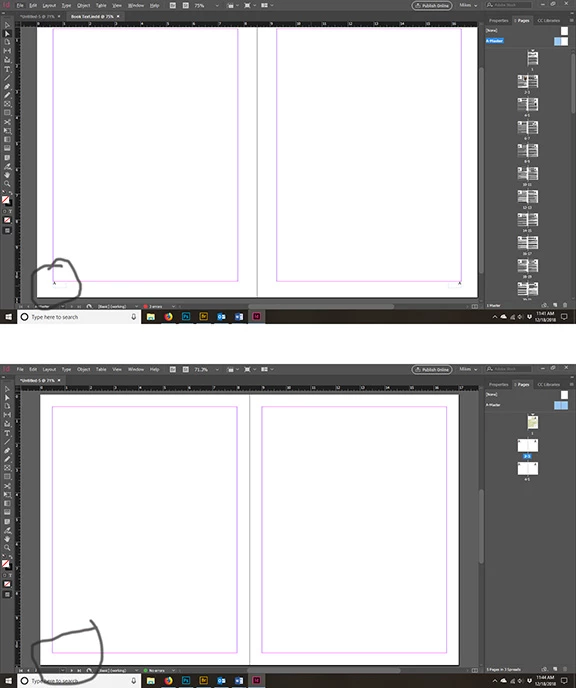
I only have an A Master. As you can see from the images, page number show up in one document based on the A Master, but not on a 2nd document I created using the A Master.

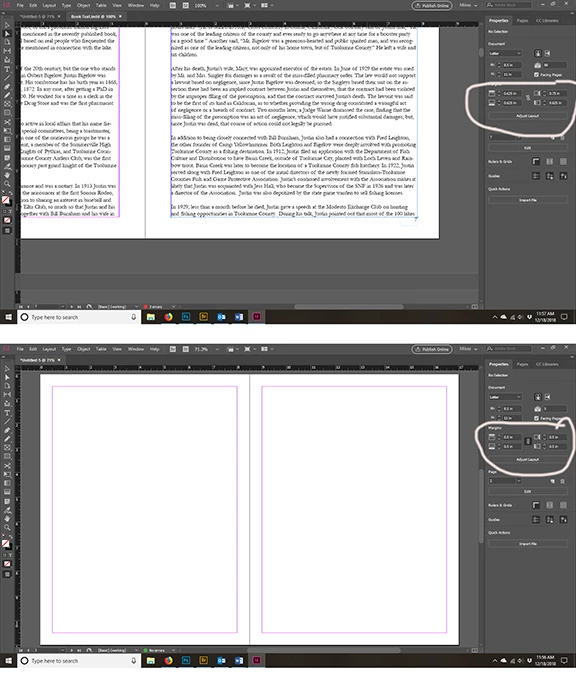
The 2nd problem is with margins, the margins are set how I want them, yet when I create a 2nd document the margins are not correct. (Indesign CC version 14.1.0) Please help!

Page number issue (top two pictures)
Margin Issue (next two pictures)
    This topic has been closed for replies.
    Correct answer BobLevine

    The master only applies to the document it is part of. There are ways to synchronize them or copy them but these are not external so they do not apply to other documents.

    3 replies

    Frans v.d. Geest
    Community Expert
    Community Expert
    December 18, 2018

    And, just advice: your margins are very very small and the page number touches them, so also touches the text.

    use wider (‘bigger’) marges and allow enough white space between the bottom of your text (the last line) and the page number.

    mshea49Author
    Known Participant
    December 18, 2018

    Thanks.

    Barb Binder
    Community Expert
    Community Expert
    December 18, 2018

    You can use the Pages panel menu to load the master pages from one file to another.

    ~Barb

    ~Barb at Rocky Mountain Training
    mshea49Author
    Known Participant
    December 19, 2018

    Thanks.

    BobLevine
    Community Expert
    Community Expert
    December 18, 2018

    Are you expecting settings in one document to be applied to all of them? That's not how it works.

    mshea49Author
    Known Participant
    December 18, 2018

    Yes, I thought the settings in the A Master would apply to all documents based on it.

    BobLevine
    Community Expert
    BobLevineCommunity ExpertCorrect answer
    Community Expert
    December 18, 2018

    The master only applies to the document it is part of. There are ways to synchronize them or copy them but these are not external so they do not apply to other documents.