
Participant
November 5, 2020
Question

Master Page Overrides Not Working

  • November 5, 2020
  • 4 replies
  • 1563 views

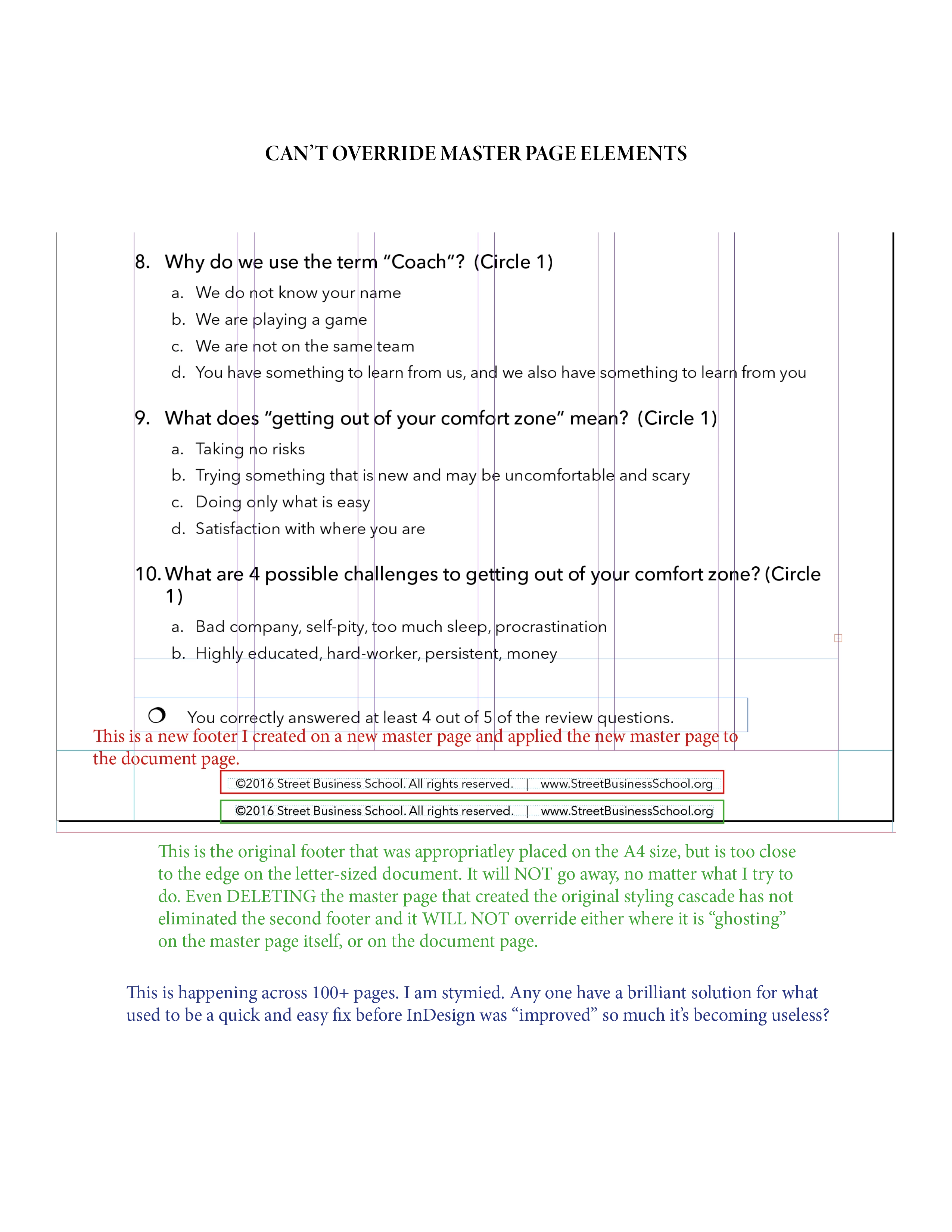
I just completed a long document designed as A4. Now I have to also convert it to US letter. Much of the document resized when I changed the sizing in document setup (file menu), but some of the master page items did not auto-"relocate" themselves. However, when I attempt to move these master page items—either on the master page, OR using an override, these elements appear locked. Even if I try to set up a new master page and apply that to the "child" master page, the incorrect item that is resisting the override, is STILL there, now creating duplicate footers on all of the pages where the original footer first appeared. SO many of the original deisgn features of InDeisgn that made it such a joy are now buggy as you attempt to "improve" this once wonderful and dependable product. PLEASE don't reinvent the wheel if you make the engine die every time you try to start the car with the shiny new hubcaps.
This topic has been closed for replies.

4 replies

Inspiring
March 15, 2023

I remember having this problem awhile ago. I believe (for me anyway) the master page was based on a different master page. So say the one I was trying to edit was B but it was based on A. I coudn't edit on B, so I had to go to A and edit it, and then it also updated on B. I don't really understand WHY that happened or if it is the same problem you are having but it's worth a shot.

Participant
March 14, 2023

I had a probem with the master page not wanting to edit, then realized I had locked the layer said objects were on thus override wasn't showing. But if you tried deleting the master page and its contents were still showing then it might be a glitch, god knows indesign is my least favorite adobe program...its user experience is crud.

Community Expert
March 14, 2023

What do you mean it's user experience is crud? 


Sounds like you have issues understanding how the application works.

If you can give more details of the issue you're experiencing we can gladly help you.

Participant
March 15, 2023

Hey Eugene,

Thanks for reaching out. Indesign's just not my cup of tea, it's a lot clunkier than other adobe software which I prefer. In any case, there's really no issue anymore so not much else to share since solving it.

Sometimes the simplest, stupidest solution's right in front of your nose and since I didn't find it online and ended up figuring it out by myself I thought to share on this post seeing as it was a somewhat similar frustration. Hopefully it'll serve as useful information for others, you never know.

Community Expert
December 12, 2020

That's odd and not usual behaviour. 

I would only suggest there might be something else at play here, like an additional master page, or perhaps the item was overridden and unlinked from the master page and locked on all the individual pages.


I don't really know, just guessing.

If you can share your file I can take a look and hopefully get to the bottom of it. 


Participant
December 11, 2020

Any update on this issue?


I am experiencing a very similar issue. I've created a very simple document where 99 of 100 pages will have the same elements, but for the first page, I need to override the master page elements. The command simply does not work. 


I would like to agree with the original poster, that simple things in InDesign simply don't work now, which is very frustrating considering how much I pay for access to this program every month. Stop trying to reinvent the wheel. I want the program I used without issue 5 years ago.

Community Expert
December 12, 2020

Same reply as above - if you can share your file I will try to get to the bottom of it.

Thanks