Inspiring
January 15, 2024
Answered

Master Pages Sorting

  • January 15, 2024
  • 7 replies
  • 3078 views

I have a >1000pages Book (a catalog) composed by 12 ID documents. Each document uses approx 50 different Master Pages ("MP" in this post) while the whole Book has 200MP in total (some pages remain the same in all documents but some documents have peculiar MP). To keep the thing as ordered as possible, I have a separate (1 page) document named "MasterPages" that collects all the MP of the documents.

When checking the document I really miss an option that would allow me to alphabetically sort/order the MP of my documents. Checking 12 documents to find the different MP is quite frustrating and can introduce errors.

Why do I need so many MP? That's because I use a plugin that automatically paginates my documents... and it uses MP's guides.

I've searched deeply here in the Community and outside and the only partial help I've found is this script https://www.corullon.com.br/scripts/product/load-selected-master-pages/. Not really what I was looking for but at least helps a little allowing to pick a specific MP (much as moving styles among documents).

Looks like Master Pages section has not received any evolution recently. Can anybody help? Am I the only one to require (at least) an alphabetical sorting of the Master Pages section and a selective import/export option? Thank You.

 

This topic has been closed for replies.
Correct answer Robert at ID-Tasker

OK, A bit "dirty" - but doable ...


You need to export your INDD file as IDML.

Add ".ZIP" as a new extension:

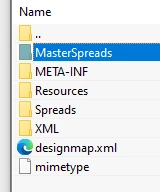
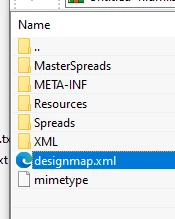
Extract file "designmap.xml" to a folder - can be on a Desktop or whatever:

Edit this file - by re-arranging order of the Masters - line numbers are not important:

(Edit it using "plain text" editor as a TEXT file, not as RTF so no extra "formatting" or encoding)

You can find names of the XML files in the MasterSpreads folder:

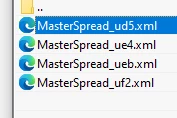
Each XML file

contains full description of the Master - including its name displayed on the Pages Panel:

After editing "designmap.xml" - put it back into ZIP package.

Remove ".ZIP" extension - open in InDesign.


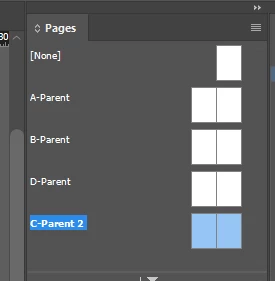
Order BEFORE:


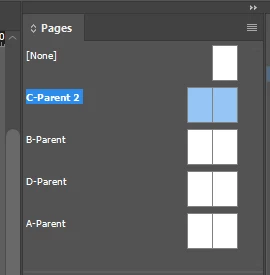
... and AFTER:


7 replies

Community Expert
February 14, 2024

Hi @Gioyer07 ,

you wrote:
"I've now tested your* solution. Everything you wrote is true. I marked your answer as the Correct one but the workflow is much too time-expensive to be implemented. Moreover I'm not sure how to get back to the complete data of the *.indd format (the workaround of extracting the content of an *.indd file of course doesn't work). "


* @Robert at ID-Tasker 's solution marked as Correct Answer.


Well, if you are on Windows you could edit the contents of the IDML package file directly inside the package.

Simply open the IDML package in the file system, no need to extract its contents.


To @Robert at ID-Tasker :

I wonder if we could extract the idmlComponentName of every parent page (technical term with scripting is masterSpread)… That should correspond with the name given in src  of that XML file in the IDML package.

No time to test this right now…


Regards,
Uwe Laubender
( Adobe Community Expert )

Robert at ID-Tasker
Legend
February 14, 2024

Those are XML / txt files - so anything can be done. 


I could even add it to my tool as a fully automatic solution...


Robert at ID-Tasker
Legend
January 16, 2024

@Gioyer07 - quick question:


Do you need to sort those MPs "permanently" - or you just need a tool to navigate / compare MPs in multiple documents?


Gioyer07Author
Inspiring
January 16, 2024

Permanently is correct. As I mentioned above, this is the basic step: once the goal is reached, any comparing tool (and maybe the ability to export a list) would be a ...gift. Thanks for your question.

Robert at ID-Tasker
Robert at ID-TaskerCorrect answer
Legend
January 16, 2024

OK, A bit "dirty" - but doable ...


You need to export your INDD file as IDML.

Add ".ZIP" as a new extension:

Extract file "designmap.xml" to a folder - can be on a Desktop or whatever:

Edit this file - by re-arranging order of the Masters - line numbers are not important:

(Edit it using "plain text" editor as a TEXT file, not as RTF so no extra "formatting" or encoding)

You can find names of the XML files in the MasterSpreads folder:

Each XML file

contains full description of the Master - including its name displayed on the Pages Panel:

After editing "designmap.xml" - put it back into ZIP package.

Remove ".ZIP" extension - open in InDesign.


Order BEFORE:


... and AFTER:


James Gifford—NitroPress
Legend
January 15, 2024

Just to pile on, that's a lot of Parent pages, even for a very complex layout. You might want to move to more differentiation between Parent layouts and document-page-level features, to keep things simpler.

Gioyer07Author
Inspiring
January 16, 2024

In respect of everyone, all of the answers are pointless for the request. Plugin is Easy Catalog and it is NOT mandatory to adopt that workflow. I picked it because there were two forces in the Company I work for: one requested total automation, the other total flexibility. So each product (>20K) has all the data and the catalog could be printed automatically from DB. Master pages de facto regulate a DB level (call it group if you prefer). So what I need is not an Alice's adventure, but a simple script that could order (the very logically choosen) names of my templates. Thanks for the attention.

Willi Adelberger
Community Expert
Community Expert
January 16, 2024

You did not answer my qestion: What is the reason that you have so many masters? That is not normal. In most cases I have seen, the reason is in nearly all cases it is caused by inefficient document structure.

brian_p_dts
Community Expert
Community Expert
January 15, 2024

There is no exposure to Parent Page sorting in the script DOM. You could, say, write a script that would add the Parent name to the slug or other nonprinting area of the page. I guess I'm failing to understand what it is you need to cross-reference or check between your master master doc and the other docs.

Gioyer07Author
Inspiring
January 16, 2024

"There is no exposure to Parent Page sorting in the script DOM. " I'd like to understand better this statment. Parent to the slug ... doesn't sound a useful way. Basically I need a simple option to sort the Master Pages. Say you have (the "collector" Master Pages document with >100 names. Then you ADD a new master page. It will appear at the bottom of the list. You can drag and drop it in it's proper place...YES! But can you imagine a faster way? Drag and drop works well for a list of 10-20 pages. Beyond that is a little nightmare.

This sorting option/function will also be usefull to compare different documents... (but this post doesn't go that far).

James Gifford—NitroPress
Legend
January 16, 2024

A script can only pull levers that are there — sometimes evident ones matching user commands, sometimes deep ones within the code. The answer above says "There are no levers in Parent page order or sorting a script could use to perform the task."


Your only solution is an overall workflow that doesn't impose the extreme demand of dozens of Parent pages. But any time you have a complex production process defined by a committee with ignorant participants, you end up in a corner like this. Been there.

Willi Adelberger
Community Expert
Community Expert
January 15, 2024

50 Parent pages per document? I doubt that it is design efficiently. What is the reason to have so many Parent Pages? What is the difference as you need so many?

Mike Witherell
Community Expert
Community Expert
January 15, 2024

Alas, there is no sort parent pages alphabetically. But you can drag them into a sort order.

Even tho you mention that a plugin needs it; you should look for ways to simplify your project so as to have fewer parent pages. 

Mike Witherell
Steve Werner
Community Expert
Community Expert
January 15, 2024

That sounds like something that would require a script. Perhaps someone has already created one.

Gioyer07Author
Inspiring
January 15, 2024

I've googled "Sorting Master Pages in Indesign" (and it's declinations) but not much has emerged...