
Participant
November 28, 2017
Answered

Master Pages, ToC, reapplied synch, section headers

  • November 28, 2017
  • 2 replies
  • 1043 views

The behavior of master pages does not do what is intended and there are several questions that needs to be answered.

The master pages have two boxes for filename (ie chapter name), a second box for section header that will be overridden in a normal page later. See image below.

The chapter numeral has been unticked as: "Allow Master Item Overrides", because the chapter numeral is based on file name, which won't need editing.
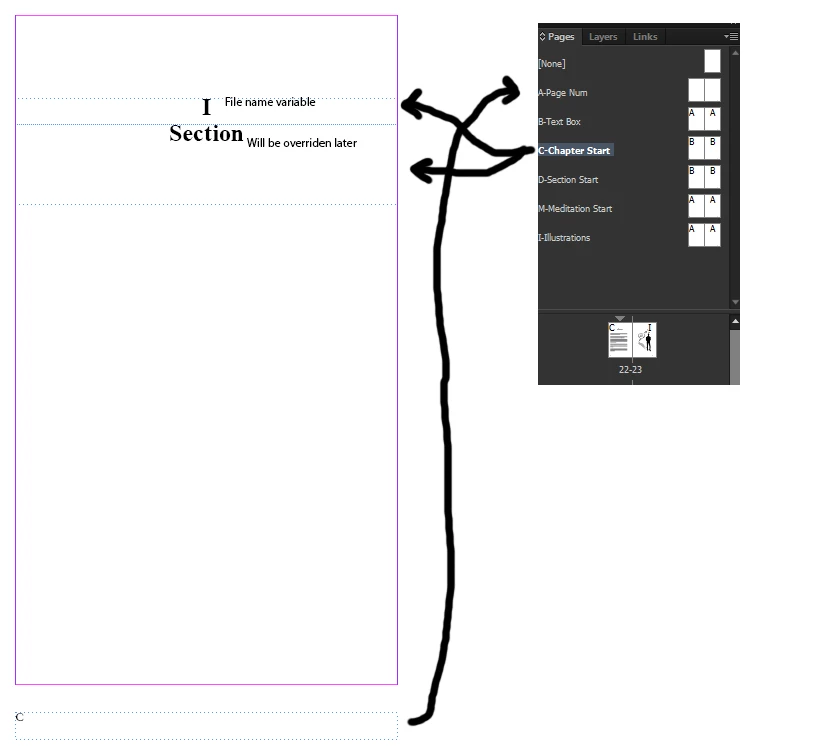
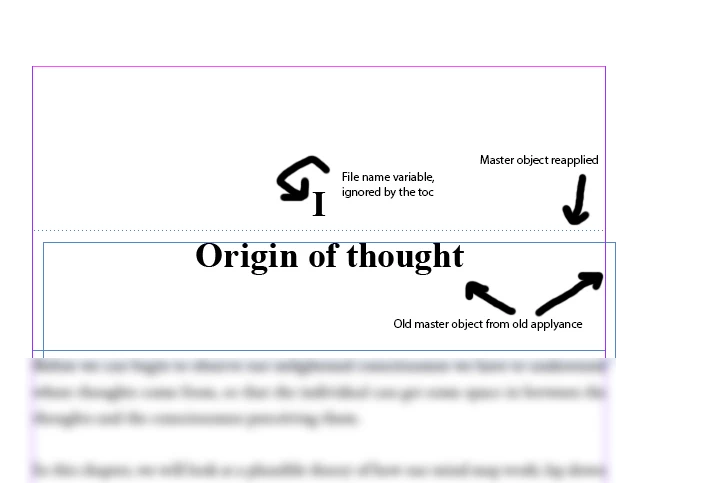
Then after changing the master, synchronizing the book, InDesign ends up with this:

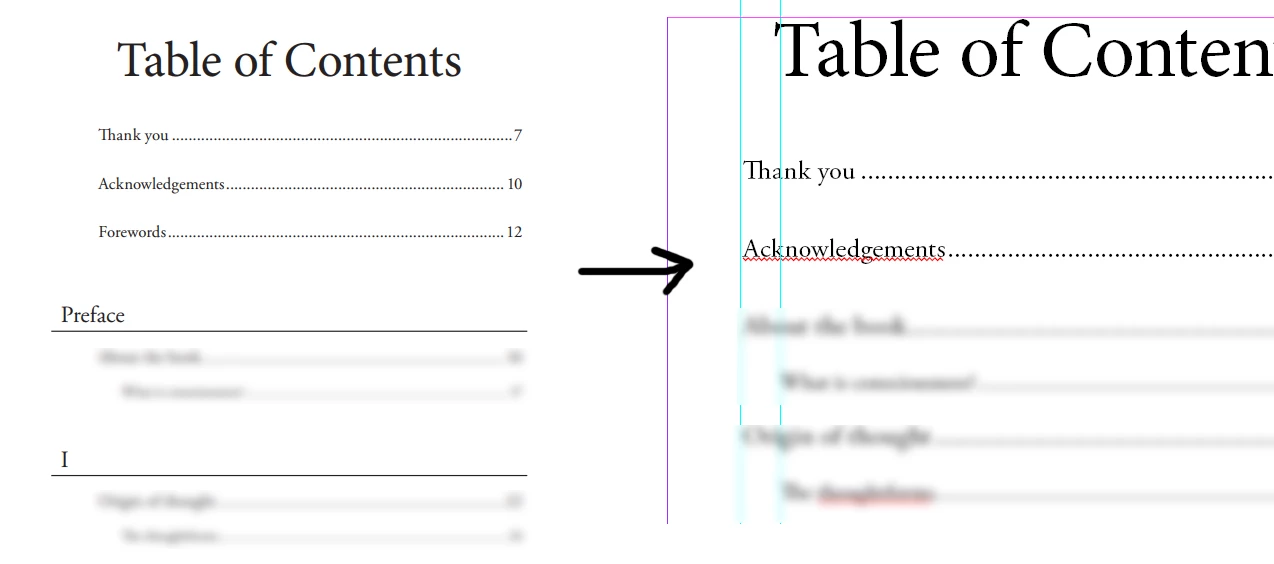
Reapplied master objects, chapter object ignored by toc.
TOC goes from this, to that ->
So here's a couple of questions:

What exactly is supposed to be on a Master page?

Is Master pages not supposed to be a template?

Why are overridden objects from a Master page reapplied?

What is the purpose of having master pages with "LOREM IPSUM" dummy objects if they will just be reapplied under the overridden objects?

What is the purpose of having chapter numerals as dummy objects if they are not included by ToC?

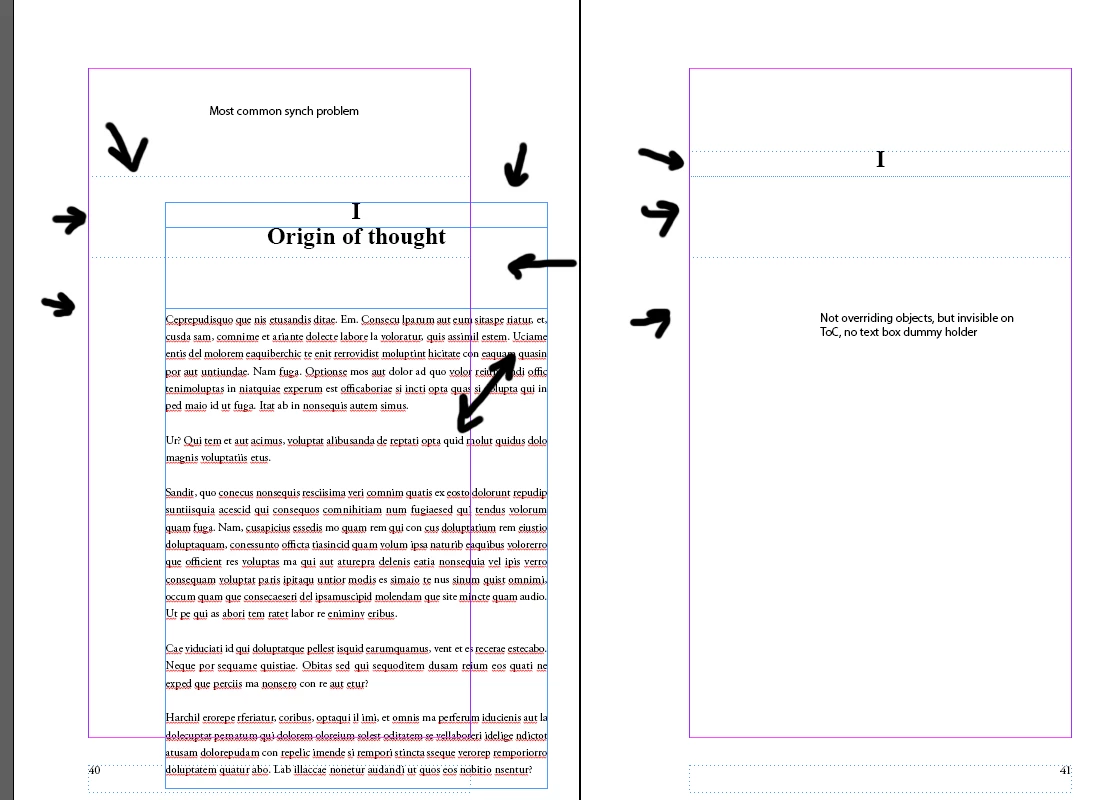
Picture below shows the most common problem on the left, and the ideal situation on the right, but the ToC doesn't include non-overridden objects.

What is the solution?
This topic has been closed for replies.
Correct answer Barb Binder

What exactly is supposed to be on a Master page? Master pages are used to hold the repeating elements of a multi-page document. The margins, columns, ruling guides, running heads, repeating graphic elements and logos are typically placed on master pages.

Is Master pages not supposed to be a template? No. Master pages are described above. A template for a multi-page document will have master pages in place, along with styles (paragraph, character, object, table and cell styles), and placeholder frames when appropriate. Templates are often designed to help newer users follow the formatting created by experienced designers, or to simply speed up the workflow for documents that have a similar look and feel.

Why are overridden objects from a Master page reapplied?

What is the purpose of having master pages with "LOREM IPSUM" dummy objects if they will just be reapplied under the overridden objects?

What is the purpose of having chapter numerals as dummy objects if they are not included by ToC?

I believe the goal of these three questions is to understand how to design the opening page to look the way you want and be able to generate a table of contents correctly. I would just start each chapter on body page one with the chapter number followed by the chapter title followed by the content of the chapter. Use paragraph styles to control the numbering and positions for consistency across chapters and just use primary frames on the master pages. It doesn't need to be complicated, and syncing the chapters later won't cause the issues you are running into.

~Barb

2 replies

Barb Binder
Community Expert
Community Expert
November 28, 2017

I do (and teach) mostly long doc layout in InDesign and FrameMaker and can tell you from experience that simplicity is best. Used correctly, the features needed for book work in InDesign are quite powerful, but the workflow is very different from laying out flyers, newsletters, magazines, etc.

You might consider taking a break from your book to learn about the workflow (from a book, a class, videos—there are lots of resources out there). Once you are up to speed, come back and give it another shot. Once you understand how it works, it's great, but I totally understand your current frustration.

~Barb

~Barb at Rocky Mountain Training
Participant
November 29, 2017

The information acquired from the semester we spent learning about InDesign and the 6 months internship at an ad firm plus the 5 youtube videos surely weren't enough. The error is not so much understanding InDesign, it's a semantic error built into the program. It behaves unintuitively and leads to hours of error correction.

InDesign should remember master page elements that has been overridden so that it doesn't add the same object twice. And from a user perspective, the master pages shouldn't have to be altered after its conception. But sometimes you want to test your master pages, see if it looks better to move something left or right, add a little variable at the top or a picture and then the master pages ruins all chapter and section beginnings.

The book has already been written, so there's no point in doing it now. It's time for book 2, but this error keeps reoccurring.

Barb Binder
Community Expert
Barb BinderCommunity ExpertCorrect answer
Community Expert
November 28, 2017

What exactly is supposed to be on a Master page? Master pages are used to hold the repeating elements of a multi-page document. The margins, columns, ruling guides, running heads, repeating graphic elements and logos are typically placed on master pages.

Is Master pages not supposed to be a template? No. Master pages are described above. A template for a multi-page document will have master pages in place, along with styles (paragraph, character, object, table and cell styles), and placeholder frames when appropriate. Templates are often designed to help newer users follow the formatting created by experienced designers, or to simply speed up the workflow for documents that have a similar look and feel.

Why are overridden objects from a Master page reapplied?

What is the purpose of having master pages with "LOREM IPSUM" dummy objects if they will just be reapplied under the overridden objects?

What is the purpose of having chapter numerals as dummy objects if they are not included by ToC?

I believe the goal of these three questions is to understand how to design the opening page to look the way you want and be able to generate a table of contents correctly. I would just start each chapter on body page one with the chapter number followed by the chapter title followed by the content of the chapter. Use paragraph styles to control the numbering and positions for consistency across chapters and just use primary frames on the master pages. It doesn't need to be complicated, and syncing the chapters later won't cause the issues you are running into.

~Barb

~Barb at Rocky Mountain Training
Participant
November 28, 2017

Yeah, after hours of frustrating research on this topic, what you are saying is true.

Master pages are for elements that are guaranteed to be repeated and not overridden. If you put primary frames on master pages, you are doomed to have them be reapplied during sync. From now on, all major text frames will be omitted from the master pages and only chapter, section markers and page numbers will be there.

These error has been repeated over 10 times and more than 20 pages of the 150 in the book has had their master objects reapplied those times.

In school, we were taught to put text boxes in the master and then override them in the normal pages. It seems even though it was more than 10 years ago that was taught, the issue still reappears in CC. Master pages are what headers and footers works as in Word. Don't edit them, don't override them unless you have to and do not put text boxes anywhere that will feature custom text.

The Master pages works great when you import 4 new duplicates into a document and the text boxes link together fine, even when importing text documents. But start fiddling with Master Pages after you reopen the book the next day and all hell will break lose.

The current solution is to use overridden boxes for the chapter numerals and the section markers. After restarting InDesign tomorrow, it will be interesting to see what happens to the document after it forgets what box is master and what not.

Frustrating.