Participant
January 15, 2024
Question

Match (or find) but replace another column

  • January 15, 2024
  • 3 replies
  • 436 views

Hi there,


I have a catalog, made in Indesing using tables. I need to update prices but I 'd like to make this process automatic because I have thousands of references/codes.

Lets say I have and excel (or csv, txt, etc) with 2 columns, one with Code and the other with the Price €.

Basically, I need a way for Indesing to "match" the code and then update the price in the respective column.   
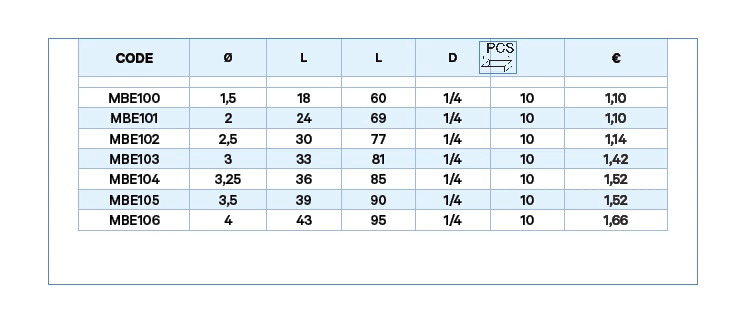
 

Is it possible to use a script for this or does anyone have another solution?


Thanks!

This topic has been closed for replies.

3 replies

Anantha Prabu G
Legend
January 16, 2024

Have you checked this? @Martins275519807ogn 

Design smarter, faster, and bolder with InDesign scripting.
Anantha Prabu G
Legend
January 15, 2024

.csv format


After:


Before:

Design smarter, faster, and bolder with InDesign scripting.
Anantha Prabu G
Legend
January 15, 2024
// get data from the CSV file
var file = File.openDialog("Choose a Remap csv file:");
file.open('r');
var data = file.read().split('\n');
file.close();

// convert the data into the object = {id1:price1, id2:price2, id3:price3, ...}
var obj = {};
for (var i = 0; i < data.length; i++) {
    var row = data[i].split(',');
    var id = row[0];
    var price = row[1];
    if (id != '') obj[id] = price;  // <------------------ here the update
}

// loop through IDs of the object and change cells in the document
var doc = app.activeDocument;
app.findTextPreferences = null;
for (var id in obj) {
    app.findTextPreferences.findWhat = id;
    var founds = doc.findText();
    for (var f = 0; f < founds.length; f++) {
        var cell = founds[f].texts[0].parent;
        if (cell.constructor.name == "Cell")
            cell.parent.cells[cell.index + 6].contents = obj[id];
    }
}
Design smarter, faster, and bolder with InDesign scripting.