selvam214
Inspiring
October 15, 2020
Answered

Match url and change in qr code

  • October 15, 2020
  • 2 replies
  • 1811 views

Hi,

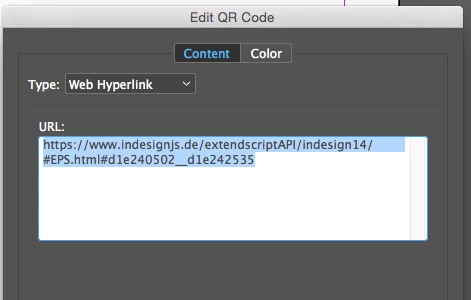
I need to collect the existing QR code's URL and match partially, then need to change the QR code. Could you please guide on this?


var pgItem= app.activeDocument.pageItems;
for(var g=0; g<pgItem.length; g++){
    var epsItem = pgItem[g].epss;
    if(epsItem){
       //edit QR code
       //Copy
       //match with new qr code
       //replace
    }
}


Thanks,

Selva

Correct answer Sunil Yadav

Try this code sample:

//=======================================

editQRCode();
function editQRCode(){
    var myDoc = app.documents[0];
    for(var i = 0; i < myDoc.pages.length; i++){
        for(var p = 0; p < myDoc.pages[i].pageItems.length; p++){
            if(myDoc.pages[i].pageItems[p].epss.length > 0){
                var QRCode = getHyperlinkQRCode(myDoc.pages[i].pageItems[p].epss[0]);
                if(QRCode != null){
                    // Here you can find replace or match whatever you want to do with the link
                    QRCode = QRCode.replace("www.indesignjs.de ","www.google.com ");
                    // Here you create hyperlink QR code again, so it will be changed as well
                    myDoc.pages[i].pageItems[p].createHyperlinkQRCode(QRCode);
                    }
                }
            }
        }
    }
//=======================================
function getHyperlinkQRCode(QRCodeObject){
    try{
        var idmsFile = File (Folder.temp+"/~QR.idms");
        QRCodeObject.exportFile(ExportFormat.INDESIGN_SNIPPET, idmsFile);
        idmsFile.encoding = "UTF-8";
        idmsFile.open("r");
        var allData = new XML (idmsFile.read());
        idmsFile.close();
        idmsFile.remove();
        var qrcode = allData..HyperlinkQRCode.@UrlLink;
        if(qrcode.length() == 1) {
            return qrcode.toString();
            }
        else{
            null;
            }
        }
    catch(e){
        return null;
        }
    }
//=======================================


Best

Sunil

2 replies

Participant
December 16, 2020

Sorry, Where do I have to paste this code? 
I am not so familiar with Indesign but I have this problem: the QR-code is already printed a thousand times, but I have to change the hyperlink behind. When I change in INdesign, the image changes also but I have only to change the hyperlink. How do I have to do that? Please help 😄 What is this development-code above? Do I have to place it somewhere? Thanks.

Sunil Yadav
Legend
December 23, 2020

QR code is something that will those values. So definitely when you change the text behind this QR code, then QR code image will automatically gets change.


Sunil

Sunil Yadav
Sunil YadavCorrect answer
Legend
October 16, 2020

Try this code sample:

//=======================================

editQRCode();
function editQRCode(){
    var myDoc = app.documents[0];
    for(var i = 0; i < myDoc.pages.length; i++){
        for(var p = 0; p < myDoc.pages[i].pageItems.length; p++){
            if(myDoc.pages[i].pageItems[p].epss.length > 0){
                var QRCode = getHyperlinkQRCode(myDoc.pages[i].pageItems[p].epss[0]);
                if(QRCode != null){
                    // Here you can find replace or match whatever you want to do with the link
                    QRCode = QRCode.replace("www.indesignjs.de ","www.google.com ");
                    // Here you create hyperlink QR code again, so it will be changed as well
                    myDoc.pages[i].pageItems[p].createHyperlinkQRCode(QRCode);
                    }
                }
            }
        }
    }
//=======================================
function getHyperlinkQRCode(QRCodeObject){
    try{
        var idmsFile = File (Folder.temp+"/~QR.idms");
        QRCodeObject.exportFile(ExportFormat.INDESIGN_SNIPPET, idmsFile);
        idmsFile.encoding = "UTF-8";
        idmsFile.open("r");
        var allData = new XML (idmsFile.read());
        idmsFile.close();
        idmsFile.remove();
        var qrcode = allData..HyperlinkQRCode.@UrlLink;
        if(qrcode.length() == 1) {
            return qrcode.toString();
            }
        else{
            null;
            }
        }
    catch(e){
        return null;
        }
    }
//=======================================


Best

Sunil

selvam214
selvam214Author
Inspiring
October 19, 2020

Hi Sunil,

This is a really nice approach to whichever we use to a different method for 'when we can't approach straight forward to the object'.


Thanks for the timely help.


Regards,

Selva