
Known Participant
May 26, 2026
Question

Mathtype eps equation symbols collapsed in InDesign

  • May 26, 2026
  • 7 replies
  • 91 views

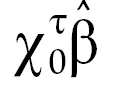
we have equations created in mathtype using open type fonts ‘ArnoPro-Regular’ and ‘STIXGeneral-Regular’ where equation symbols such as beta are correct in mathtype eps. When it is placed in InDesign the symbols are collapsed even though the fonts are present in the system. What could be the issue when palcing the mathtype eps image in InDesign? How to overcome the solution? The client’s requirement is to use only these fonts. 

Coorect equation:
Same equation how it appears in InDesign:
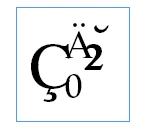
Entire equation is collapsed in InDesign

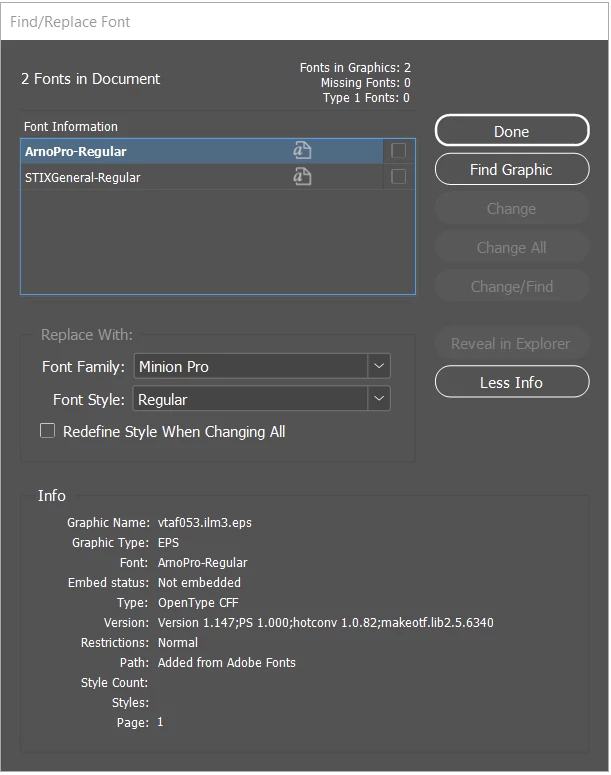
When checking the fonts panel in InDesign: it shows not embedded.


    7 replies

    Peter Kahrel
    Community Expert
    Community Expert
    May 28, 2026

    Related topic here:


    Brad @ Roaring Mouse
    Community Expert
    Community Expert
    May 28, 2026

    According to wiris’s website,  “STIX fonts (and OpenType fonts in general) do not fully work in MathType”, so the issue seems to lie with MathMagic. This makes sense as EPS format doesn’t really support many of the special features of OpenType fonts

    https://docs.wiris.com/en_US/mathtype-troubleshooting-faqs/mathtype-known-issues

    Have you tried to open the EPS with Acrobat? Doing so will invoke Distiller and create a PDF file. If the fonts are properly available in the EPS, you should have a successful PDF. If not, the fonts are not properly included nor properly referenced in the EPS.

    If you want, send me one and I can poke into it a bit.

    -Brad


    Known Participant
    May 28, 2026

    Hi Brad,

    Tried opening in acrobat still the equations is collapsed. DM you the eps.


    kglad
    Community Expert
    Community Expert
    May 27, 2026

    post this in the id forum, https://community.adobe.com/indesign-669


    p.s. change your title to avoid a duplicate message problem.

    Known Participant
    May 27, 2026

    Pls find my reply for each questions below:
    Could you please confirm the exact version of InDesign you are using, along with your operating system details?

    InDesign version: 20.5.3 & 21.4
    OS: Windows 10 Pro Version: 22H2
     

    As a test, could you also try exporting the equations from MathType as PDF instead of EPS (or convert the exported EPS files to PDF afterward) and then place the PDF into InDesign to check whether the symbols render correctly?
    Not able to create direct pdf but used the option ‘Microsoft print to PDF’ the symbols render correctly, but the issue here is more white space around the equations and the equation part appears too dark compared to the surrounding text,  changed to CMYK black rather than 100% black refer screenshot below:

    And also the font panel in InDesign appears as below:
     

    Additionally, please confirm whether the issue is limited to these two fonts or if it also occurs with other OpenType or non-OpenType fonts.
    The issue is with open type fonts and not with mathtype supported fonts.
     

    If possible, and especially when testing with an older file, please try placing the same equation into a brand-new InDesign document as well to compare the behavior.

    The same issue occurs when placed in the brand-new indesign document.
     

    If required will DM you the equation files along with fonts.


    Pearl_18
    Participant
    May 27, 2026

    EPS - PDF works fine and more white space around inline and display math equations also color is changed to CMYK rather than Black 


    Pearl_18
    Participant
    May 27, 2026

    We are experiencing issues with MathType equations saved as EPS with the embedded STIXGeneral font for Greek characters. After placing them in InDesign, the equations appear as junk text or show missing fonts due to font embedding issues. Please see attached screenshots for reference. Please advise. 

    Abhishek Rao
    Community Manager
    Community Manager
    May 26, 2026

    Hi ​@dt0245d3009278,


    Thank you for reaching out.

    Could you please confirm the exact version of InDesign you are using, along with your operating system details?

    As a test, could you also try exporting the equations from MathType as PDF instead of EPS (or convert the exported EPS files to PDF afterward) and then place the PDF into InDesign to check whether the symbols render correctly?

    Additionally, please confirm whether the issue is limited to these two fonts or if it also occurs with other OpenType or non-OpenType fonts.

    If possible, and especially when testing with an older file, please try placing the same equation into a brand-new InDesign document as well to compare the behavior.


    Looking forward to your update.
    Abhishek

    Pearl_18
    Participant
    May 27, 2026

    InDesign 2025 (version 20.5.1) and 2026 21.3 - Windows:


    Abhishek Rao
    Community Manager
    Community Manager
    May 28, 2026

    Hi ​@dt0245d3009278  and ​@Pearl_18,


    Thanks again for sharing all the detailed findings and test results. I’ve checked this further internally along with the observations around OpenType font behavior inside MathType-generated EPS files and the “Not Embedded” font reporting in InDesign.

    At the moment, this is being investigated further to better understand whether this is an expected limitation/behavior with OpenType fonts inside EPS workflows or something more specific with MathType-generated EPS handling. I’ll keep you posted here as soon as I have any further updates to share.


    Thanks for your patience.

    Abhishek