
shannonwbrown
Inspiring
February 23, 2021
Answered

Menu Items Grayed Out

  • February 23, 2021
  • 1 reply
  • 2478 views

I just updated to InDesign 2021 and all of my menu dropdown shortcuts are grayed out (see the screenshot of the View tab below). This is preventing me from using any keyboard shortcuts. 


Any suggestions? Help?


I made sure I was logged into Creative Cloud and it is up and running fine.
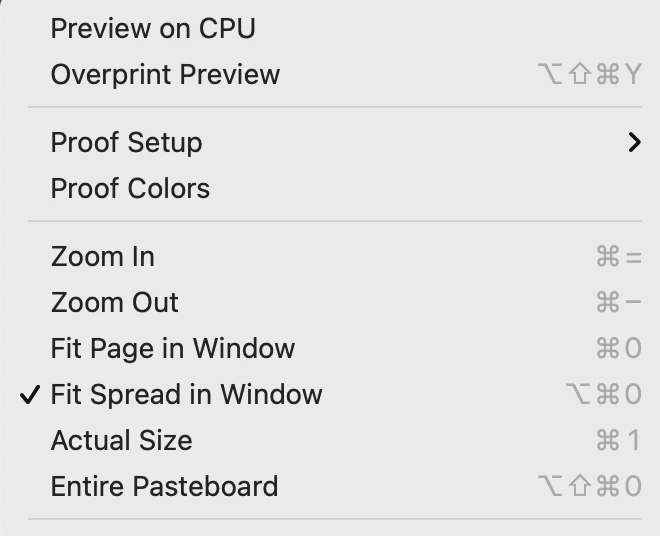
 

Correct answer Ian Sayers

Some folks have reported this before - please reboot your machine and only open indeisgn to see if the problem is still there.
Maybe another application causing problems like this: https://community.adobe.com/t5/indesign/keyboard-shortcuts-not-working-cc-2020/m-p/10728946


or try this: https://creativepro.com/topic/keyboard-shortcuts-not-working/


1 reply

Ian Sayers
Ian SayersCorrect answer
Inspiring
March 1, 2021

Some folks have reported this before - please reboot your machine and only open indeisgn to see if the problem is still there.
Maybe another application causing problems like this: https://community.adobe.com/t5/indesign/keyboard-shortcuts-not-working-cc-2020/m-p/10728946


or try this: https://creativepro.com/topic/keyboard-shortcuts-not-working/


david@kpt
Participant
January 7, 2025

It does solve the issue, but it also persists. Restarting InDesign solves this for me but just a few minutes working with InDesign and the issue comes back. It is not very efficient restarting the app or the computer every time this happens. Is there a more permanent solution?

Abhishek Rao
Community Manager
Community Manager
January 7, 2025
 
Thank you for reaching out! To assist you more effectively, we’ll need a few additional details:
  • Does this issue occur with all menu items or only specific ones? Could you share a screenshot similar to the one above?
  • What operating system are you using (Windows/Mac), and what version of InDesign?
  • Does the problem happen with a specific file or with newly created documents as well?
  • When did this issue start? Have there been any recent changes to your system, such as installing new apps, web extensions, desktop management tools, clipboard managers, or antivirus software? Shortcut issues are often caused by conflicts with third-party applications.
  • If you haven’t already, please try launching your machine in safe mode to see if the issue persists. Reference: Windows : https://adobe.ly/4iYnm61
    macOS: https://adobe.ly/4j3zxym;
Best,
Abhishek Rao