
Inspiring
July 19, 2023
Question

Merge table cells with a script

  • July 19, 2023
  • 2 replies
  • 782 views

Hi all


I've written the following script:

function _table() {
    if (app.selection.length > 0) {
        var _selection = app.selection[0];
        if (_selection.parent.constructor.name == "Table" || _selection.parent.parent.constructor.name == "Table") {
            var _cells = _selection.columns[0].cells;
            for (var i = 0; i < _cells.length - 1; i++) {
                var i2 = i + 1;
                if (_cells[i].contents === _cells[i2].contents) {
                    var _mergeValue = _cells[i].contents;
                    _cells[i].merge(_cells[i2]);
                    _cells[i].contents = _mergeValue;
                    if (_cells[i].contents === _cells[i2].contents) {
                        i--;
                    }
                }
            }
        }
    }
}

app.doScript(_table, ScriptLanguage.JAVASCRIPT, [], UndoModes.ENTIRE_SCRIPT);


Unfortunately it's not performing as expected. What it should do is loop through the selected cells and check if subsequent cells contain the same content and merge them if they do. And not only merge them but only keep one instance of the content, not both, as would be standard with InDesign.

In some cases, this works fine. In some, it behaves weirdly and in some cases it doesn't work at all.
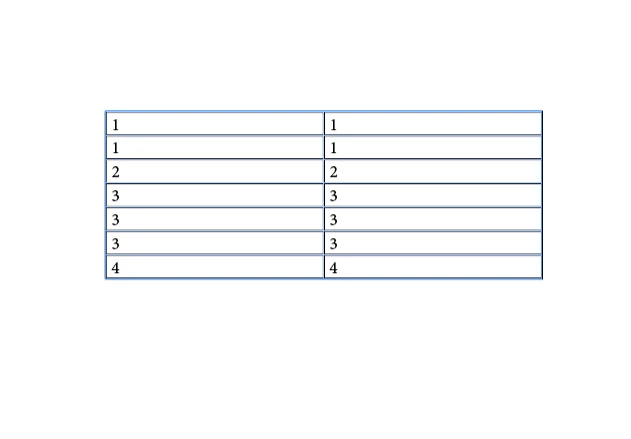
In this case, it works on one of the columns. If I select the other one, the script doesn't do anything. It doesn't matter which column I start with.
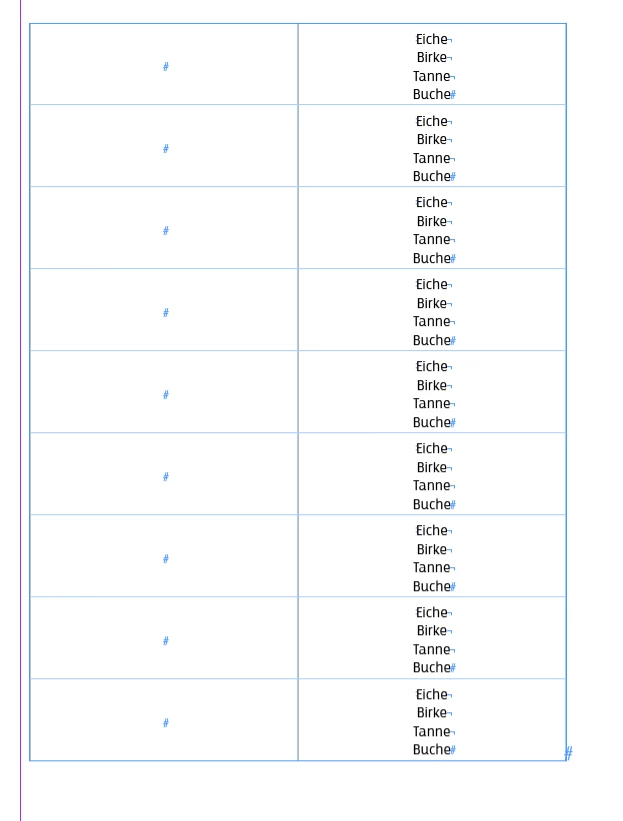
In this case, it behaves completely unexpectedly. It merges some of the cells but not correctly. This is the result:
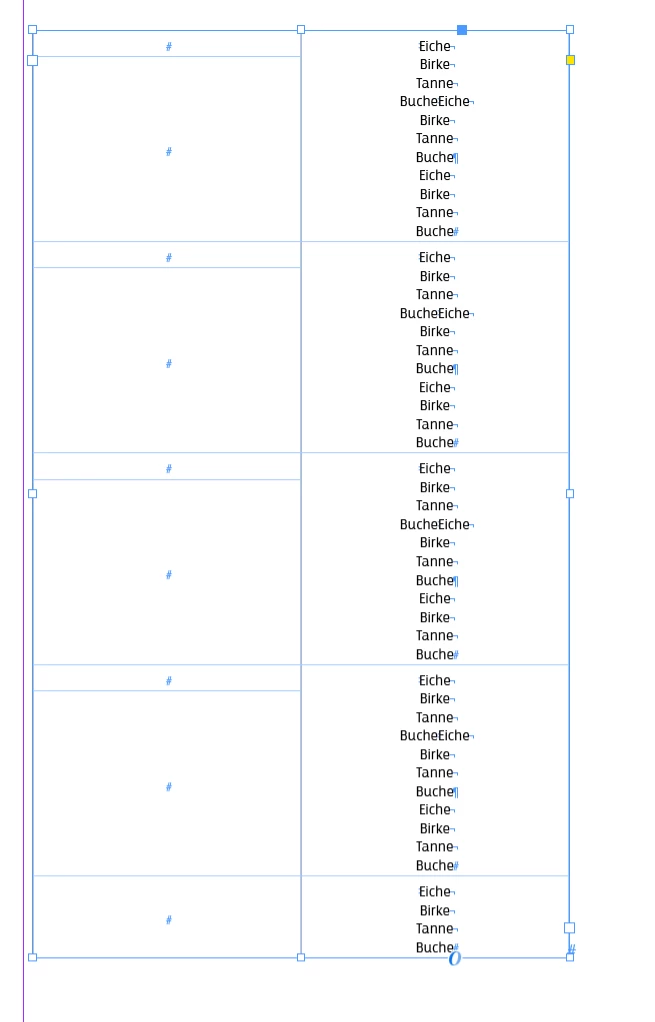


Any ideas why the script behaves like that? Any help is much appreciated!

This topic has been closed for replies.

2 replies

Robert at ID-Tasker
Legend
August 8, 2023

First, when you change collection of objects - destroy them when iterating - you need to iterate from the end - otherwise, the next object in the collection may not be the one you would expect it to be. 


Second, instead of setting ".contents" to a variable and then using it - first empty contents of the Cell you want to merge with, then merge with it - this way you'll preserve formatting - otherwise you are just transferring "raw" text contents. 


I'm not JS guy so can't give you a working code but I hope it will help. 


Robert at ID-Tasker
Legend
August 8, 2023

Or, if your selection is a whole Table or whole Rows - instead of iterating through Cells - iterate through Rows and then Cells in a Row.

This way, even if you merge / unmerge Cells in a Row - it won't affect other Rows. 

Still, depends on the number of Columns in a Row you may need to iterate backward. 


BarlaeDC
Community Expert
Community Expert
August 9, 2023

Hi,


I don't know if it is just a quirk of how InDesign handles its collections but when you do a merge withs cells in a collection, the collection does not change until you actually call it again, so you can work with all the elements, you do have to be careful, because if you rely on the change you have to refresh the collection. This can be seen in the debugger,

As can be seen above I have merged 8 cells into for, but the length of the _cells collection is still 8, so it has not updated.


It should also be noted that using this method you can't actually delete cells, you are not allowed to, the JS throughs an error.

BarlaeDC
Community Expert
Community Expert
August 8, 2023

Hi,

I have reworked your code a little to make it work with a 2 column table.

if (app.selection.length > 0) {
        var _selection = app.selection[0];
        // altered this just to make sure _selection, points at a table.
        if ( _selection.parent.constructor.name === "Table"){
          _selection = _selection.parent;
        } else if ( _selection.parent.parent.constructor.name === "Table"){
          _selection = _selection.parent.parent
        } else {
          _selection = null;
        }
        if (_selection != null ){
            // altered this so we get all the cells in a single list
            // note this is by column, not row
            var _cells = _selection.columns.everyItem().cells.everyItem().getElements();
            for (var i = 0; i < _cells.length/2; i++) {
                // as it is by column, the cell next to it is half the size of the table
                var i2 = i + _cells.length/2;
                if (_cells[i].contents === _cells[i2].contents) {
                    var _mergeValue = _cells[i].contents;
                    _cells[i].merge(_cells[i2]);
                    _cells[i].contents = _mergeValue;
                }
            }
        }
    }


Hope this helps, if you have any further questions please don't hesitiate to respond.