

Messed up page layout in InDesign
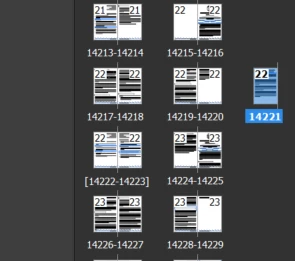
I'm pretty sure I've made a rookie mistake somewhere in this project but I have a document with various sections that each have their own parent page. In order to get the page numbering correct I had to switch off 'Allow Document Pages To Shuffle' but I think it's messed up the layout because when my client tries to upload the print ready PDF to KDP, a bunch of pages at the end have their margins messed up.
When I look at the pages panel you can see all the spreads but then there is a lone page hanging just before these errors begin. I can't remember what I did there because this has been a long and complex project but it looks as though the margins are 'compensating' for that missing page and so, even though the page looks like its on the left in the pages panel it has the margins of a right page. I hope that makes sense.
Any suggestions on how to fix that?


 AdChoices