


Participating Frequently
April 15, 2024
Question

Missing Adobe PDF preset

  • April 15, 2024
  • 2 replies
  • 295 views

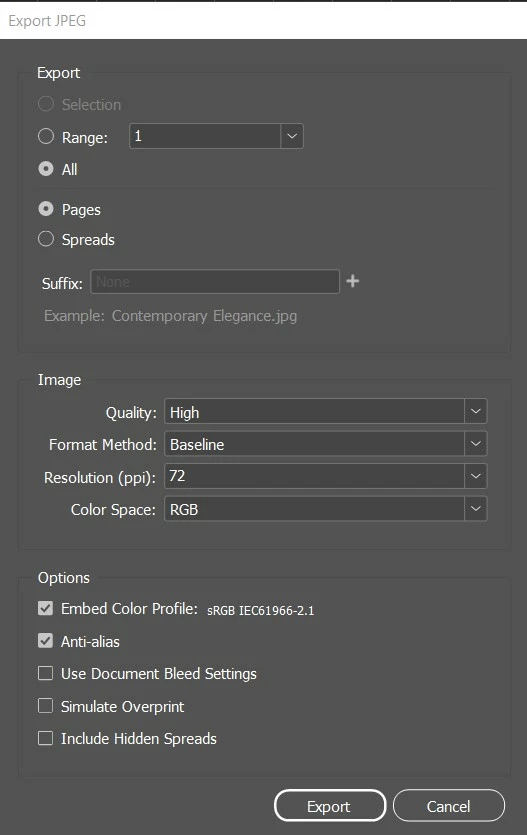
Hi all A few days ago up pop up asked if I wanted to use creative cloud and I clicked Maybe later. Later that day I went to save my moodboard to Adobe PDF Preset and it didn't come up but instead the attached photo came up. How can I fix this problem? Thanks for your help.
This topic has been closed for replies.

2 replies

Community Expert
April 15, 2024

When you use File>Export you will have options of what file types to save to


From the Format drop down list select Adobe PDF and which one you want (interactive or print)

there are multiple formats you can export to.


Participating Frequently
April 16, 2024

Thanks Eugene - I missed that important step.

leo.r
Community Expert
Community Expert
April 15, 2024
quote

Hi all A few days ago up pop up asked if I wanted to use creative cloud and I clicked Maybe later.


By @lurleenk15056329


I'm sure that the popup didn't ask exactly that (as it wouldn't make much sense), plus it's unlikely to have anything to do with your question anyway.


quote

Later that day I went to save my moodboard to Adobe PDF Preset and it didn't come up but instead the attached photo came up. How can I fix this problem?


Your screenshot shows Export to JPEG settings. Are you sure you didn't select JPEG in the export formats list? What steps exactly did you take to export to PDF (via Export menu or by directly selecting the desired PDF preset from the Adobe PDF Presets menu)? Can you post screenshots that demonstrate your steps.

Participating Frequently
April 16, 2024

Got it. Thanks for your help.