J. Flügel
Inspiring
August 30, 2017
Answered

Missing Baseline Grid Button in Top Control Panel, Indesign CC 2017.1

  • August 30, 2017
  • 1 reply
  • 2067 views

Hi All,

we do not find the Baseline Grid Button where it was placed in CS6.

After a quick search in Adobe Help we found it at the Paragraph Panel. For more convenience we would still like to find it in the top control panel as it is supposed to be found. So we checked the Settings and thought we'd
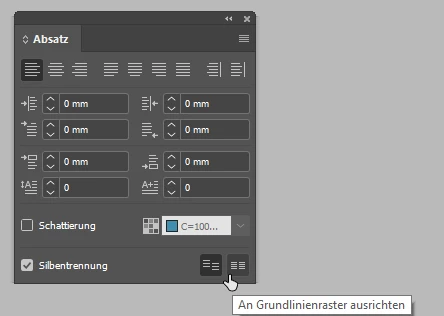
Baseline Grid Button in Paragraph Panel
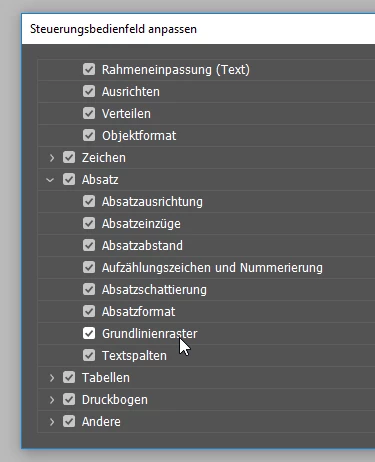
Settings for Panels in top control panel, Baseline Grid is activated, but still doesn't show up in the control panel


This topic has been closed for replies.
Correct answer Jongware

Yes -- just one control too many! It should be next, to the right of Shadow/Color:

But it's so far to the right because you have selected the Character part. Toggle the left button A|¶ to "Paragraph" so the paragraph properties appear first:

1 reply

Community Expert
August 30, 2017

Hi,

since the new UI I think there is simply no space for this button in the panel.
To see it you have to turn off other controls.

Regards,
Uwe

J. Flügel
Inspiring
August 30, 2017

Hi Uwe,

thank you for the fast reply.

Good Idea, but it seems that doesnt work.

Should be enough space in the corner now but the Button is still hidden.

Do you have any other ideas?

Thanks for your help!

Community Expert
August 30, 2017

No other idea but to remove other options as well…

Sorry,
Uwe
