
Known Participant
June 26, 2017
Answered

Missing chapters from the TOC list.

  • June 26, 2017
  • 4 replies
  • 3269 views

Hi there,

I am scratching my head over this one.

I have created a book with several chapters.

Set up Paragraphs Styles and Character Styles to all of the chapters the same way and added them to the book. (as i have done this several times before with different documents)

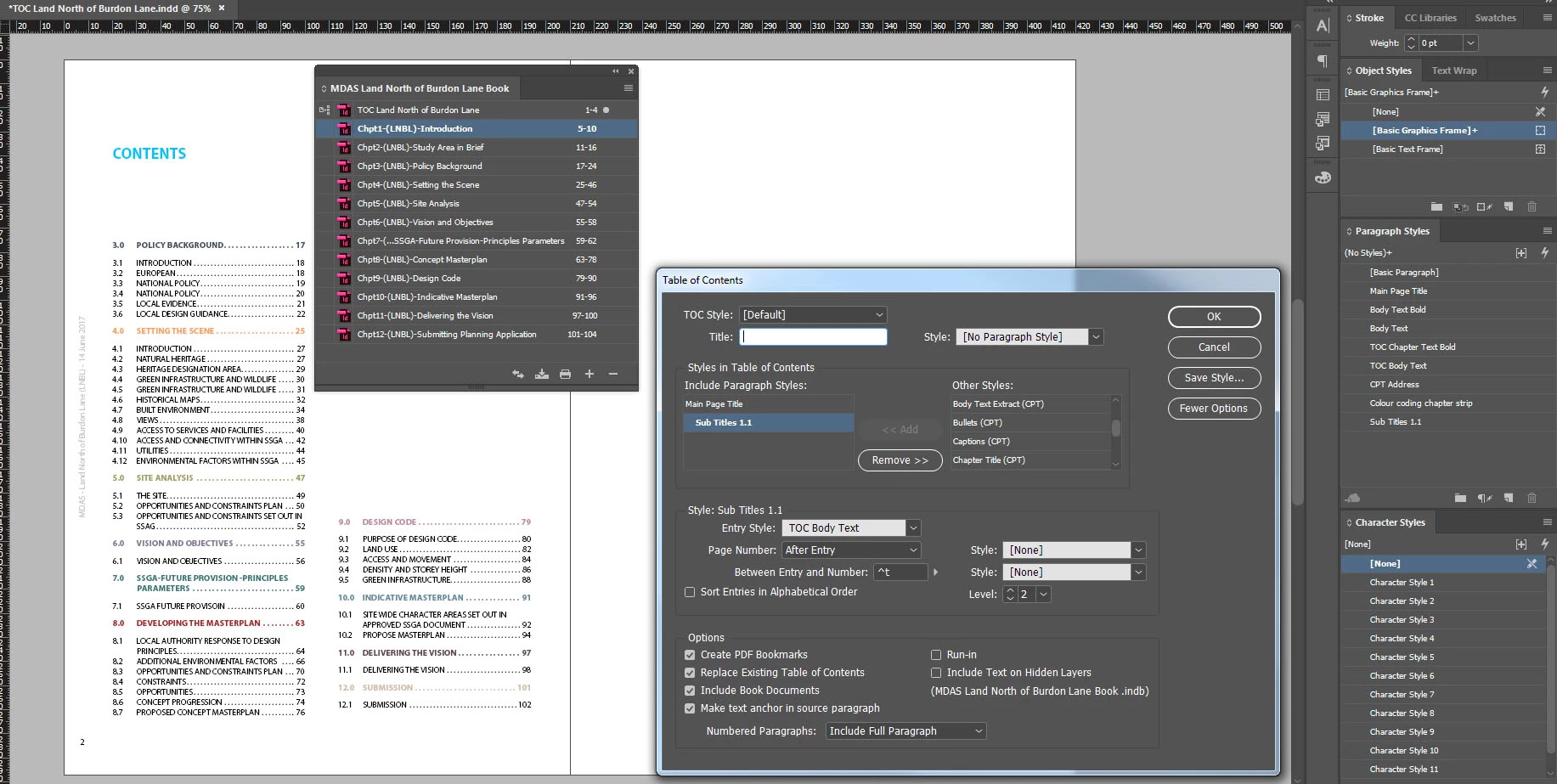
Set up TOC and ticked Include Book Documents.

The two first chapters are missing from the TOC list.

I have updated all numbering, redone paragraph and character styles in each chapter, detach and attach files to the book again, I have started the TOC file once again from the scratch ...

Still there is no chapter 1 and 2  in TOC list.

It is probably something as simple as a tick somewhere(?)

I would appreciate any help?

Thx

Kamila
This topic has been closed for replies.
Correct answer Justin Brown MMD

Dropbox - Public

Let me know if you have received , thank you.


I've had a look Kamila.

It appears that in some of the source documents the chapter heading styles are grouped together in a styles group called CPT and some aren't. When you're generating the TOC, InDesign sees them as different styles (ie, the styles within the group CPT are not being brought into your TOC).

So the solution is to remove your chapter 1 and 2 paragraph styles from the group CPT in the source documents.

4 replies

Barb Binder
Community Expert
Community Expert
June 26, 2017

Sorry, I had to run into a meeting, Kamila, but the previous answer is right on the money. When I copied the working head from chp 3 to php 1 it produced a duplicate Main Page Title tag.

~Barb at Rocky Mountain Training
KamilaBAuthor
Known Participant
June 27, 2017

HI Jane this is marvelous It works fine now thank you so much for help.

Justin Brown MMD
Participating Frequently
June 26, 2017

Hi Kamila,

a few obvious things to check:

1) Are your chapter 1 and 2 styles on hidden layers ? Also, double check they have the styles applied correctly in the source documents.

2) Can you generate a brand new TOC in a separate text frame, with just [Basic Paragraph] as the TOC style? Does that reinstate the missing chapters?

3) Is your text frame where chapter 3 onwards appears threaded? Maybe there's a previous threaded frame, somewhere on the pasteboard, that's got your chapter 1 and 2 on it?

KamilaBAuthor
Known Participant
June 26, 2017

Hi,

Thanks for responding to my question.

1. Chapter 1 and 2 are on visible layers.

2. There is no additional threading, no text frame elsewhere on the pasteboard.

3. I have tried to create new TOC and it does not help. The TOC starts from Chapter 3 with basic formatting. I have noticed that the new TOC did not bring Character Style for Chapter 1 and 2, so I assume there might be wrong setup in Chapter 1 and 2 itself(?)...(which i have checked and it seemed to be fine)....

Barb Binder
Community Expert
Community Expert
June 26, 2017

have noticed that the new TOC did not bring Character Style for Chapter 1 and 2, so I assume there might be wrong setup in Chapter 1 and 2 itself(?)

You can import the Paragraph and Character styles from one file to another. Working on a copy of the files:

  1. Open chapter 1.
  2. Paragraph Styles panel menu > Load All Text Styles > pick chapter 3.


  3. Decide which styles you want to import—I'd check the ones that impact the TOC and uncheck the others for now.
  4. Try to update the TOC again.
~Barb at Rocky Mountain Training
Community Expert
June 26, 2017

What are all the character styles for?

Can you show us what the Styles are like in Chapter 1?

Even better, can you share the working files?

KamilaBAuthor
Known Participant
June 27, 2017

Hi, sorry for late reply...

I use character styles in a book to create a Table of Content which is separate file added to the book and bring all the colour coded chapters titles into a TOC.

The TOC has text is of one size 10pt, where the headings of chapter files are larger 32pt size.

I wanted the main chapter files names appear the same size as TOC (10pt) so I created a character style to achieve that.  See attached.

Thanks

jane-e
Community Expert
Community Expert
June 26, 2017

For the first test, try generating a TOC on the pasteboard of one of the chapters. What happens?

KamilaBAuthor
Known Participant
June 26, 2017

Thanks for responding to my q.

The TOC on individual chapters spearing fine.

Barb Binder
Community Expert
Community Expert
June 26, 2017

Starting with the most obvious (which you said you did but we have to check): in the first two chapters, are you using the same tag names:

  • Main Page Title
  • Sub Titles 1.1

Same spelling, same case, no invisible trailing space at the end of tags?

What if you pull those two chapters out of the book, save and update the TOC, and then add them back in?

~Barb at Rocky Mountain Training