


Inspiring
March 30, 2026
Question

Missing Document Name in Save As and Export Dialog in InDesign on macOS 26.4

  • March 30, 2026
  • 5 replies
  • 69 views

Since a week or two I often don’t see a document name when I try to save a document. So I open an older document and when I try to ‘Save as’ the document name spot is empty. See screenshot.
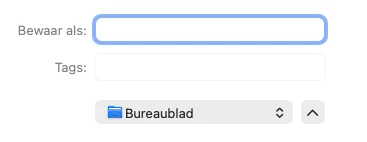


Behind ‘Bewaar als:’ there usually is the document name! There also is no document name when I try to save the document as a pdf. Not all documents have this problem: some do and some don’t.

I wonder why there is no document name with some documents… and of course I also wonder how I can prevent this from happening. Is there a setting I accidentally enabled or disabled…?

I am on macOS and use the latest version of everything. 

    5 replies

    Joeri_a_m
    Participant
    April 1, 2026

    I believe it’s a Mac OS issue and not an Adobe issue. If I want to save a text editor file I also cannot enter, or paste, a filename like CL8.4DEEN1 - D3424. We should ‘spam’ Apple to fix this! 🙈

    amandalarsson
    Participant
    April 1, 2026

    Same issue here. For us it occurs when we have a full stop in the file name, for example “1.5.2. lorem ipsum”. Does not seem to happen on files that doesn’t include a full stop. 

    leo.r
    Community Expert
    Community Expert
    March 30, 2026

    I can't reproduce it here on macOS 26.4.


    I wonder if it happens with file names that have spaces or periods? Some users reported recently issues with such names. 

    Abhishek Rao
    Community Manager
    Community Manager
    March 30, 2026

    Hi ​@J van E  and ​@Joeri_a_m,


    Thanks for reaching out, and sorry to hear you’re running into this issue.

    Could you please confirm the exact version of Adobe InDesign you’re using? Also, let me know if this happens only with certain documents or if you see the same behavior with a newly created file as well. Please try creating a new blank document and then go to Save As, and share what you observe.

    It would also help if you could try both Save As and Save a Copy on the same file and check if the behavior differs between the two. Additionally, please confirm where you’re saving the file, whether it’s locally on your machine, an external drive, or a network or cloud location.

    To further isolate this, I’d recommend testing in a new local admin user account on macOS. You can follow the steps here: https://support.apple.com/en-in/guide/mac-help/mh15191/mac

    Lastly, please let me know if this issue is only with Save As and Export to PDF, or if it also occurs with other save options.


    Looking forward to your update.

    Abhishek

    J van EAuthor
    Inspiring
    March 30, 2026

    Hi Abhishek,

    The ID version is 21.3.

    The problem occurs with certain documents (old and new). It seems to happen randomly. One document sudddenly has no name and another still has it. I tried it with a new document and it worked as it should but a document I created yesterday has the problem… 

    Save as and Save as copy have the same result: a document that doesn't show a name during Save as also doesn’t show a name during Save as copy or when creating a pdf. 

    All my files are saved locally.

    I haven’t tried any other save options (and I don’t really know which other options there are...).

    I did create a new admin user account but creating a new document there didn't give me any problems: I just didn’t know how to access one of the faulty files from that account.

    Joeri_a_m
    Participant
    March 30, 2026

    Hello fellow Dutchman :-), same issue here. For me this started after I updated Mac OS to the latest version, Tahoe 26.4. Already contacted support but the things they suggested didn’t solve the issue.

    J van EAuthor
    Inspiring
    March 30, 2026

    Hi there! So it could be a Mac OS update then…! I think this is also happening after that update indeed. Hopefully there will be a patch one day then...

    V_Luke
    Participant
    March 30, 2026

    I also same issue after upgraded to MacOS 26.4 on my MacBook, MacMini and also my wife’s MacBook. It’s so annoying that you even save as a document easily.  I think it’s single Acrobat or In Design or Photoshop problem. It’s a problem with MacOS on latest update but I think this needs quick action.