Participant
May 29, 2017
Answered

Missing files > go to that page

  • May 29, 2017
  • 1 reply
  • 354 views

Hi!

I have document with 298 pages - some of the pages have missing image files (the images got new names)

Is it possible in Indesign to click on the missing file in the LINKS panel and then it will take me to that page?

Can't seem to find a way...

Maybe a Find/Change command?

Thanks!
    This topic has been closed for replies.
    Correct answer Damien Berest

    Hello Kirikokos

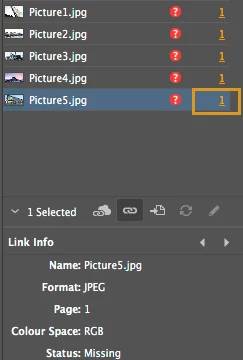
    In the link panel, click on the '1' link next to the file name, to be taken to that instance of the missing file in your document:

    Kind regards

    Damien

    1 reply

    Damien Berest
    Adobe Employee
    Damien BerestCorrect answer
    Adobe Employee
    May 29, 2017

    Hello Kirikokos

    In the link panel, click on the '1' link next to the file name, to be taken to that instance of the missing file in your document:

    Kind regards

    Damien

    KiriKAuthor
    Participant
    May 29, 2017

    HAH OMG... couldn't see the numbers! Thanks!