


Participant
September 22, 2021
Answered

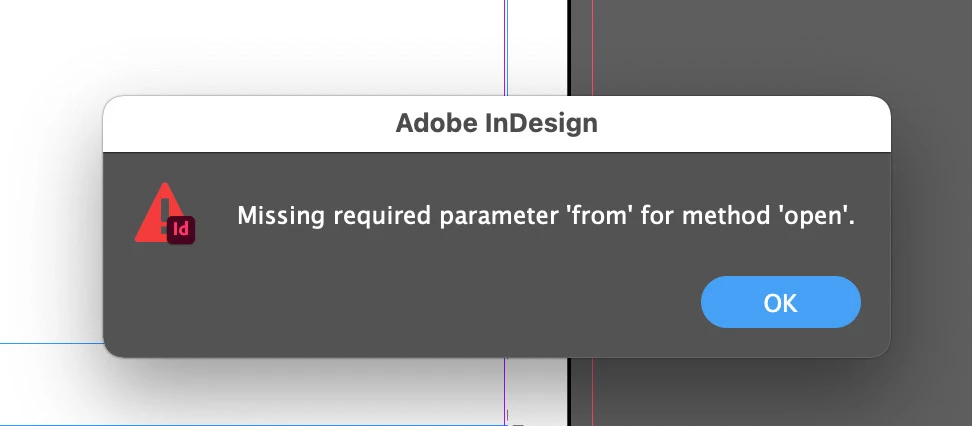
Missing required parameter from for method open

  • September 22, 2021
  • 2 replies
  • 4517 views

Hi,


Have upgraded my machine to MacOS BigSur and updated to InDesign 2021 and whenever I attempt to open an .indd or .idml from the desktop, InDesign pops up this dialog box. 


I see I'm not alone with this issue as I see a couple of other threads that mention the same issue.  Is it an issue with InDesign or Big Sur? 
  

This topic has been closed for replies.
Correct answer Dirk Becker

Sorry, I thought you were trying to open a file using a script. I was wrongfooted by the title of the topic. 


On the Mac, the Open gesture (double-click a file etc.) translates to an open "AppleEvent" - the basic operation also used by an AppleScript.


This could be an issue with security 🤡 in Cupertino overdoing it recently.


Have a look at System Preferences >> Security & Privacy >> Files and Folders, if there are any restrictions on InDesign. While I have no particular InDesign entry there, I have InDesign listed in the "Full Disk Access" next door.

2 replies

Peter Kahrel
Community Expert
Community Expert
September 22, 2021

What code do you use to open a file?

Participant
September 26, 2021

Hi Peter,


I'm not sure what you mean by code?  All I'm doing is double clicking or dragging the file onto the dock icon

Peter Kahrel
Community Expert
Community Expert
September 27, 2021

Sorry, I thought you were trying to open a file using a script. I was wrongfooted by the title of the topic. 

Community Expert
September 22, 2021

I personally don't use BigSur so far but have not seen this issue reported by the people I know use InDesign and BigSur. Can you provide the following information

  • Does the file path have any special characters?
  • What happens if you create a file, save it and then try to open it, does it still fail to open?
  • Does it happen only to files saved on the Desktop?
  • Do you have any third party plugin or script installed on your InDesign? If yes try by removing those

-Manan

-Manan
Participant
September 26, 2021

Hi Manan,


  1. No special characters in the file path
  2. Yes, it still fails to open if I open them from Finder or the Desktop
  3. All files regardless of location
  4. No extra scripts or plugins