


Inspiring
June 22, 2023
Answered

Missing text in tool options and dialog boxes

  • June 22, 2023
  • 3 replies
  • 1321 views
 

Hi,

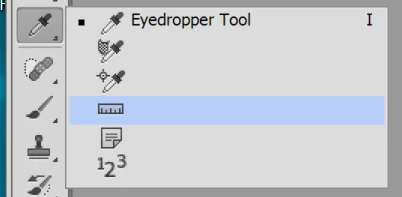
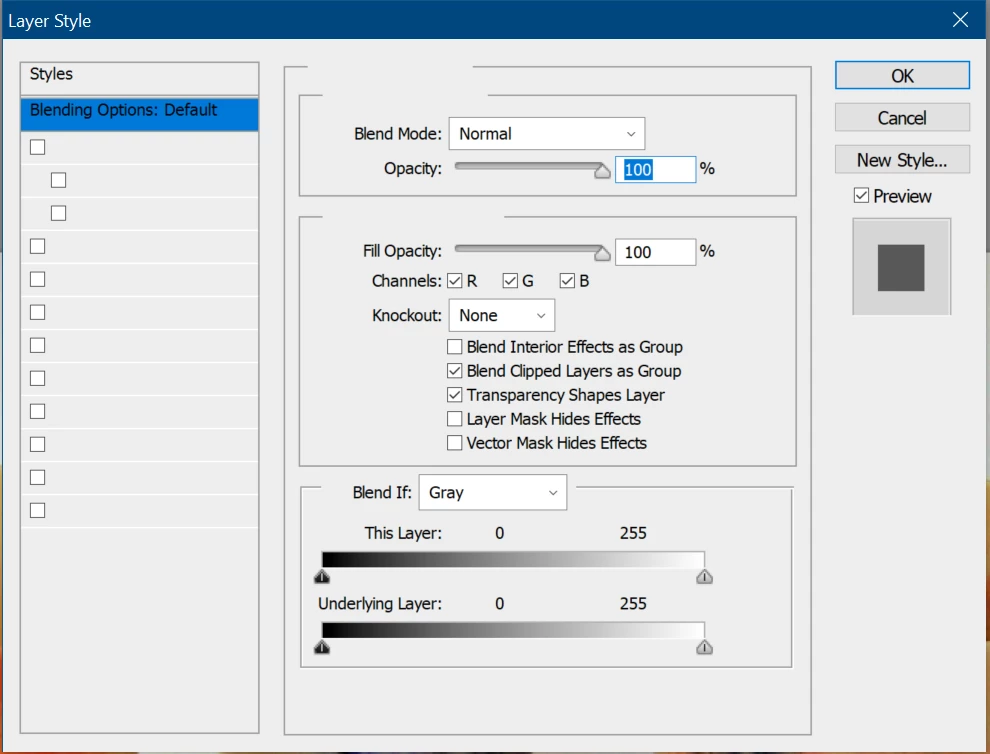
I have recently installed Adobe CS6, but unfortunately all but the first line of text for the tools and dialogue boxes are missing - see screenshots below. Please note this is apparent for InDesign and Photoshop so  I assume it's some system-wide problem. I only have these two apps installed at present.

I have tried replacing all the system fonts (Tahoma and Myriad; a solution given elsewhere in this forum), but this makes no difference. Has anybody got a clue what's going on?


This topic has been closed for replies.
Correct answer davide69676215

Looks like Photoshop doesn't store anything in the Local path, but the prefs and other data are at C:\Users\[username]\AppData\Roaming\Adobe\Adobe Photoshop CS6\Adobe Photoshop CS6 Settings

You can rename the files ending in Prefs.psp, or if that fails, the whole folder. Might be faster just to try pressing Ctrl/Alt/Shift immediately as you start Photoshop. If successful you should see a dialog asking if you want to delete the prefs.


Hi Peter,

The problem with PS appears to be the text scaling. As I use a 4K screen, the scaling was changed the Photoshop.exe/Properties/Compatibility/Change high DPI settings, then select 'High DPI scaling override' and I chose 'Application'. I've now chosen 'System' and everything works fine.

Thanks for all your trouble.

3 replies

Peter Spier
Community Expert
Community Expert
June 22, 2023

I can see you're running Windows (and CS^ runs just fine here on Win 10), so the first thing I would do is rename the Caches folder at C:\Users\[your user name]\AppData\Local\Adobe\InDesign\Version 8.0\[your language]\Caches, then restart InDesign and let it regenerate.

Inspiring
June 23, 2023

Thanks Peter, that worked for InDesign 🙂  However, I can't see a similar path to a Caches folder in Photoshop.

I've only been around computers for 41 years and I'm still learning (and forgetting!)

Peter Spier
Community Expert
Community Expert
June 23, 2023

Looks like Photoshop doesn't store anything in the Local path, but the prefs and other data are at C:\Users\[username]\AppData\Roaming\Adobe\Adobe Photoshop CS6\Adobe Photoshop CS6 Settings

You can rename the files ending in Prefs.psp, or if that fails, the whole folder. Might be faster just to try pressing Ctrl/Alt/Shift immediately as you start Photoshop. If successful you should see a dialog asking if you want to delete the prefs.

Inspiring
June 22, 2023

Thanks for the response. However, this same computer (5 years old) ran CS6 two years ago without a problem. In fact, it originally ran CS5.5 flawlessly! So I don't believe it is the age of the system.

Community Expert
June 22, 2023

What are your computer specs? I had a similar issue with an older version running on a mac and a javascript update caused issues. The workaround was to downgrade javascript.

Inspiring
June 23, 2023

Thanks Jeffrey - can you guide me on how to "roll back" the javascript update as there doesn't seem to be a coherent (to me) solution on the 'net. It seems that I'm currently working with v1.5.

Community Expert
June 22, 2023

CS6 is almost 20 years old, and to run any CS6 application, you will need to have a computer just as old. If you are working on a newer computer, unexpected performance should be expected.