

Earthling v42.0
Inspiring
July 8, 2022
Answered

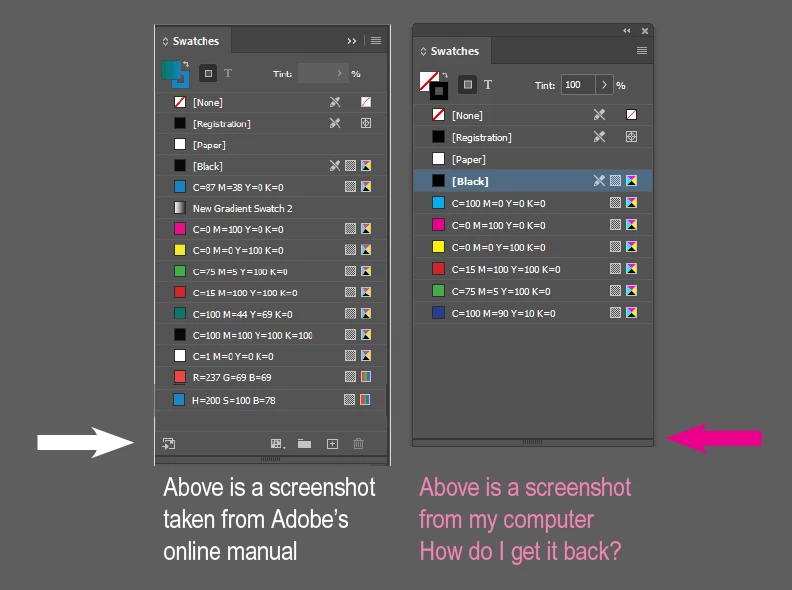
Missing the bottom part of Swatches panel

  • July 8, 2022
  • 1 reply
  • 1097 views

My swatches panel is missing the bottom options/icons for: create folder, create swatch, trash can, add to cc library, etc. I have deleted all preferences, uninstalled InDesign, then reinstalled InDesign. I tried turning "Options" on and off. Is there another area that I should be looking to show it?

Correct answer Steve Werner

When parts of the interface are missing or "damaged," it's usually a problem with your caches:


Try this this solution:


Adobe InDesign: Rebuilding Preferences and Cache Fileshttps://www.rockymountaintraining.com › adobe-indesi...


1 reply

Steve Werner
Community Expert
Steve WernerCommunity ExpertCorrect answer
Community Expert
July 9, 2022

When parts of the interface are missing or "damaged," it's usually a problem with your caches:


Try this this solution:


Adobe InDesign: Rebuilding Preferences and Cache Fileshttps://www.rockymountaintraining.com › adobe-indesi...


Earthling v42.0
Inspiring
July 10, 2022

Thanks so much, Steve!

Weird - I deleted the preferences when re-installing InDesign and it didn't work. This time I just deleted them while opening the software and it worked! Below are the instructions from the link you provided. I'm putting them here to help others.

  • (Windows) Start InDesign, and then immediately press Shift+Ctrl+Alt.
  • Click "Yes" when asked if you want to delete preference files. 
Earthling v42.0
Inspiring
January 22, 2025

I was looking for the answer to this problem only to realize I posted the same question... 2-1/2 yrs ago! LOL