
Participant
Oct 15, 2020 8:17 AM UTC
Answered

missing zoom-field in control-bar

In the current InDesign version, there is no longer a zoom field at the top of the control bar - the window layout is also no longer displayed. In the 2018 version, both are displayed. Can I customize this bar? If so, how?
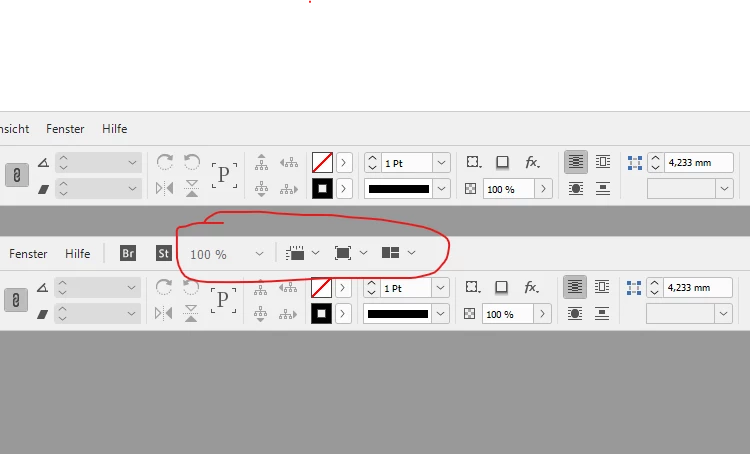

This topic is closed to new replies. Start a new post to keep the conversation going.
jmlevy
jmlevyCorrect answer
Community Expert
Oct 15, 2020 8:51 AM UTC

Unfortunately, you can't customize it. The zoom is at the very bottom left of the window and the window layout is accessible only via the window menu.

4 replies

Ashutosh_Mishra
Inspiring
Oct 15, 2020 11:30 AM UTC

Hi there,


Thanks for reaching out. As @jmlevy mentioned that these options are no longer available in 2020 version of the app. If you would like, you may share a feature request regarding this on Adobe InDesign UserVoice. This UserVoice forum is monitored by product team and they might look into it in future releases. Hope it helps.


Regards,

Ashutosh

Translate
Participant
May 19, 2022 11:30 PM UTC

My zoom toolbar is missing. I've reset the Advanced workspace, but this does not correct the issue. 

How do I fix this?


Translate
jmlevy
Community Expert
jmlevyCommunity ExpertCorrect answer
Community Expert
Oct 15, 2020 8:51 AM UTC

Unfortunately, you can't customize it. The zoom is at the very bottom left of the window and the window layout is accessible only via the window menu.

Translate
Participant
Oct 15, 2020 8:58 AM UTC

that's really a pity, but thanks a lot for your quick feedback

Translate