
January 20, 2026
Question

Montserrat Font Missing From Illustrator Linked Document in InDesign

  • January 20, 2026
  • 4 replies
  • 166 views

Our brand font is Montserrat, which is an Adobe Font. I have the whole suite installed and I use it across all apps. When I link Illustrator files where I've used Montserrat into InDesign documents, it shows that the font is missing, even though Illustrator itself doesn't have an issue with the font. It's not a huge issue as everything appears okay, but I hate the error message on the bottom of the screen. I've checked my Font Book (I'm on a Mac) and I don't have any other versions of the font installed outside of Adobe Fonts, so there shouldn't be a conflict there. Based on the Find/Replace Font box inside InDesign, it looks like maybe an issue with the font naming between the two apps? Inside Illustrator I'm using Montserrat Regular, which shows up fine in the find/replace box, but it shows it's missing "Montserrat" alone, no other weight distinction. How can I fix this discrepancy? 
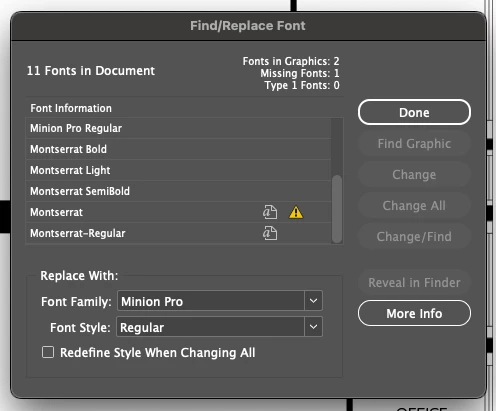
 

Screenshot 2026-01-20 at 12.19.28 PM.png

4 replies

Barb Binder
Community Expert
Community Expert
January 21, 2026

Hi @brooke_1203:


OK, that's helpful. Unclear why your images didn't appear for me yesterday but I see both sets today.


Now, does your Illustrator file need to be an .SVG? This doesn't happen when I place a native .ai file, or an .ai file saved as Adobe PDF. If no, that's the answer and you can stop reading.


If yes, continue on. In the InDesign doc below, I typed the text in the first frame in InDesign, and placed an Illustrator to SVG file in the second frame.


The imported SVG adds two lines to Find Font: the missing Montserrat and Montserrat-Regular. (with a hyphen). The only content in the Illustrator file is the text Montserrat Regular and it is assigned Montserrat Regular, just like the InDesign file. I played with other fonts and am getting the same result. 


2026-01-21_10-17-00.png


I poked around a found a bug report on fonts in SVGs from my fellow Community Expert @UweLaubender that referenced this 2020 thread: https://community.adobe.com/t5/indesign-discussions/missing-font-error-not-going-away-after-installing-required-font/m-p/11664439#M407183.


So after reading about his experience, I tried packaging the same file I'm showing you above (File > Package) and


a.) The Package dialog box doesn't alert on the missing or duplicate fonts that are seen in the same file with Type > Find/Replace Fonts:

2026-01-21_10-30-58.png


and


b.) Packaging fixes it! Opening the packaged file shows that all is well.

2026-01-21_10-40-20.png


In conclusion, please understand that other people know a lot more about SVGs than I do and I'm just poking around trying to help you out, but my personal conclusion is that the SVG import is still buggy. Packaging seems to fix it if you need an SVG. Otherwise, just import a native AI or Adobe PDF—which is what I typically do and why I've never seen this before.


~Barb

~Barb at Rocky Mountain Training
January 22, 2026

Okay, this does make sense because my other AI files that I import don't show me the same error. 

Our floor plans are given to us in SVG format and since they're editable I've kept the file type, but moving forward I'll just save my changes into an AI file and import that instead. 

Thank you for investigating this! You definitely got a few steps further than I did. I appreaciate your help! 

Barb Binder
Community Expert
Community Expert
January 20, 2026

That's progress! 🙂


Did you try deactivating/reactiving Monserrat on fonts.adobe.com?


And can you please share the Font Info as per my first screen shot?


~Barb

~Barb at Rocky Mountain Training
January 21, 2026

I replied to your comment above with those screenshots but I'll attach them again hereScreenshot 2026-01-20 at 4.24.52 PM.pngScreenshot 2026-01-20 at 4.27.48 PM.png

Barb Binder
Community Expert
Community Expert
January 20, 2026

We are having issues with attachments at the moment, so I downloaded your image and added it to your question. Now that I can see it and mine, the font names are spelled differently than mine, which I just activated a few minutes ago.


I'll be curious to see what you post in response to my request but now I'm thinking you might want to go to fonts.adobe.com and deactivate Montserrat. Look for any lingering versions (there are lots of folders where fonts can be installed on our Macs, see list below), remove them and then reactivate the family.


InDesign Font Folder Locations on macOS

  • User Fonts: ~/Library/Fonts/ (Type Cmd+Shift+G in Finder and paste ~/Library/Fonts/).
  • System Fonts: /Library/Fonts/ (Accessible via Finder > Go > Go to Folder).
  • Adobe Fonts (Application Specific): ~Library/Application Support/Adobe/Fonts.
  • InDesign Application Folder: Applications/Adobe InDesign [Year]/Plug-ins/ (for font management plugins).
  • Document Fonts Folder: A subfolder named Document Fonts inside your InDesign project folder, for fonts specific to that project. 


~Barb

~Barb at Rocky Mountain Training
January 20, 2026

Thank you for helping me track down where to find fonts in all these different places! 

I've run through these locations and checked them all, but I found no traces of a Monterrat font. It doesn't look like I have it installed in any weird locations I wasn't aware of. 

Barb Binder
Community Expert
Community Expert
January 20, 2026

Can you please share the same screen shot two more times, only this time click the font name and then click the More Info button? The easiest way to do this is to reply in your browser (not your email) and use the Insert Photos button (little mountain range icon) on the message toolbar.


~Barb


2026-01-20_11-17-24.png


And BTW, there is a similar dialog box in Illustrator (not as detailed). The same name should appear there.

2026-01-20_11-08-23.png


~Barb

~Barb at Rocky Mountain Training
January 20, 2026

Yes! Screenshot showing "More Info" on the missing font is attached, I've also attached the Illustrator version 

Screenshot 2026-01-20 at 4.24.52 PM.pngScreenshot 2026-01-20 at 4.27.48 PM.png